By signing up, you agree to our Terms and Conditions and Privacy Policy.
AI Humanizer for Academic Writing & Research Papers
A leading AI text humanizer developed exclusively for academics and researchers. Rewrites AI-assisted research content into a natural, human-like writing style. Engineered to be semantically faithful to the original text, protecting meaning, key terms, citations, grammar, and formal tone, while simultaneously lowering AI scores on detectors like Turnitin.
Compare the original AI-generated text with humanized output.
In the latest benchmark on a dataset of 2,000 academic documents, ProofreaderPro humanized text and lowered the Turnitin AI score on up to 92.33% of documents.
Why Use ProofreaderPro AI Humanizer?
Academic-First Design
Combines the academic insight of natural language processing researchers with technical expertise of devs, and is built specifically to produce formal research writing.
LLM + NLP + KB Hybrid Engine
Combines fine-tuned language models trained on datasets of human-written research papers across all disciplines, advanced syntax-aware NLP algorithms, and lexical knowledge bases for AI-to-human style transformation.
Diverse LLM Handling
Trained to recognize and process the distinct stylometric fingerprints of frontier AI model families, including OpenAI, Anthropic, Google Gemini, Perplexity, Meta Llama, DeepSeek, Qwen, Mistral, and more.
AI Fingerprint Analysis & Scrubbing
Analyzes in-text linguistic metrics like burstiness (sentence-level variation), perplexity (word-level predictability), and token distribution (statistical patterns) to detect and scrub the AI fingerprint.
Humanization History
Every run is saved to your humanization history, so you can revisit, compare, and restore earlier passes at any time.
Iterative Humanization Technology
Re-humanize builds on the previous pass instead of starting over, so you can iterate subsequent rounds of humanization.
An Engineered, Research-Backed AI Humanizer
Humanize for Naturalness
Rewrite generic AI-assisted drafts into a natural, human-like writing style by manipulating the linguistic properties of text.
Humanized output
In the realmfield of natural language processing, this studyworkdelves intoinvestigates transformer architectures through the lens ofusing semantic understanding — underscoring. This highlights a pivotalmajor shift in how machines interpret human language.the manner in which human language is interpreted by machines.
Intensity vs. Low-Score Rate, Faithfulness & Rewrite %
AI score reduction (avg)Semantic faithfulnessRewrite % (word-bigram divergence)
Humanization Intensity Slider
Fine-tune the humanization intensity level on a 0-1 scale with five intensity points. Slide toward Mild to protect semantic faithfulness, or toward Aggressive to maximize AI score reduction.
Humanization intensity
0.25.50.751
Mild:The least amount of rewrite. The highest faithfulness at the expense of a smaller AI score reduction. Safest if you prioritize semantic faithfulness.
Lower AI Scores on University-Grade Detectors
Treating humanization as a writing style transfer problem, the humanizer injects linguistic patterns that resemble human writing and strips patterns that resemble AI writing. This naturally shifts the text to a “safe zone” token distribution that detectors are generally blind to.
In a recent benchmark study across a 2K-document corpus, our outputs achieved a low-score rate of 92.33% on Turnitin AI, 89.12% on Originality.ai, and 87.91% on GPTZero. All while maintaining semantic faithfulness of the input text above 94%.
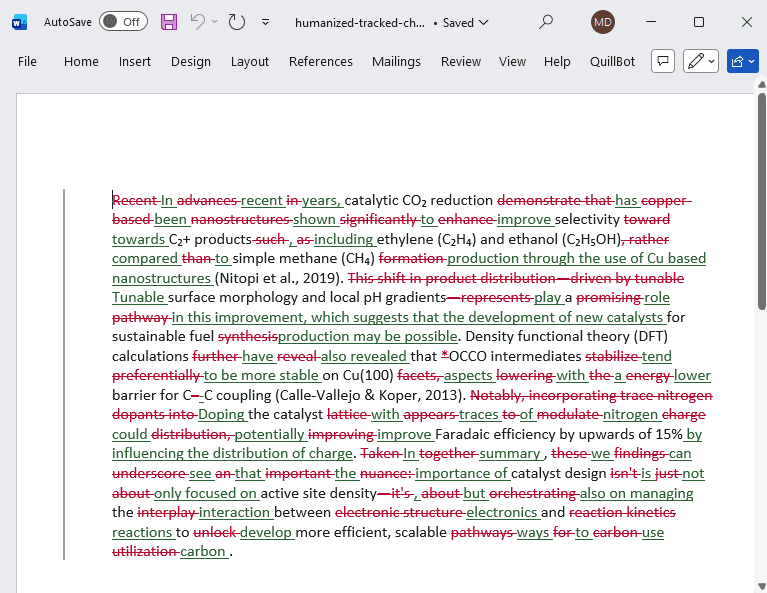
Recent advances in catalytic CO₂ reduction demonstrate that copper-based nanostructures significantly enhance selectivity toward C₂+ products such as ethylene (C₂H₄) and ethanol (C₂H₅OH), rather than simple methane (CH₄) formation (Nitopi et al., 2019). This shift in product distribution—driven by tunable surface morphology and local pH gradients—represents a promising pathway for sustainable fuel synthesis. Density functional theory (DFT) calculations further reveal that *OCCO intermediates stabilize preferentially on Cu(100) facets, lowering the energy barrier for C–C coupling(Calle-Vallejo & Koper, 2013). Notably, incorporating trace nitrogen dopants into the catalyst lattice appears to modulate charge distribution, improving Faradaic efficiency by upwards of 15%.
Humanized
In recent years, catalytic CO₂ reduction has been shown to improve selectivity towards C₂+ products, including ethylene (C₂H₄) and ethanol (C₂H₅OH) compared to simple methane (CH₄) production through the use of Cu based nanostructures (Nitopi et al., 2019). Tunable surface morphology and local pH gradients play a role in this improvement, which suggests that the development of new catalysts for sustainable fuel production may be possible. Density functional theory (DFT) calculations have also revealed that OCCO intermediates tend to be more stable on Cu(100) aspects with a lower barrier for C-C coupling(Calle-Vallejo & Koper, 2013). Doping the catalyst with traces of nitrogen could potentially improve Faradaic efficiency by upwards of 15% by influencing the distribution of charge.
Freeze terms
Add terms to preserve verbatim...
Recent:+ large-scale language models+ hybrid optimization framework
Humanized
For example, large-scale language models is considered as one of the most important objectives of current deep learning studies, which are used to improve the quality of generation and efficiency (Vaswani et al., 2017; Kaplan et al., 2020). Since many works use transformer-based architecture, new training methods should be introduced to deal with overfitting and representation collapse problems. The importance of scaling laws has been stressed in some recent studies, such that in addition to the expansion of parameters, the amount of data and computation is required to be optimized (Hoffmann et al., 2022). A hybrid optimization framework with adaptive learning rate and gradient noise scale is proposed to provide a stable learning process.
Preserve Semantic Entities
Lock In-Text Citations
Our engine is designed to handle academic source formatting with extreme care. It automatically detects and preserves all major citation styles, including APA parenthetical and narrative formats, IEEE numerical brackets, MLA, etc., ensuring your references remain intact and correctly structured throughout.
Humanized outputAPA citations preserved
Self-efficacy beliefs shape both persistence and performance in academic settings, as Bandura (1997) argued in his foundational work. Later meta-analyses confirmed moderate to strong effects across disciplines (Richardson et al., 2012; Honicke & Broadbent, 2016).
Maintain an Academic Tone and University-Level Readability
Most humanizers default to a casual, conversational tone with informal wording and slang terms. Our engine was trained exclusively on peer-reviewed journal research papers, and is optimized to hold a Flesch-Kincaid Grade Level in the 14-16+ range, consistently delivering formal vocabulary in every rephrase.
Intensity vs. Readability (FK Grade)
Humanized output (FK grade)AI baseline (FK 20.9)
Maintain Clean Grammar
Other humanizers intentionally inject spelling, grammar, and punctuation errors into the output to lower AI detection scores. You get a lower AI score, but also a poorly written document that is full of grammar issues. Our engine is error-free by design. Benchmarking across a 188K-document dataset using the LanguageTool API demonstrates 94.22% grammar and formatting accuracy.
Intensity vs. Grammar Score
Grammar score (LanguageTool)
Cut the Fluff
Compress long-winded AI filler and mechanical transitions that bloat your writing into concise, to-the-point statements while preserving the intended meaning. The example shows a ~60% reduction of words to express the exact same meaning.
Humanized output
It is important to take into consideration the fact that artificial intelligence detection systems utilize various mathematical methodologies in order to analyze text, which means that writers need to be aware of how they structure their sentences.Because AI detectors analyze text using mathematical formulas, writers must actively vary their sentence structures.
Get Human Score & Metrics
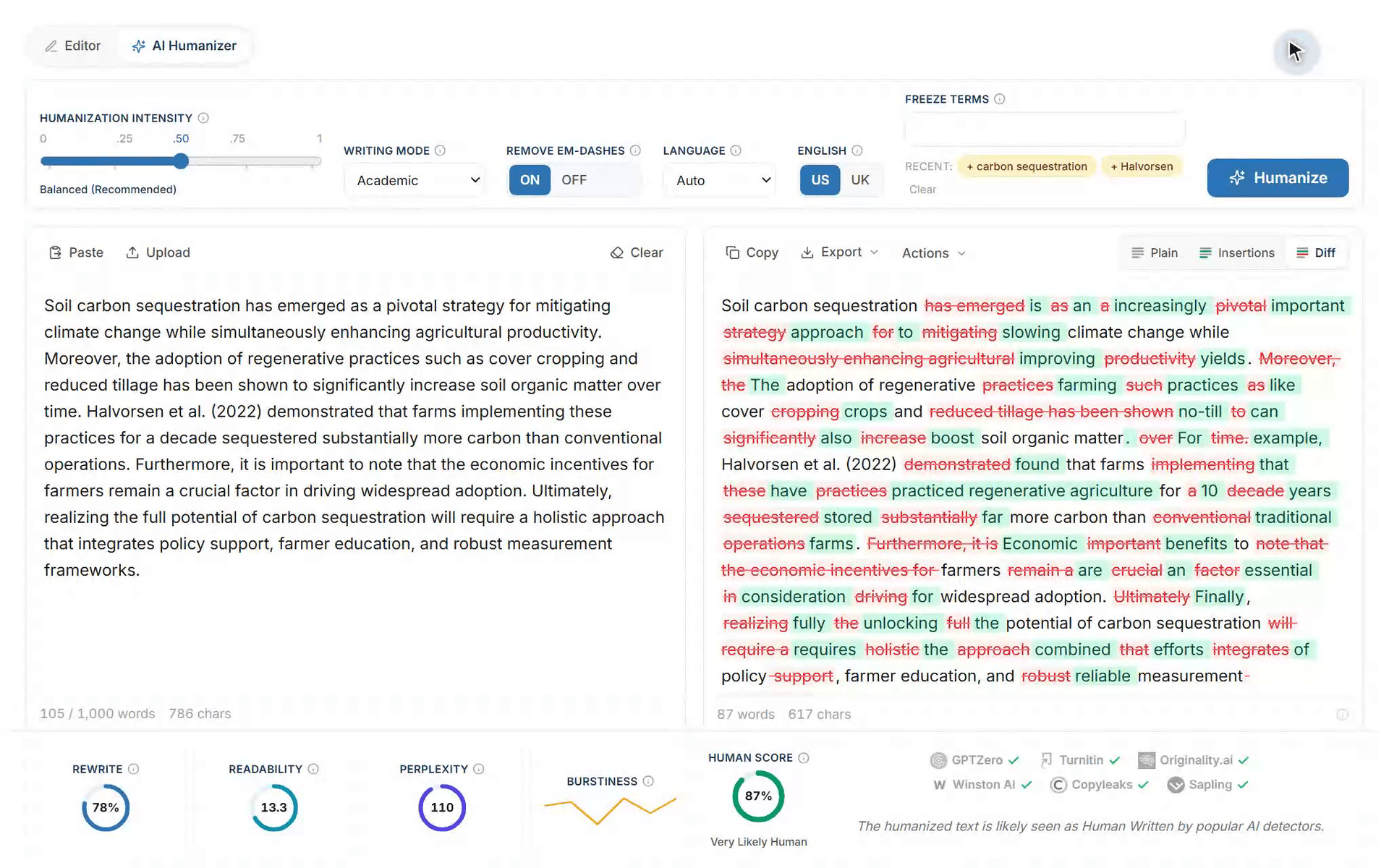
Human Score: A per-doc heuristic estimating the likelihood AI detectors read the text as human written, computed post-processing, based on intensity, rewrite depth, word variation, sentence-length variation, and token distribution.
Rewrite Percentage: Amount of words changed against the original.
Readability: Flesch-Kincaid Grade Level based on the original formula.
Perplexity: Word variation and surprise distribution (type-token ratio).
Burstiness: Sentence-level variation (stdev).
Rewrite
78%
Readability
16.9
Perplexity
81%
Human Score
89%
Very Likely Human
Burstiness
AI Detector Low-Score Rates: Our Latest Benchmark
We frequently update our benchmark test results against university-grade AI detectors. This table presents our latest benchmark run, and we update it with every new run. Each figure is the share of humanized documents that fell below the detector's flagging threshold value, measured on a corpus of 2,000 academic texts spanning STEM, social sciences, humanities, and other disciplines.
Detector
Low-score rate, Balanced
Low-score rate, Aggressive
Turnitin AI
86.0%
92.33%
Originality.ai
84.5%
89.12%
GPTZero
82.8%
87.91%
Semantic faithfulness stayed above 94% on each run, and grammar accuracy was about 94%. We update this table with each new benchmark run.
Method: every document is humanized once at each intensity, then submitted to each detector through its standard interface. A document counts as low-scoring when the returned AI probability is below the detector's own flagging threshold. We report the corpus-level low-score share for each detector. Only Balanced and Aggressive humanization mode results are presented, since they achieved the highest performance in comparison to the other writing modes.
Multilingual Humanization
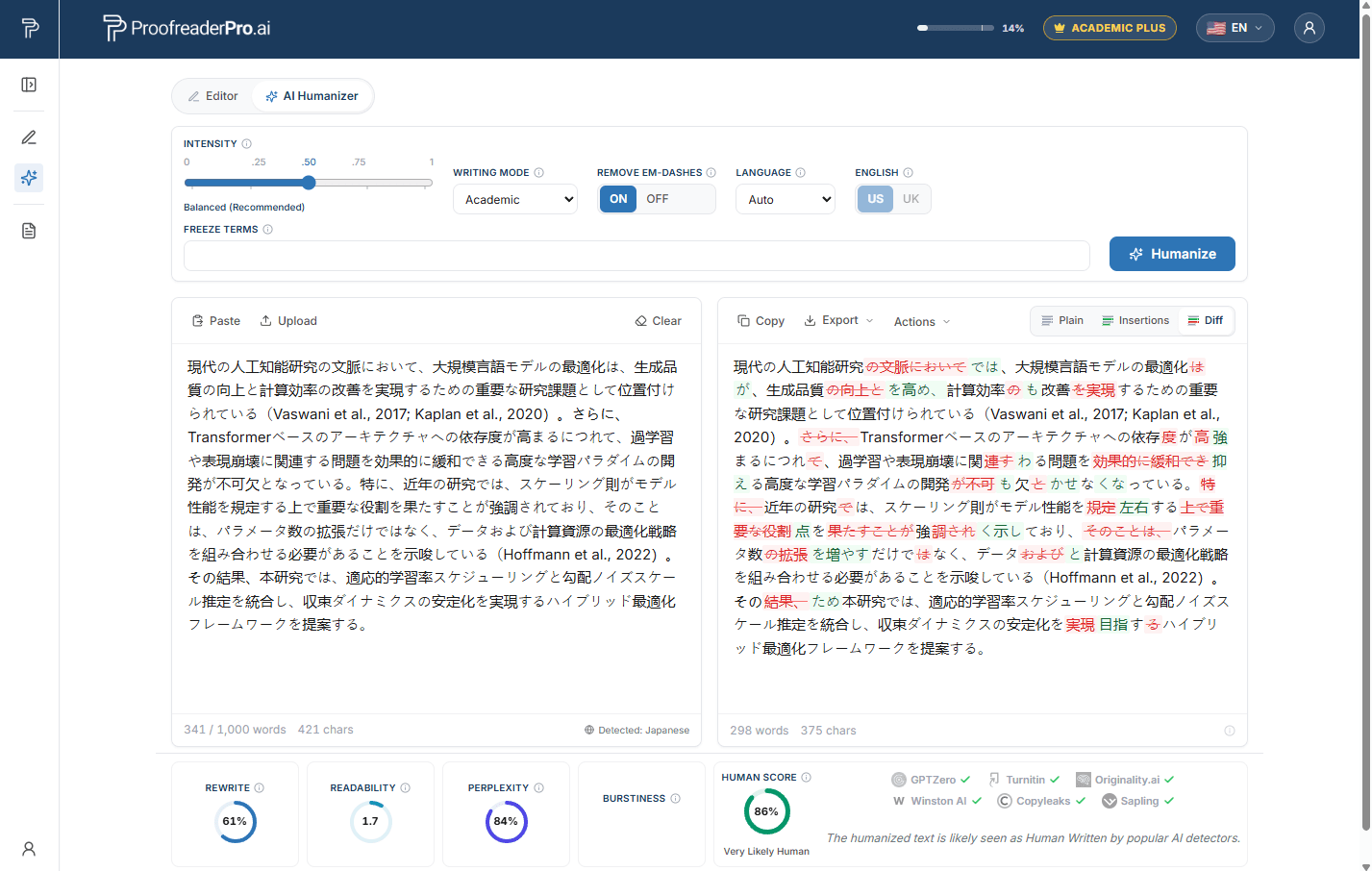
Designed to auto-detect 60+ languages and seamlessly humanize in the target language for a more natural tone. Paste research text in any language. The engine detects the language automatically and rewrites it with the same academic care as English. It also supports US and UK variations for English.
East Asia
🇨🇳Chinese🇯🇵Japanese🇰🇷Korean
Southeast Asia
🇮🇩Indonesian🇻🇳Vietnamese🇹🇭Thai🇲🇾Malay🇵🇭Filipino🇲🇲Burmese🇰🇭Khmerand more
South & Central Asia
🇮🇳Hindi🇧🇩Bengali🇵🇰Urdu🇮🇳Tamil🇮🇳Telugu🇮🇳Punjabi🇮🇳Marathiand more
🇰🇪Swahili🇪🇹Amharic🇳🇬Yoruba🇳🇬Hausa🇿🇦Zulu🇳🇬Igbo🇿🇦Afrikaansand more
Europe
🇪🇸Spanish🇫🇷French🇩🇪German🇮🇹Italian🇵🇹Portuguese🇷🇺Russian🇳🇱Dutchand more
Humanize a Draft in 4 Steps
1
Paste your draft or upload the document. The humanizer accepts up to 1,000 words per pass on Academic Plus plan.
2
Pick a writing mode and set the intensity slider. Balanced is the recommended starting point for academic text.
3
Review every rewrite as a tracked change in the Diff view. Freeze exact terms you need kept verbatim.
4
Export to Microsoft Word with tracked changes, or copy the clean text straight into your manuscript.
Each humanization returns an estimated per-doc human score and detector metrics beside the rewritten text, so you can judge the result before you accept a single change.
The Final Proofread That Keeps Your AI Score Low
Humanized text leaves the humanizer with acceptable grammar; our benchmark holds grammar accuracy near 94%. Most manuscripts still deserve one final proofread before submission, and this final step is where many users undo their own humanization. Running the humanized text through an AI-assisted proofreader such as Grammarly, QuillBot, Scribbr, or Wordvice rewrites your sentences with AI again, and the AI score you just lowered increases as a result.
ProofreaderPro closes that gap with Light Proofreading, a mode optimized specifically for grammar checking without tripping university-grade AI detection. To run it on your humanized text:
Open your humanized result in the output pane.
Choose Actions, then Proofread in Editor.
Set the Proofreading/Editing intensity slider to Light Proofreading.
Review the tracked changes and export.
Light Proofreading corrects the remaining grammar and punctuation without touching the human sentence rhythm the humanizer created, so your Turnitin AI score stays where the humanizer left it. The full workflow lives in one pipeline: humanize, proofread lightly, export, submit.
The Only AI Humanizer with a Voice Filter
Choose the perspective your submission needs and the humanized text preserves it end to end, whether a formal academic tone, first person, second person, or a mix. ProofreaderPro preserves your exact voice in the humanized output.
Third person
Formal academic
Neutral, objective tone for journals and theses, with no first or second person.
First person
First person only
Uses 'I' and 'we'. Blocks the second person.
Second person
Second person only
Uses 'you'. Blocks the first person.
As written
Match my draft
Leaves the voice exactly as you wrote it in your original input.
ProofreaderPro is the only humanizer with a voice filter. Draft in the voice your submission needs, select it, and every sentence preserves it. Available on Academic Plus.
Upload a Word document of up to 15,000 words and download it humanized, with the headings, lists, tables, figures, equations and references preserved verbatim. The body paragraphs are humanized with your AI Humanizer settings and saved as a downloadable Word document.
Whole document
One upload of up to 15,000 words
Upload the .docx and the Document Humanizer humanizes every body paragraph in order, section by section until the entire document is processed. Developed with convenient one-off humanization in mind.
Structure preserved
Formatting and structure preserved
Headings, lists, tables, captions, equations, footnotes and the reference list are preserved verbatim. Inline citations, hyperlinks and the formatting of the surrounding text are kept inside the humanized paragraphs.
Two downloads
Clean copy or tracked changes
Download a clean Word file ready to submit, or a Word file with every change tracked, so you or your supervisor can accept and reject the changes in Word. A plain-text file is also included.
Runs in the background
Progress window and an email when it is ready
A small window shows the humanization progress. Keep working or leave the page, and you get an email when your document is complete and ready to download.
The Document Humanizer is included in the Academic Plus plan. It uses the same word credit allowance as the AI Humanizer, and the cost is shown before you start. Finished documents stay available for download for 30 days.
Humanize AI-drafted cover letters, resumes, CVs, and LinkedIn profiles into a specific human voice, while your names, dates, and keywords stay ATS-safe.
Humanize SEO-driven articles, landing copy, and social media posts while preserving your target seo keywords and long tail keywords, so content reads human and still ranks in search engine SERPS.
Download your humanized text as a .docx with every insertion and deletion preserved as native Word tracked changes. Review, accept, or reject each edit in Microsoft Word, exactly like revisions from a human editor.
Join us
Join Researchers, Professors, and Postgraduates From Around the Globe
This platform has saved a great deal of time editing my articles. I find it highly efficient to perform a quick AI integrated scan of my writing before adding it to my finalized article. The concept of 'Efficient Editing using AI' saves time and costs. Valuable platform for any researcher.
Assoc. Prof. Klaus Müller M.
University of Heidelberg
This software is very helpful in grammar checking journal papers. It improves my sentence structure and removes many small mistakes that are hard to detect by the human eye. I have recommended this software to all my colleagues.
Dr. Zhang Wei
Tsinghua University
It is a great tool for refining research work and making sure that the English is clear and correct before submission for peer review.
Professor Carlos Martínez
University of Barcelona
As a PhD student, I need help with presenting results in my thesis. ProofreaderPro assisted me to improve my grammar for important parts of my thesis like Results and Discussion section. A big thank you to their team for assisting me how to use this app correctly.
Nurul Izzah Binti Ahmad
Universiti Malaya
ProofreaderPro.ai makes my paper writing more efficient and zero errors. I submitted and was accepted first trial. I will continue to use it for upcoming publications.
Dr. Sergey Ivanov
Moscow State University
Best online app for proofreading. Even better than Grammarly and Quillbot. Thank you ProofreaderPro.
Nattapong Charoensuk
Chulalongkorn University, Thailand
I struggle with the scientific language in my biochem dissertation work. This AI proofreader has helped improve it all and make the discussion more expressive regarding scientific terms. I still can see a great difference when I look back at my earlier drafts.
Priya Singh
Jawaharlal Nehru University, India
It is highly efficient and fast in polishing my writing. It will instantly fix grammar mistakes and add professional words. I recommend ProofreaderPro.ai for quick polishing.
Yuki Nakamura
University of Tokyo
This proofreader helped me to translate some text to English and also edit my papers. I think it is a good app to use for students especially for translations and editing.
Siti Aisyah
Universitas Gadjah Mada
It has significantly reduced the time spent on editing improvements, allowing me to focus my time more on the actual research output. Helpful and responsive support team as well. 10/10 - I personally highly recommend it!
Dr. Ahmed Al-Fahad
King Saud University
ProofreaderPro.ai'nin Pro sürümünü satın aldım. Öğrencilerimin kağıtlarını uygulama üzerinden kontrol ederek dilbilgilerinin kusursuz olduğundan emin oluyorum. Mükemmel bir yazım denetim aracıdır ve çalışmalarını teslim etmeden önce kağıtlarını gözden geçirmek isteyen herkese kesinlikle tavsiye ederim.
Dr. Emre Yılmaz
Boğaziçi University
Trusted by Researchers at Leading Institutions
Simple Pricing for Every Researcher
Start free with 250 words per month, then pick the plan that fits your writing volume.
Annual plans save 26%. Cancel anytime with no commitment.
Frequently Asked Questions About AI Text Humanization
How is the ProofreaderPro Humanizer different?
Other humanizers were developed for general content and blogs, so they output a conversational tone that is unacceptable for academic writing. Ours was trained on research content from peer-reviewed papers, so it was taught to rephrase in an academic tone. It combines fine-tuned language models trained on research content, syntax-aware NLP algorithms, and lexical knowledge bases to be semantically faithful to the input text, preserving entities, underlying meaning, citations, and a formal register.
Does humanizing change the meaning of my academic text?
No. Our academic text humanizer is semantically faithful to the input, and preserves your core arguments, evidence, findings, and conclusions. It changes how ideas are expressed (sentence structure, word choice, phrasing) without altering what is being said. Your research integrity remains fully intact.
Am I allowed to use a humanizer to rephrase my research draft?
Using an AI humanizer tool is comparable to using any editing software. It refines how your ideas are presented without generating new content or arguments. Most universities permit a certain amount of AI-assisted editing. However, always check your institution's specific AI use policy and disclose AI tool usage where required. Most universities require citing any AI models that assisted in your writing.
Which AI models can it humanize? Does it handle some better than others?
The model was trained to detect the writing styles and patterns of all popular AI model families, including ChatGPT, Claude, Gemini, Perplexity, Meta Llama, DeepSeek, Qwen, Mistral, Grok, as well as other smaller models. It tends to do its best humanizations on Gemini, Claude, and DeepSeek output, which achieves the largest AI score reduction. ChatGPT comes towards the end, with slightly less AI score reduction.
Does it handle a structured paper, or just body text?
The model was trained on pure body text only. So it is highly recommended that you paste in body text paragraphs only, without any headers, titles, figure/table captions, formulas, or any other non-body text components. Whatever you input will be processed and output as raw text. So it is best to humanize your body text first, and then re-insert it into your structured paper. For a whole Word document, use the Doc Humanizer (Academic Plus plan). It humanizes the body paragraphs in place and preserves the headings, tables, figures, equations and references verbatim.
What is the Document Humanizer, and who can use it?
The Document Humanizer humanizes a whole Word document (.docx) of up to 15,000 words in one upload. The file is split into sections, each section is humanized with your AI Humanizer settings, and the document is rebuilt with its original formatting. It is included in Academic Plus and opens from 'Doc Humanizer' in the left panel of the dashboard, or from the 'Doc Humanizer' button beside the 'Humanize' button.
Which languages does the humanizer support?
The humanizer auto-detects 60+ languages and rewrites in the target language with the same academic care as English. Paste research text in any supported language and the engine handles the rest. For English, a US/UK toggle keeps spelling and conventions consistent throughout your document.
How was the humanizer engine built?
NLP researchers and engineers at TextPulse built the engine and fine-tuned it on our own dataset of peer-reviewed, human-written research papers. It is engineered for research-heavy content, with multilingual support, field-specific terms, protected in-text citations, proper grammar, and a formal academic tone. Occasional updates driven by feedback from our users and the international research community keep it academic-first, unlike general-purpose humanizers trained mostly on conversational blog posts and social media content.
Does ProofreaderPro guarantee a low AI detector score?
No tool can guarantee a consistently low score across all AI detectors. Third-party detectors produce probabilistic assessments that change as their algorithms are updated. ProofreaderPro does not guarantee a specific score from any third-party detector, or that a particular output will achieve a particular result. Results vary with the input text, the AI model that generated it, the settings used, and the detector doing the scoring.
Turnitin is the gold standard AI detector used by most universities, and is considered the most reliable benchmark of whether text truly reads as human, so Turnitin is the detector we benchmark against.
In a recent test, one round of humanization reduced the Turnitin AI score by up to 70%, and a second round on only the remaining AI-flagged sentences reduced the final Turnitin AI score to below 20%.
If you need professional humanization and proofreading for your manuscript, our expert editors at ProofreaderPro provide this service. Our editors are PhD holders with professional academic editing experience across a wide range of disciplines. The service includes an editor-verified Turnitin AI report to confirm the low score. Upload your manuscript for a quick quote.
What is the best way to have the humanizer's output get the lowest possible AI detection score?
Some additional steps to reach the lowest possible AI score:
(1) Humanize the text again. The engine is stochastic, so it can produce a much lower score on the same input. Generate two versions and keep the better one.
(2) Use a higher humanization intensity, which forces a more aggressive rewrite.
(3) Use the Rehumanize feature (Actions -> Rehumanize) to humanize the already humanized text for a second round, which forces further changes.
(4) Draft with Claude or Gemini and humanize their output. The humanizer reaches lower detection scores on text from those models, and their formal writing is cleaner than ChatGPT's to begin with, so you get cleaner writing as well as a lower AI score.
Why is the Rewrite % low sometimes?
The humanizer was designed to recognize AI-generated content, and would heavily rewrite it. But if you input human-written text or heavily human-edited AI text, it would see that the input (structure and wording) already resembles human writing in the first place, so it would rewrite less aggressively.
What is the Human Score?
The Human Score is a per-document heuristic estimating how likely AI detectors are to read your text as human written. It is computed after processing, based on intensity, rewrite depth, word variation, sentence-length variation, and token distribution. Alongside it, every run reports Rewrite %, Readability (FK grade), Perplexity, and Burstiness metrics.
Does the ProofreaderPro Humanizer output grammatically sound content?
It was trained on human writing. And human writing is not grammatically perfect. It tends to come with subtle imperfections. This is true even for peer-reviewed research papers. With this being said, benchmark tests show that the humanizer maintains a ~94% grammar accuracy. So you get a grammatically acceptable draft, with subtle imperfections, as if a postgrad wrote it. Note that if you want to clear up any residual imperfections, we made this easy too. In the Humanizer dashboard, click on Actions above the Output Panel, then click 'Proofread in Editor'. This takes you to the Editor Dashboard, where you can apply a Light Proofreading pass on the humanized text. Light Proofreading performs a light grammar polish without re-spiking the AI score. Be careful not to use the other Editing features (Standard and Comprehensive), since those might re-spike the AI score. For humanized text, Light works best.
How do I use the features in the dashboard?
The Intensity Slider, Writing Mode, Em Dash Toggle, Language Selection, US/UK Toggle, Freeze Terms, Doc Upload, Export, Rehumanize, Diff Tracked Changes View, and Humanization Metrics all have tooltip explanations that you can refer to for more information. The User Guide also gives a brief overview of how to use the dashboard.
What are Writing Modes?
Four writing modes tailor the output register to your content: Academic (formal scholarly writing, the default for research), Corporate (reports, proposals, and business documents), Creative (essays and narratives that keep your voice), and Blog/SEO (articles that preserve your target keywords). Academic mode comes with the Academic plan; all four modes are included in Academic Plus.
How does the Intensity Slider work?
It fine-tunes how aggressively the model rewrites, on a 0-1 scale with five points. Mild applies the lightest rewrite and protects semantic faithfulness, Aggressive maximizes AI score reduction, and Balanced is the recommended default. The intensity graphs above show how the low-score rate, faithfulness, and Rewrite % move across the scale.
What is the Rehumanize feature?
The Rehumanize feature (Actions -> Rehumanize) re-processes an already-humanized text for a second round. This forces the model to make more aggressive changes over two passes instead of one.
What are Freeze Terms?
Freeze Terms are manually added terms that you prefer to remain as-is in the output. These could be highly technical terms, specialized naming conventions, industry-specific names, etc. Although the model preserves key terms reliably, an additional level of precaution is to add them as Freeze Terms, as the highest level of protection.
Can I view and export the output in tracked changes?
Yes, you can view the tracked changes, or all the changes made to the original text, and even export them to Microsoft Word or any other text processor for further editing.
What does the em dash option do?
AI drafts overuse em dashes, and both detectors and reviewers notice. The Em Dash Toggle automatically removes AI-typical em dashes and replaces them with proper academic punctuation like commas, colons, and semicolons.
What is Humanization History?
Every run is saved to your humanization history, so you can revisit, compare, and restore earlier passes at any time. The Academic plan keeps your last 3 humanizations; Academic Plus keeps your last 20.
Can I upload documents instead of pasting text?
Yes. Paid plans support TXT, DOC, and PDF upload. You can export results as TXT or DOC on the Academic plan, with PDF export added on Academic Plus. Academic Plus also includes the Document Humanizer, which takes a complete .docx document of up to 15,000 words and returns it humanized with its structure preserved.
What does the Document Humanizer preserve, and what am I charged?
Only body paragraphs are rewritten. Headings, lists, tables, captions, equations, footnotes, the table of contents and the reference list are preserved verbatim, and inline citations, hyperlinks and formatting are kept inside the humanized paragraphs. The document is charged from the same word allowance as the AI Humanizer. The popup mentions the total before you start, and if you cancel, only the sections already delivered are charged.
What do I download, and how long are my documents kept?
You download a clean Word file, a tracked changes Word file, or a plain-text file. Finished documents are listed in the Humanized Docs page for 30 days, and the latest 20 documents are listed. One document is humanized at a time per account.
How does the Voice setting keep my draft in the right perspective?
The voice filter tells the humanizer which perspective the humanized text is allowed to keep, and it acts as a filter on the voice/perspective your draft already has. 'Formal academic' preserves the text in the impersonal, neutral tone expected in journals and theses, with no 'I', 'we' or 'you'. 'First person' only keeps your 'I' and 'we' and rules out second person. 'Second person' only keeps your 'you' and rules out first person. 'Match my draft' leaves the voice exactly as in the input text. Write in the voice your submission needs, and select that voice. Every sentence of the humanized text is then preserved in that voice. This has been a long term flaw in all humanizers, but, recently, we fixed that. You're welcome.
Is the AI humanizer free to use?
Yes. ProofreaderPro.ai offers a free AI humanizer with 250 words per month, no credit card required. For students and early-career researchers on a budget, this provides enough capacity to humanize key sections of a paper. The Academic plan starts at $19/month for those needing more volume.
How many words can I humanize per pass?
The Academic plan processes up to 500 words per pass with a 25,000-word monthly quota. Academic Plus doubles that to 1,000 words per pass and 50,000 words per month. For longer sections, split the text and humanize it in consecutive passes.
Your Research Giving Off AI Vibes? Cut the fluff!
Humanize it in one pass: natural academic tone, preserved citations and key terms, clean grammar, and tracked changes. Start with 250 free words, no credit card required.