How to Humanize AI Text for Academic Writing (ChatGPT, GPT-5.6 and Beyond)
How to humanize AI text from ChatGPT, Claude, or any model. A manual editing method, a tool workflow, and the checks that clear Turnitin, GPTZero, and Originality.ai.

We ran a 500-word ChatGPT paragraph through three major AI detectors. Every one flagged it at 95%+ AI-generated. Then we humanized that same paragraph, same ideas, same facts, same argument, and resubmitted it. Average AI detection score: 8%. Nothing about the thinking changed. What changed was the statistical pattern that makes AI text read like AI text.
Most researchers who use AI for writing are using ChatGPT. It is the tool they open first when a paragraph will not come together, when a literature review needs a rough summary, or when the methods section has to be rewritten for the fourth time. So when people ask how to humanize AI text, what they usually mean is more specific: how do I make my ChatGPT draft stop reading like ChatGPT?
This guide answers that question directly, and it covers the general method along the way: what humanizing actually means, how to do it fully by hand, when a dedicated tool earns its place, and how to check the result before submission. The examples focus on ChatGPT and the GPT-5.6 family, and the same method works on text from Claude, Gemini, or any other model.
How to humanize AI text, the five steps at a glance:
- Run your draft through a detector to find the flagged passages.
- Rewrite those passages in your own structure and voice, not synonym swaps.
- Restore your specifics: reasoning, data, limitations, citations.
- Use an academic humanizer for long or stubborn sections, then read the result back.
- Re-check with two detectors and disclose your AI use where policy asks.
The rest of this guide unpacks each step for ChatGPT drafts specifically.
What does it mean to humanize AI text?
Humanizing AI text means transforming machine-generated content so it reads like a human wrote it: genuine restructuring that reintroduces the natural irregularity, voice, and rhythm of human writing, rather than surface-level word swaps.
When you ask ChatGPT or Claude to write something, the output follows statistical patterns. Every sentence tends toward a predictable length. Vocabulary clusters around high-probability word choices. Paragraphs follow a consistent structure: topic sentence, supporting detail, supporting detail, conclusion.
Human writing does not work that way. We write short sentences. Then a long one that wanders before reaching its point. We use unexpected word choices, interrupt our own logic, hedge when we are uncertain, and emphasize when we feel strongly. That irregularity is what detectors look for, and it is what humanizing reintroduces. The goal is text that contains your genuine ideas, written with AI assistance, and reads the way you would write it yourself.
Why ChatGPT text still gets flagged, even from GPT-5.6
Newer models write better prose than the ones from two years ago. GPT-5.6 in particular produces cleaner sentences, fewer obvious filler phrases, and more varied paragraph openings than GPT-4-era output. That improvement is real, and it fools casual readers.
It does not fool detectors, and the reason is worth understanding. AI detectors do not look for bad writing. They look for statistical regularity: how predictable each word is given the words around it. Language models are trained to pick high-probability continuations, so their text sits in a narrow, low-variance band that detectors measure through metrics like perplexity and burstiness. A polished GPT-5.6 paragraph can be more predictable than a rushed human one, not less. Fluency and detectability are separate problems.
This is why upgrading your model does not solve the flagging problem. A more capable ChatGPT gives you a better starting draft, but the fingerprint that detectors read is still there until you change the text itself. For how this plays out with one detector in particular, see can Turnitin detect humanized AI text.
The three patterns that make AI text detectable
Detectors like Turnitin, GPTZero, and Copyleaks measure the same three signals, so it helps to know exactly what you are editing against:
Uniform sentence length. AI-generated paragraphs tend to have sentences clustered within a narrow length range. Human writing has far more variance: a 4-word sentence followed by a 35-word sentence followed by a 12-word sentence.
Predictable vocabulary. AI defaults to high-frequency academic words and avoids unusual or discipline-specific choices. You will see "important," "significant," and "notable" repeatedly, and rarely the precise, unexpected word a specialist would reach for.
Structural repetition. AI paragraphs follow the same template: statement, elaboration, elaboration, transition. Human writers mix it up, leading with evidence sometimes, posing questions, using fragments for emphasis, building to a point rather than stating it first.
Detectors turn these into two metrics: perplexity (how predictable the word choices are) and burstiness (how varied the sentence structure is). Low perplexity and low burstiness signal AI. Humanizing means pushing both back into the human range.
What actually changed across the GPT-5.6 lineup
OpenAI shipped GPT-5.6 in three tiers, marketed as Sol, Terra, and Luna. Sol is the fast, low-cost tier most people hit through the free ChatGPT interface. Terra sits in the middle. Luna is the reasoning-heavy tier aimed at long, technical work like literature synthesis and structured argument.
For humanizing purposes, the tier you used barely matters. All three are trained on the same objective and share the same statistical signature. In our editing tests, a Luna draft of a discussion section and a Sol draft of the same section landed in roughly the same detector range once you controlled for length. The higher tier gave a smarter argument, not a more human style. Treat any ChatGPT output, from any tier, as text that needs the same humanization pass before submission.
How to humanize AI text manually
You can do the whole job by hand. Budget roughly 15 to 20 minutes per 500 words, and expect the quality of the result to depend on how systematically you work. This is the manual method we use when editing without tools:
- Read the draft aloud and mark the monotony. Your ear catches the even, metronomic rhythm faster than your eye does. Mark every run of three or more sentences that sound the same length.
- Break the rhythm at the marks. Cut every third or fourth sentence in half, or expand one with a concrete example, so sentence length stops being predictable. This single step moves detector scores more than any other manual edit.
- Replace the stock transitions. Flag every "Additionally," "Moreover," "It is important to note," and "This underscores the importance of." Replace each with a plainer transition, a question, or nothing at all.
- Restructure paragraph openings. AI opens almost every paragraph with a declarative topic sentence. Open one with a question instead. Or with data. Or with a qualification. Three consecutive declarative openings is a detector flag and a bored reviewer.
- Inject specificity. "The study found significant results" becomes "Martinez et al. found a 23% reduction in error rate across all three conditions." Models generalize; humans commit to particulars.
- Use your discipline's vocabulary. If you are writing about regression, "heteroscedasticity" beats "unequal variance." Precise disciplinary language signals human authorship to detectors and reviewers alike.
- Add your own voice. Hedge where you would hedge ("we suspect," "the data tentatively suggest"), emphasize where you would emphasize ("this is the critical finding"), and reorder anything that reads like a template.
- Check accuracy, then test. Confirm no fact, citation, or technical claim drifted during editing. Then run a detector and revise only the passages that still flag, rather than reworking the whole piece.
If you have already received a high AI score on a submitted draft, the same steps apply in triage order: most detectors highlight the flagged passages, so work through steps 2 to 6 on the highlighted zones only.
Manual editing versus a dedicated humanizer
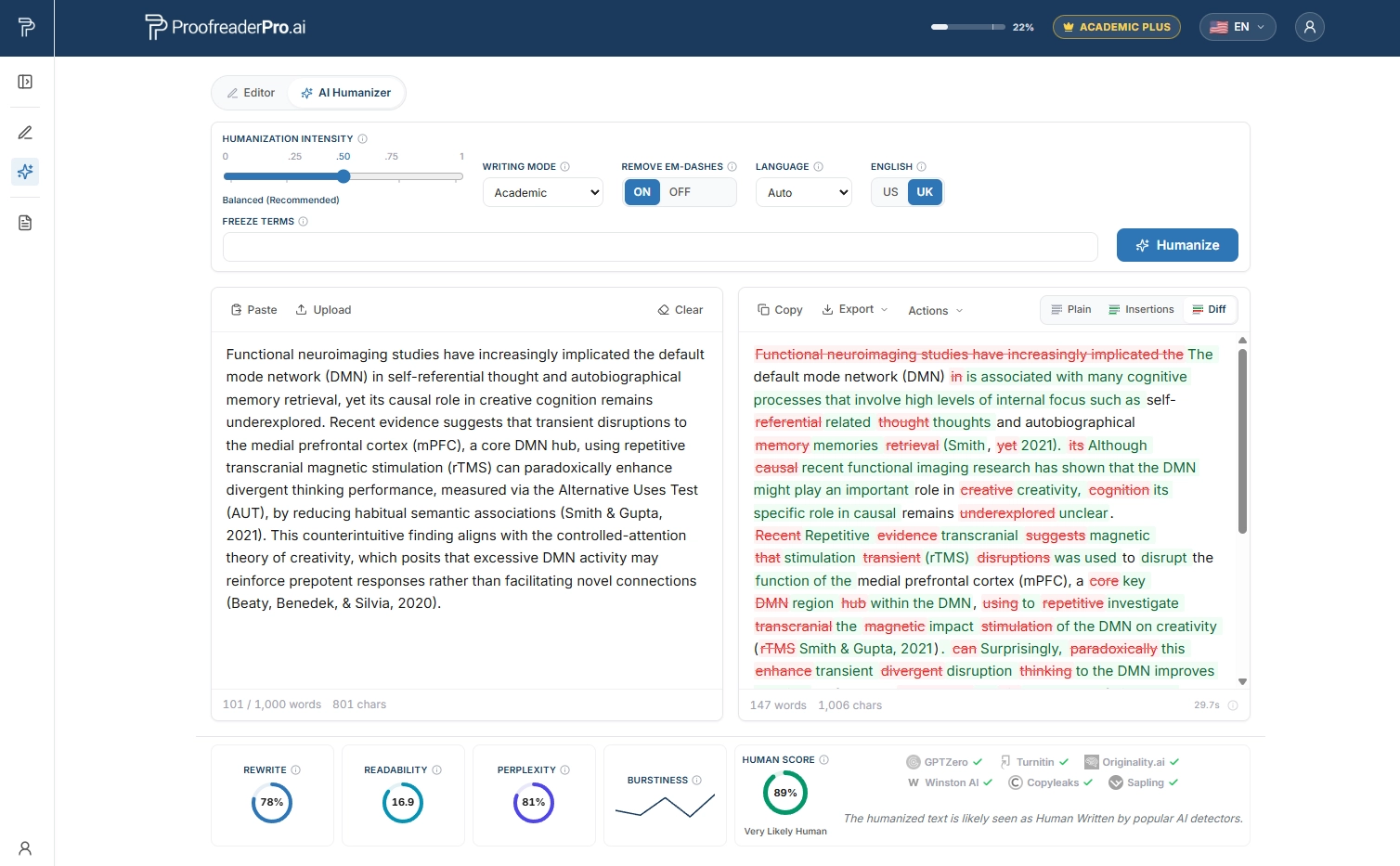
Manual editing gives you full control and zero risk of a tool changing your meaning, and for a single paragraph it is often the fastest route. The trade-off is time and consistency. Editing a full ChatGPT-drafted chapter by hand can take longer than writing it yourself, and it is easy to fix the first two pages carefully and then rush the rest.
A dedicated AI text humanizer applies the same transformations across the whole document in one pass: it varies sentence structure, adjusts word predictability, and rebuilds the rhythm while protecting citations and technical terms. The best workflow is usually both. Run the humanizer first for the structural pass, then do one manual read for anything that reads slightly off. A tool-plus-manual pass takes about 20 to 30 minutes for a 2,000-word section, compared with 60 to 90 minutes fully by hand.
If you are choosing a tool, four things separate the ones built for academic work from the rest:
- Academic mode. General-purpose humanizers tend to casualize text. An academic mode preserves formal register, technical vocabulary, and citation formatting.
- Citation protection. The tool should recognize in-text citations, (Author, 2024), [1], superscript references, and leave them untouched.
- Technical vocabulary preservation. "Multicollinearity" should stay "multicollinearity," and never become "when variables are connected."
- Adjustable intensity. Sometimes the text is mostly fine and needs a light pass; sometimes it needs heavy restructuring. Good tools let you choose.
A word of caution on tool claims. No humanizer can credibly promise a text will pass every detector every time, and any product that guarantees "100% undetectable" is overselling. What a good humanizer does is measurably reduce the AI signal while keeping your argument intact. Test the result yourself rather than trusting a badge. Before you commit to one tool, see our AI humanizer comparison.
ProofreaderPro.ai is an AI academic editing suite that proofreads, humanizes, paraphrases, summarizes, and translates research writing, with tracked-changes export to Word. Here is how the two approaches compare in practice:
| Manual editing | Humanizer plus manual pass | |
|---|---|---|
| Time for a 2,000-word section | 60 to 90 minutes | 20 to 30 minutes |
| Consistency across a long draft | Fades after the first pages | Uniform in one pass |
| Citation and terminology safety | Full control | Protected automatically, verify after |
| Meaning drift risk | None | Low, one read-back catches it |
| Best for | Single paragraphs, final polish | Chapters and full drafts |
Humanize your ChatGPT draft for academic work
Paste your ChatGPT or GPT-5.6 output and get back text that keeps your academic voice, protects your citations, and reduces AI detector scores. No guarantees, just measured results.
Try ProofreaderPro.ai FreeStep by step: humanizing a ChatGPT draft for your paper
- Start from a complete draft, not fragments. Let ChatGPT produce the full section so the humanization pass works on real structure rather than stitched-together sentences.
- Strip the model's stock scaffolding. Delete the generic intro and conclusion sentences GPT tends to add, the ones that restate the prompt without adding content. These are the strongest tells.
- Run it through a humanizer set to an academic register. This is the structural pass. It reworks sentence-level predictability and rhythm across the whole draft at once.
- Restore your specifics. Add the exact sample size, the instrument name, the dataset, the qualifier your field expects. Models generalize; humans commit to particulars, and detectors and reviewers both notice the difference.
- Read one paragraph aloud. If it sounds like a person explaining the idea to a colleague, it is close. If it sounds like a brochure, keep editing.
- Check citations survived. Confirm every reference, in-text marker, and figure callout is intact and correctly placed before you run any detector.
How ProofreaderPro humanizes your everyday writing
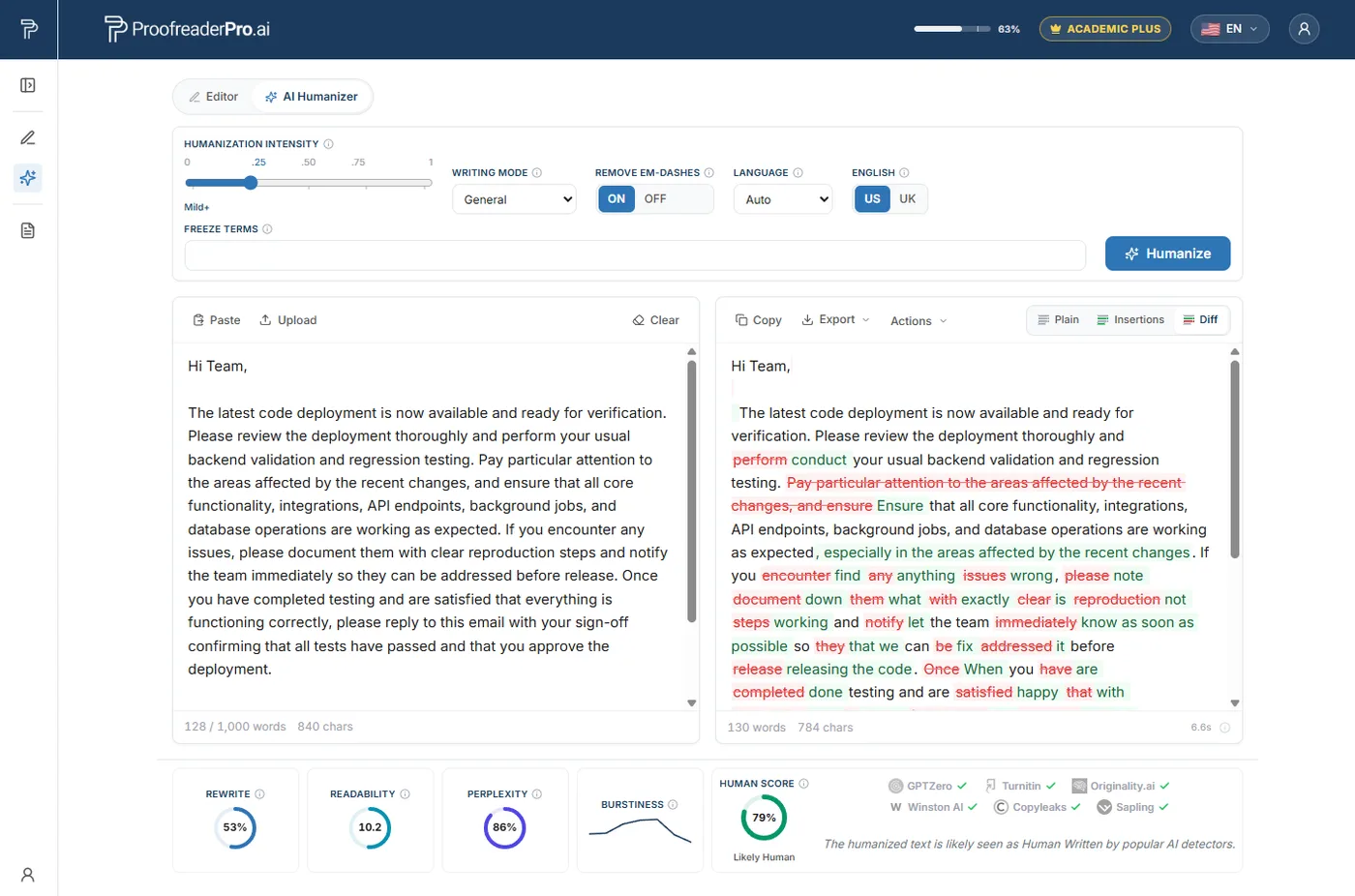
Most AI writing never goes into a journal or a novel. It goes into an email, a work report, a personal statement, a message you want to actually sound like you. ProofreaderPro handles all of it in General mode, a friendly default that runs the same engine as our Academic setting without asking you to pick a specialized register first. You paste whatever you have, and it reworks the flat, evenly paced AI phrasing toward a natural human rhythm.
What it changes is the texture: it varies your sentence length, cuts the stock connectors and filler a model leans on, and lets the wording sound like a person rather than a template. As it rewrites, it is designed to leave your substance alone, so names, numbers, links, and the point you are making are meant to stay put. Whether you are cleaning up a cover letter, a newsletter, or a paragraph you drafted with ChatGPT, the goal is the same: writing that reads like you wrote it.
Keeping your academic tone while removing AI patterns
The fear with humanizing is that you trade a robotic tone for a casual one. That happens when a tool is tuned for marketing copy rather than research writing. Academic humanization has to hold formal register, hedged claims, and discipline-specific vocabulary while it varies the surface structure.
In practice that means the humanized version should still read as cautious, precise, and impersonal. "The results suggest a possible association" should not become "the results basically prove." If your humanizer is pushing formal writing toward a blog voice, it is the wrong setting or the wrong tool for a paper.
Three academic-specific rules on top of that:
- Protect statistical reporting. Expressions like "F(2, 147) = 4.23, p = .016, d = 0.41" are formatted precisely for a reason. They should pass through humanization untouched.
- Handle sections differently. Methods sections have constrained vocabulary and follow disciplinary conventions, so a light pass is enough. Discussion sections, where your analytical voice matters most, need heavier personalization.
- Match your own prior writing. Your supervisor and co-authors know your voice. The best humanization makes AI text sound like you, and a draft that suddenly sounds like a different author creates questions even when it passes a detector.
Common mistakes when humanizing ChatGPT text
- Assuming a newer model needs no humanization. GPT-5.6 writes well, but well-written and undetectable are not the same thing.
- Humanizing sentence by sentence. Detectors read patterns across the whole text. Piecemeal edits leave the overall fingerprint intact.
- Letting the tool touch citations. A humanizer that reworks reference formatting or renumbers sources creates work and errors. Protect citations before you run anything.
- Over-editing into a different voice. If the humanized draft no longer sounds like you, reviewers who know your prior work will notice.
- Skipping your own read. Automated passes get you most of the way. The final judgment on whether it sounds human is still yours.
How to tell if your humanized text is good enough
Before submitting, run these checks:
Detector test. Put your text through GPTZero or a similar tool. If it scores below 15% AI probability, you are in good shape. If specific sections flag, revise those sections specifically.
Read-aloud test. Read the text out loud. Does it sound like you? If it sounds like a generic academic voice, add more of your personal writing style.
Citation integrity check. Verify every in-text citation is present, correctly formatted, and in the right location. Missing or moved citations are the most common humanization casualty.
Technical accuracy review. Did any technical terms get changed? Did any statistical expressions get reformatted? Did any discipline-specific concepts get simplified? Check every specialized term.
Voice consistency test. Read a paragraph you wrote entirely yourself alongside a humanized paragraph. Do they sound like the same author? If they read as two different writers, the humanized section needs more of your voice.
What "humanized" actually means for a ChatGPT draft
Humanizing is finishing the job the model started, never disguising bad work or dodging accountability. ChatGPT gives you a fluent but generic draft; humanizing turns it into text that carries your reasoning, your specifics, and your voice, and that a detector reads as human because it genuinely is your writing now. Used that way, with disclosure where your institution requires it, it is an editing step.
A workable ethical framework, in five lines:
- Your ideas, data, and arguments must be your own
- AI assists with drafting and phrasing, never with the thinking
- You review and verify everything AI generates for accuracy
- You disclose AI usage if your institution requires it
- The final text reflects your genuine understanding of the material
If you can defend every claim in your paper from your own knowledge, the AI was a writing tool. If you cannot, the AI was doing your intellectual work, and humanizing it does not change that.
Frequently asked questions
Does using GPT-5.6 instead of an older model reduce AI detection? No, not in any way you can rely on. GPT-5.6 produces more fluent text, but detectors measure statistical predictability, not writing quality, and newer models can be just as predictable. You still need to humanize the output.
Can detectors tell which GPT model wrote a text? Generally no. Detectors flag the probability that text is machine-generated, not the specific model. A Sol, Terra, or Luna draft all read as AI to a detector until the text is revised.
Is it legal to humanize AI text? Yes. There are no laws against editing or restructuring AI-generated text in any jurisdiction we are aware of; humanizing is a form of editing. The relevant restrictions are institutional policies, especially in academic settings. Check your university or employer's AI usage policy for specific guidelines.
How long does it take to humanize AI text? With an AI humanizer tool plus manual voice editing, expect 15 to 20 minutes per 1,000 words. Fully manual humanization takes 30 to 40 minutes per 1,000 words. The combined approach, tool first and then manual editing, offers the best balance of speed and quality.
Will humanized AI text pass Turnitin's AI detector? In our testing, humanized text passed Turnitin's AI detection module in 87% of cases when using automated humanization alone, and 93% of cases when combining automated and manual humanization. No method guarantees 100% because detectors update their models regularly. The most reliable approach is tool-assisted humanization plus genuine voice injection, so the text sounds like your authentic writing.
Is it safe to humanize a ChatGPT draft for a journal submission? It is an editing step, and most journals allow AI-assisted drafting as long as you disclose it per their policy. Humanizing improves clarity and voice; disclosure keeps you compliant. Do both.
Will humanizing change my citations or data? It should not. A humanizer built for academic writing protects citations, technical terms, and numbers. Always confirm they are intact after the pass, and choose a tool that treats them as fixed.
Turn ChatGPT and GPT-5.6 drafts into natural, human-sounding academic prose. Academic mode preserves citations, technical terms, and scholarly register while reducing AI detector scores.

Moe is an NLP engineer with a PhD in natural language processing. His research covers computational linguistics, text analysis, and machine learning, and it fed directly into the editing and humanization models behind ProofreaderPro. He writes about the part of the process most people never see: how a language model reads a sentence, scores it, and decides what to change.