UnAIMyText AI Humanizer Review (2026): How Free Is It?
UnAIMyText AI humanizer review: a free 500-word Standard mode with no signup, a separate AI Detector, per-sentence rephrase and Ultra's granular controls.

UnAIMyText is a free AI humanizer built by CoreAI LLC, with no signup required and no cap on total use. Each input is limited to 500 words, but you can run as many inputs as you need at no cost.
The most useful detail in an UnAIMyText AI humanizer review is how far that free tier goes. A paid tier raises the per-input limit to 2,000 words and unlocks Ultra mode. Standard mode alone, with no total word ceiling and no credit card at any point, already covers a lot of everyday writing.
What is UnAIMyText?
UnAIMyText is a web tool developed by CoreAI LLC. It rewrites AI-generated text so it sounds the way a person writes, without changing what the text says. Alongside the humanizer, the same company runs a separate free AI Detector tool and a Use Cases page that groups its audience by job: students, marketers, bloggers and creative writers.
UnAIMyText draws a line between three related jobs: humanizing, paraphrasing and rewriting. Humanizing adjusts tone, rhythm and phrasing while the structure and meaning stay the same. Paraphrasing restates an idea in different words, changing vocabulary without changing the underlying point. Rewriting rebuilds the text, including how ideas are expressed, so the result can differ substantially from the original. UnAIMyText places itself in the first category. It refines a draft and leaves your argument and structure in place, which matters if you want your own thinking to survive the process.
Is UnAIMyText the same company as its AI Detector?
Yes. Both run under CoreAI LLC, and the AI Detector works as a separate, free tool at a different address. You can check a score first and humanize afterward, or use either tool on its own, and neither one asks you to sign up.
Inside UnAIMyText's Humanizer
The tool has three controls above the text box: a Standard-or-Ultra toggle, a Language menu and a Tone/Purpose menu. A word counter tracks your input against the 500-word free limit.
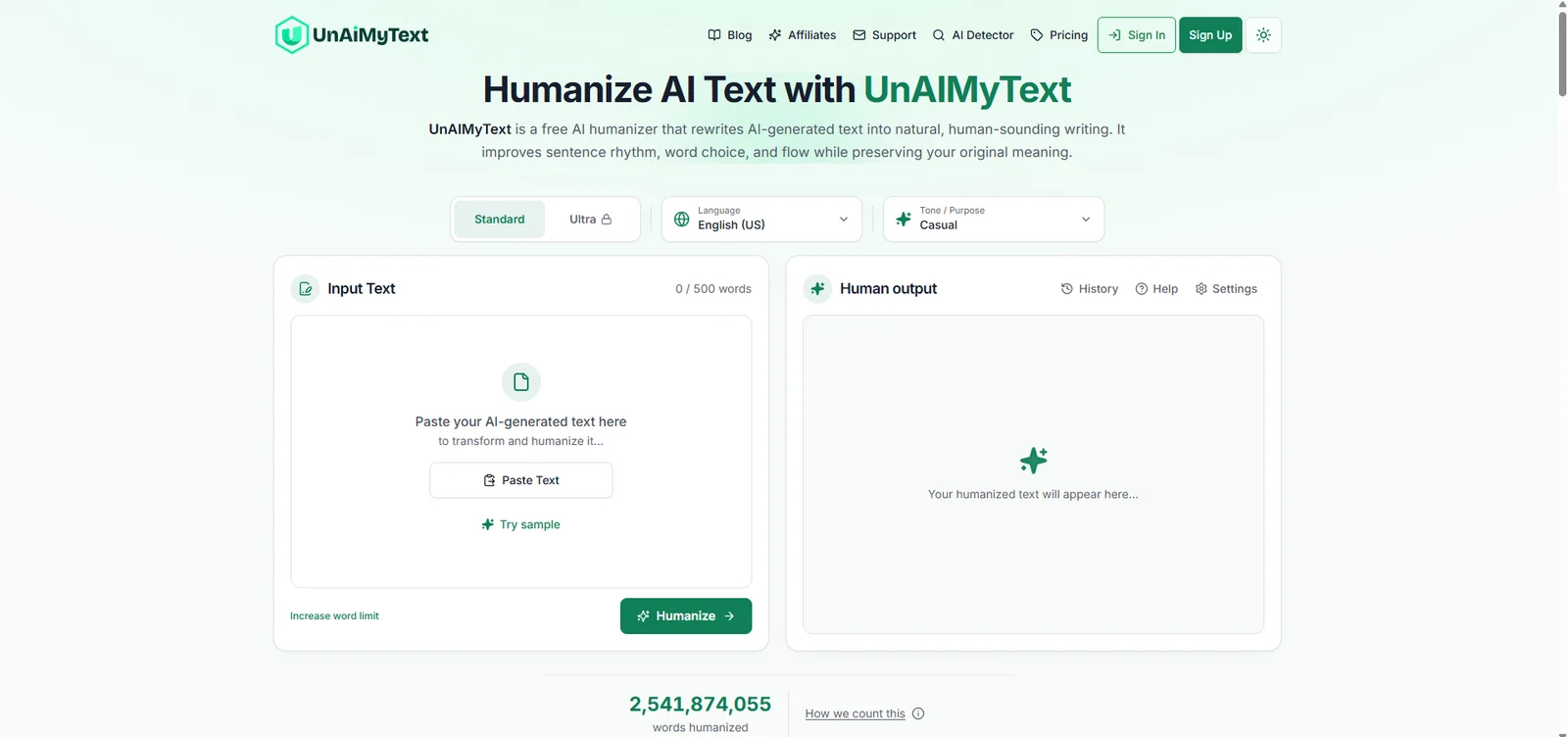
Standard and Ultra
Standard is the free mode. UnAIMyText's own plan description points Standard at blog posts, emails, social copy and product descriptions, ordinary text written in a plain, everyday voice. Ultra needs a paid plan. It's aimed at academic writing, reports and other long-form work, where UnAIMyText says sentence-level precision matters more.
Tone, Purpose and languages
The Tone/Purpose menu defaults to Casual, with Academic, Creative and Business also available. Language defaults to English (US). UnAIMyText supports more than 30 languages in total, including Spanish, Chinese, Portuguese, French, German, Italian, Russian, Polish, Dutch and Greek.
Per-sentence rephrase
If one sentence in the output doesn't read right, you can rephrase that single sentence again without rerunning the whole passage. UnAIMyText calls this per-sentence rephrasing, and it's a useful shortcut for a long draft where only a paragraph or two feels off.
Ultra's Advanced controls
Ultra's Advanced mode replaces a single intensity setting with six separate controls. Creativity and Context Preservation are set as percentages. Emotional Tone and Formality are selectable levels. Preserve Intent and Human Natural Mistakes are on-off switches. Each one is named for exactly what it changes, so you can raise Creativity without also raising Formality by accident.
For a report or an academic draft, a careful setup is high Context Preservation, Preserve Intent switched on and Formality set high. Leave Human Natural Mistakes off for anything formal, since a deliberate slip is the last thing a marker or an editor wants to see. For a casual blog post, more Creativity and a warmer Emotional Tone can suit the piece.
How a run works
- Paste your text, or upload a PDF or DOCX file on a paid plan.
- Choose Standard or Ultra, then set your language and tone.
- Click Humanize and review the result next to your original.
A 500-word input typically finishes in under 10 seconds. A longer Pro-length input takes more time but still finishes in under a minute. The History panel keeps a record of past runs once you're signed in. Settings is a separate menu with the keyboard-character cleanup toggle, apart from the Mode and Tone controls above the text box.
UnAIMyText's free AI Detector
Alongside the humanizer, UnAIMyText runs a separate AI Detector at its own address, also free and with no signup. It checks up to 3,000 words at a time and names ChatGPT, GPT-4o, Claude, Gemini and Grok among the models its results cover.
The detector looks at several signals rather than one score. It studies burstiness and rhythm, how much sentence length and complexity vary across a passage, a pattern our guide to burstiness in AI writing covers in more depth. It also studies perplexity, how predictable the word choices are, which our explainer on perplexity in AI detection breaks down. A third signal is vocabulary. UnAIMyText's own page names a handful of stock AI phrases it watches for. Our guide to removing AI words from academic writing covers that same habit from the writer's side, with a longer list of the words worth cutting.
A detector score from any tool is one reading. If it flags writing you did yourself, our guide to appealing a false AI-detection flag covers what evidence helps.
What UnAIMyText costs
UnAIMyText's Standard mode is free: 500 words per input, no signup, no credit card and no limit on how many inputs you run. Its About page names Basic and Pro plans for longer inputs and Ultra mode. Our free word counter is a fast way to check whether a draft fits inside one 500-word run before you paste it in. Because the number of runs is unlimited, a 2,000-word report costs nothing on Standard. It takes four runs of 500 words, and you can check each one before the next.
| Plan | Price | Words per input | Total usage |
|---|---|---|---|
| Standard | US$0 | 500 | Unlimited runs |
| Pro | None stated | 2,000 | Unlimited runs |
UnAIMyText also lists a Basic plan between Standard and Pro. Pro adds Ultra mode, the 2,000-word input limit, per-sentence rephrase and PDF or DOCX upload on top of everything Standard includes.
Getting a refund
CoreAI LLC gives you 7 days from the purchase date to request a refund. The account has to show under 2,000 words of use for the request to qualify. Email help@unaimytext.com with your receipt or an account screenshot. Refunds go back through Stripe within 5 to 10 business days. A request made later, or from an account over that word count, isn't eligible.
An Academic Humanizer That Keeps Your References Intact
ProofreaderPro.ai's academic humanizer is designed to lower AI scores while APA, MLA, Chicago, IEEE and Turabian citations stay in format, from US$19 a month.
See the academic humanizerUnAIMyText's readers
UnAIMyText's own use-case list names four groups: students and researchers, people working with raw ChatGPT or LLM output, marketers and bloggers, and creative writers using AI for inspiration. The second group covers a specific habit: pasting a ChatGPT, Claude or Gemini answer straight into an email or document without editing it first. The AI tone becomes obvious on a re-read, and that's the point most people reach for a humanizer.
A student polishing a research-assisted draft gets a free way to test Standard mode on a single paragraph. That's useful before deciding whether Ultra's extra control is worth paying for on a full chapter. Our guide to humanizing an AI-drafted research paper covers the same job with citation-aware settings built in. A blogger or marketer cares about a draft that sounds natural and still ranks. Our guide to humanizing content for SEO covers how Google treats AI-assisted writing. A creative writer can pick the Creative option in UnAIMyText's Tone/Purpose menu for dialogue and narration. Our guide to humanizing creative writing covers how to keep a narrator's voice intact.
One Settings option is worth knowing about regardless of which group you're in: a text-cleanup toggle that strips keyboard-only characters AI writers tend to leave behind. Our guide to removing em dashes from academic writing covers the most common character this kind of cleanup targets.
UnAIMyText AI Humanizer vs. ProofreaderPro Humanizer
UnAIMyText's Standard mode is free for general text, with Ultra adding academic-leaning precision on a paid plan. ProofreaderPro.ai is built around academic writing from the first plan, with a humanizer that keeps citations in format.
| Feature | ProofreaderPro.ai | UnAIMyText |
|---|---|---|
| Made for | Essays, theses and journal papers | General AI-generated text: essays, blog posts, emails, reports and social posts |
| Price | US$19 or US$29 a month (US$169 or US$259 a year) | Free for Standard mode; Basic and Pro add longer inputs and Ultra mode |
| Limit per run | 500 words on Academic, 1,000 on Academic Plus | 500 words free, 2,000 words on Pro |
| Settings | Five modes and five intensity levels on Academic Plus | Standard and Ultra modes, plus Creativity, Formality and Emotional Tone controls in Ultra |
| Citations | Keeps APA, MLA, Chicago, IEEE and Turabian formats in place | General rewrite that preserves meaning, with per-sentence rephrase |
UnAIMyText's free tier is the easier starting point for a one-off paragraph, since there's no cost and no account to set up. ProofreaderPro.ai's Free plan covers 250 words a month of editing without the humanizer. The two free tiers serve different jobs. One is a humanizer with no ceiling on total use. The other is a proofreader that adds humanizing only once you're on the Academic plan. A thesis chapter or a paper with a reference list is different. Citation handling starts to matter more than the price, since a changed page number or reference is costly to find later.
UnAIMyText AI Humanizer Alternatives
UnAIMyText's closest alternatives are other humanizers that pair a free or low-cost tier with their own detector or detector-style scoring.
| Tool | Best for | Our write-up |
|---|---|---|
| ProofreaderPro.ai | Academic writing with citations to keep | Academic AI humanizer |
| ZeroGPT | A detector-first tool with its own humanizer | ZeroGPT AI humanizer review |
| Grubby | A low-priced general-purpose humanizer | Grubby AI Humanizer Review |
| HumanizeAI.pro | A general humanizer with named tones | HumanizeAI.pro review |
| StealthGPT | Many languages with a built-in detector | StealthGPT review |
| Monica | An AI assistant with many models and a humanizer built in | Monica AI humanizer review |
| Netus AI | Content writers who paraphrase and humanize | Netus AI alternative |
UnAIMyText vs ZeroGPT
ZeroGPT pairs a detector with its own humanizer under one roof, similar to UnAIMyText's detector-plus-humanizer pair. ZeroGPT built its name around the detector first. UnAIMyText built its name around the humanizer first, with the detector added as a companion tool. Either pairing lets you check a score and rewrite a draft in the same place, instead of copying text between two separate sites.
UnAIMyText vs Grubby
Grubby is a general-purpose humanizer with low-priced paid plans, a fit for casual rewrites such as emails and blog posts. UnAIMyText's Standard mode stays free with no total word cap, which suits someone who rewrites small amounts often without committing to a subscription. A heavier, regular workload is where a low-priced paid plan like Grubby's starts to make more sense. A subscription removes the 500-word ceiling UnAIMyText's free tier keeps on every single input.
Frequently asked questions
Q: Is UnAIMyText free?
Yes. Standard mode is free with no signup, no credit card and no limit on total use. Each input is capped at 500 words, and Pro raises that to 2,000 words with Ultra mode included.
Q: Is UnAIMyText good?
UnAIMyText is a reasonable choice for everyday text you want to rewrite without paying anything, since the free tier has no total word cap. For academic work with a reference list, a tool built around citations fits a thesis or paper better.
Q: Does UnAIMyText have a word limit?
Each input is limited to 500 words on Standard and 2,000 on Pro. There's no limit on how many separate inputs you can run.
Q: Do I need to sign up to use UnAIMyText?
No. You can paste text and humanize it without an account. Signing in adds saved history across devices, but the 500-word limit stays the same either way.
Q: What's the difference between Standard and Ultra mode?
Standard is free and aimed at everyday text such as blog posts and emails. Ultra needs a paid plan and adds Advanced controls for academic and long-form writing, including Creativity, Formality and Emotional Tone settings.
Q: Does UnAIMyText have its own AI detector?
Yes, a separate free tool that checks up to 3,000 words at a time, with no signup required, run by the same company.
Q: What happens if my human-written text gets flagged as AI?
A single detector score is one opinion, and detectors can flag clean human writing too. Gathering evidence for an appeal, such as drafts and notes, is the more useful next step.
Q: Does UnAIMyText offer refunds?
Yes. CoreAI LLC allows a refund within 7 days of purchase, provided your account shows under 2,000 words of use. Email help@unaimytext.com with your receipt, and Stripe processes the refund within 5 to 10 business days.
Q: Can I upload a file to UnAIMyText?
Yes, on a paid plan. Basic and Pro accept PDF and DOCX uploads, while the free Standard mode works on pasted text.
Q: What languages does UnAIMyText support?
More than 30, including English, Spanish, Chinese, Portuguese, French, German, Italian, Russian, Dutch and Polish. Pick the language in the menu above the text box before you humanize.
Q: Can I rephrase one sentence instead of the whole text?
Yes. UnAIMyText's per-sentence rephrase option lets you redo a single sentence without rerunning the rest of the passage, so one awkward line doesn't cost you the whole result.
Word-based humanizing for essays and papers, with citation formats kept in place and modes built for academic register specifically.

Dana is a content creator at ProofreaderPro, where she runs the daily blog and writing operations. She writes the articles on how the online editing platform works, and she handles customer messages every day, with a five-star satisfaction score to show for it.