HumanizeAI.pro Review (2026): Pricing, Tones & Alternatives
HumanizeAI.pro review: Humanize AI Pro is a low-cost humanizer for everyday writing. Pricing from US$4.99 a month, nine tones and alternatives for research.

HumanizeAI.pro, also known as Humanize AI Pro, is a low-cost, general-purpose AI humanizer for everyday writing such as emails, blog posts and marketing copy. It has an Academic tone, but it isn't built around citation styles or technical terms. If you're humanizing a thesis chapter or a journal paper, a humanizer made for research writing is a better fit.
This HumanizeAI.pro review covers what the tool does, what each plan costs and how refunds work. You'll also find a side-by-side comparison with the ProofreaderPro humanizer and a list of HumanizeAI.pro alternatives.
Here's HumanizeAI.pro at a glance:
| Detail | HumanizeAI.pro |
|---|---|
| Best for | Everyday writing, such as emails, blog posts and marketing copy |
| Price | US$9.99 to US$59.99 a month, or from US$4.99 a month billed yearly |
| Free option | A free humanizer on the homepage, according to HumanizeAI.pro |
| Languages | Several, including English, Chinese, Russian, Arabic and Japanese |
| Humanizer words | 10,000 to unlimited a month, by plan |
| Main features | Nine tones, five writing levels, file upload, an AI detector, a paraphraser, and grammar and plagiarism checks |
What is HumanizeAI.pro?
HumanizeAI.pro is an AI humanizer website, and the site calls its tool Humanize AI. You paste in text from ChatGPT, Claude or another AI tool, and it rewrites the text to sound more natural while keeping your meaning. HumanizeAI.pro says more than 200,000 writers use it and that it has humanized more than 180 million words.
Besides the humanizer, the site has an AI detector, a paraphraser, a grammar checker, a plagiarism checker, an essay writer and an API for developers.
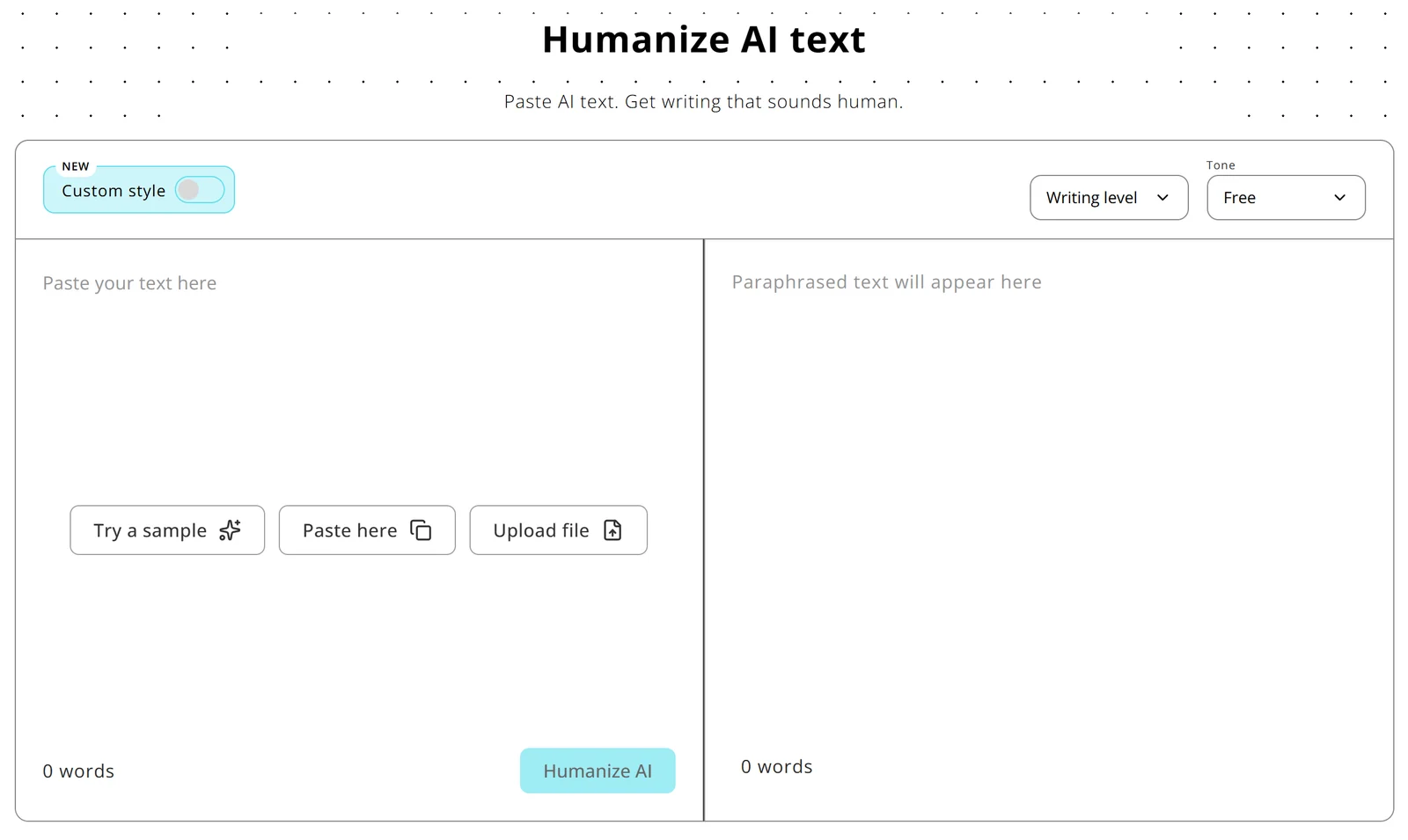
The layout is two panes. Your text goes on the left and the rewrite appears on the right, with the tone and writing level menus above them.
How to use HumanizeAI.pro
- Go to humanizeai.pro. You can try the humanizer on the homepage or sign up for a paid plan.
- Paste your text, upload a file, or click "Try a sample" to see how it works first.
- Pick a tone. The default is Free, and the other tones include Academic, Formal and Simple.
- Choose a writing level if you want the result plainer or denser.
- Click "Humanize AI", read the result in the right-hand pane and copy what you want to keep.
HumanizeAI.pro features
Nine tones
The Tone menu has nine options: Free, Standard, Academic, Simple, Flowing, Informal, Formal, Expand and Shorten. Most of them change the style of the rewrite, while Expand and Shorten change its length too.
Expand and Shorten are handy when your draft is over or under a word count. Academic and Formal suit essays and reports, and Informal suits social posts and casual emails.
Writing levels
The writing level setting is new. You pick a level from Easy to read to Very difficult, and the rewrite comes back with sentences and wording pitched at that level. It's optional, and Default is the starting setting.
This is useful if you write for different readers. A plain level suits a general audience, and a denser level suits readers who expect technical writing.
AI detector, paraphraser and checks
Every plan includes unlimited grammar and plagiarism checks, and HumanizeAI.pro says it checks your text against 11+ AI detectors. The paraphraser has its own word allowance: 5,000 words a month on Lite and 12,500 on Standard.
Keep in mind that AI detectors often disagree, so a score from one tool won't always match another.
Re-humanizing and selective rephrase
Standard and Unlimited add unlimited re-humanizing and selective rephrase, so you can run a passage again or rewrite only part of it. Both plans also remove the limit on words per process, which helps with long documents.
File upload and languages
You can upload a file instead of pasting text. HumanizeAI.pro says the humanizer supports several languages, including English, Chinese, Russian, Arabic and Japanese.
HumanizeAI.pro pros and cons
HumanizeAI.pro is one of the cheaper humanizers, and a few plan details are worth knowing before you pay.
Pros
- Low prices on yearly billing, from US$4.99 a month.
- Nine tones, including Academic, plus five writing levels.
- Unlimited grammar and plagiarism checks on every plan.
- A free homepage version you can try before you pay.
Cons
- Lite has no re-humanizing or selective rephrase.
- Unused words don't carry over to the next month.
- Refund requests have to be made within 3 days of a payment.
- It's a general-purpose tool, so it isn't built around citation styles or field-specific terms.
How much does HumanizeAI.pro cost?
HumanizeAI.pro pricing starts at US$9.99 a month, and yearly billing halves the price of every plan. Here are HumanizeAI.pro's prices on 2 October 2026:
| Plan | Monthly | Yearly (per month) | Humanizer words a month | Paraphraser words a month | Words per process |
|---|---|---|---|---|---|
| Lite | US$9.99 | US$4.99 (US$59.88 a year) | 10,000 | 5,000 | None stated |
| Standard | US$19.99 | US$9.99 (US$119.88 a year) | 25,000 | 12,500 | Unlimited |
| Unlimited | US$59.99 | US$29.99 (US$359.88 a year) | Unlimited | Unlimited | Unlimited |
If you'd use it every week, I'd go with Standard on yearly billing. You get 25,000 humanizer words a month, re-humanizing and no limit per process for US$9.99 a month.
Unused words don't roll over to the next month. If you cancel, you keep access until the end of the month or year you've paid for.
HumanizeAI.pro refunds the last payment if you ask within 3 days of paying. You send your payment details and the reason to support, the team reviews the request within 5 business days, and approved refunds go back to your original payment method.
Is HumanizeAI.pro worth it?
HumanizeAI.pro is worth it for everyday writing, especially on yearly billing. For academic work, a humanizer built for research writing is a better fit.
For emails, blogs and marketing copy
The tones cover most everyday needs, from Informal for social posts to Formal for business emails. The writing level setting lets you make a draft plainer or denser, and yearly billing keeps the cost low if you write often.
For academic writing
The Academic tone gives you a formal register, which is fine for a short essay. A thesis or a journal paper needs more: your citation style and defined terms have to stay exactly as you wrote them. Your supervisor may also ask to see what changed, and a humanizer built for research writing handles both.
Tips for humanizing academic writing
A few habits help with any humanizer:
- Keep your original draft open and compare each paragraph after the rewrite.
- Check every in-text citation against your reference list. Our free AI citation checker helps with that.
- Watch for changed numbers, units and defined terms, since a general rewrite can swap a technical word for a common one.
- Follow your university's or journal's rules on AI use, and disclose it where they ask. Our AI disclosure statement guide has examples.
- If you write in a second language and a detector flags your own work, our guide to why AI detectors flag non-native writers explains why it happens.
For a wider view, our 2026 humanizer comparison compares twelve humanizers on academic text.
A Humanizer Built for Research Writing
Designed to lower AI scores on Turnitin, GPTZero and Originality.ai while citations and technical terms stay in place, with tracked-changes export on Academic Plus.
Try ProofreaderPro.ai FreeHumanizeAI.pro vs. ProofreaderPro Humanizer
The main difference is focus. HumanizeAI.pro is a general-purpose humanizer with many tones, and the ProofreaderPro humanizer is built for academic writing.
| Feature | ProofreaderPro.ai | HumanizeAI.pro |
|---|---|---|
| Built for | Academic and research writing | General-purpose humanizing |
| Citations | Keeps APA, MLA, Chicago, IEEE and Turabian formats | Not listed |
| Technical terms | Freeze terms on Academic Plus | Not listed |
| Modes and tones | General and Academic on Academic; General, Academic, Corporate, Creative and Blog/SEO on Academic Plus | Nine tones, including Academic, Formal and Informal, plus five writing levels |
| Languages | 60+ languages on Academic Plus | Several, including English, Chinese, Russian, Arabic and Japanese |
| Words per input | 500 on Academic, 1,000 on Academic Plus | Unlimited on Standard and Unlimited |
| Tracked changes | .docx export with tracked changes on Academic Plus | Not listed |
| Other tools | AI proofreader, paraphraser, summarizer, translator and citation tools | AI detector, paraphraser, grammar and plagiarism checks, essay writer and API |
| Price | US$19 or US$29 a month (US$169 or US$259 a year) | US$9.99 to US$59.99 a month, or US$4.99 to US$29.99 a month billed yearly |
| Free option | 250 words a month of editing; the humanizer starts on Academic | A free homepage humanizer, according to HumanizeAI.pro |
HumanizeAI.pro's entry plans cost less. Pick it if you want a flexible humanizer for everyday writing at a low price. Pick ProofreaderPro.ai if your writing has citations or field-specific terms, or if your supervisor wants to review the changes.
ProofreaderPro.ai also includes a proofreader and citation tools, so you can edit and humanize a whole paper in one place and export a Word file with tracked changes.
HumanizeAI.pro Alternatives
If HumanizeAI.pro isn't the right fit, these humanizers suit slightly different kinds of writing, and we've written about all of them.
| Tool | Best for | Our write-up |
|---|---|---|
| ProofreaderPro.ai | Academic writing with citations and technical terms | Academic AI humanizer |
| StealthGPT | Fast rewrites in many languages with a built-in detector | StealthGPT AI humanizer review |
| JustDone | A humanizer, detector and study tools in one subscription | JustDone AI humanizer review |
| Grubby AI | Casual writing at a low annual price | Grubby AI humanizer review |
| Undetectable AI | Humanizing and checking a score in one place | Undetectable AI alternative |
| QuillBot Humanizer | People who already paraphrase with QuillBot | QuillBot Humanizer alternative |
| WriteHuman | Quick one-click rewrites | WriteHuman alternative |
HumanizeAI.pro vs StealthGPT
Both are general-purpose humanizers. HumanizeAI.pro costs less, from US$4.99 a month on yearly billing, and has nine named tones and a writing level setting. StealthGPT adds a built-in detector, a Chrome extension, an iOS app and a US$1 trial.
HumanizeAI.pro vs QuillBot
QuillBot's humanizer is part of QuillBot, along with its paraphraser and grammar checker, so it makes sense if you already pay for QuillBot Premium. HumanizeAI.pro is a standalone humanizer with its own paraphraser and grammar and plagiarism checks.
HumanizeAI.pro vs Undetectable AI
Both let you humanize text and check a score in the same place. HumanizeAI.pro gives you more tone options, and its yearly plans start at US$4.99 a month. The easiest way to choose is to run the same paragraph through both and keep the version you prefer.
For academic writing, I'd start with ProofreaderPro.ai, since it's built around citations and technical terms. For everyday writing, HumanizeAI.pro and the tools above will all do the job.
Frequently asked questions
Q: Is Humanize AI Pro free?
HumanizeAI.pro says its homepage humanizer is free to use. Paid plans start at US$9.99 a month, or US$4.99 a month on yearly billing, and add a monthly word allowance, the paraphraser and more features.
Q: Is HumanizeAI.pro legit?
Yes, HumanizeAI.pro is a real humanizer website with paid plans and email support at support@humanizeai.pro. It says your text is processed only to humanize it and isn't shared or used to train public models.
Q: Is Humanize AI Pro good?
Humanize AI Pro is good for everyday writing, with nine tones, five writing levels and low yearly prices. For theses and journal papers, a humanizer that keeps citation formats and technical terms, such as ProofreaderPro.ai, is a better fit.
Q: How much does Humanize AI Pro cost?
Lite costs US$9.99 a month, Standard US$19.99 and Unlimited US$59.99. On yearly billing, the same plans cost US$4.99, US$9.99 and US$29.99 a month.
Q: How many words can I humanize with HumanizeAI.pro?
Lite includes 10,000 humanizer words a month, Standard 25,000 and Unlimited has no monthly cap. Unused words don't roll over to the next month.
Q: Does HumanizeAI.pro offer refunds?
Yes, if you ask within 3 days of a payment. HumanizeAI.pro reviews each request within 5 business days, and approved refunds go back to your original payment method.
Q: How do I cancel HumanizeAI.pro?
You can cancel from your account or by emailing support@humanizeai.pro. You keep access until the end of the month or year you've paid for.
Q: Does HumanizeAI.pro have an AI detector?
Yes. HumanizeAI.pro has its own AI detector, and its pricing page says your text gets checked against 11+ AI detectors.
Q: Does HumanizeAI.pro work in other languages?
Yes. HumanizeAI.pro says the humanizer supports several languages, including English, Chinese, Russian, Arabic and Japanese.
Q: What is the best HumanizeAI.pro alternative for academic writing?
ProofreaderPro.ai is the best HumanizeAI.pro alternative for academic writing, because its humanizer keeps citations and technical terms in place and exports tracked changes. For everyday writing, StealthGPT and Undetectable AI are common picks.
Humanize your AI-assisted writing while protecting citations, terminology, and academic tone.

Dana is a content creator at ProofreaderPro, where she runs the daily blog and writing operations. She writes the articles on how the online editing platform works, and she handles customer messages every day, with a five-star satisfaction score to show for it.