Grubby AI Humanizer Review (2026): Pricing & Alternatives
Our Grubby AI humanizer review explains pricing and the free plan, and compares Grubby with the best Grubby AI alternatives for academic writing.

Grubby AI is a general-purpose AI humanizer that works well for casual writing, such as emails and blog posts. It isn't built for academic work, so if you're humanizing a thesis chapter or a journal paper, a tool made for research writing is a better fit.
This Grubby AI humanizer review covers what the tool does and what it costs, including the free plan. You'll also find a side-by-side comparison with the ProofreaderPro humanizer, short comparisons with the tools people check next, and a list of Grubby AI alternatives.
Here's Grubby AI at a glance:
| Detail | Grubby AI |
|---|---|
| Best for | Casual writing, such as emails, blog posts and social posts |
| Price | US$14.99 to US$79.99 every 4 weeks, or from US$6.99 a month billed yearly |
| Free plan | 300 words a month, no card needed |
| Language | English |
| Words per input | 500 to 2,500, by plan |
| Main features | Three humanizer modes, PDF upload, AutoTyper and a Turnitin guarantee on paid plans |
What is Grubby AI?
Grubby AI is an AI humanizer: you paste in AI-generated text, and it rewrites it to sound more natural. It's made by Study Solutions A16 LLC and is aimed mostly at students. Grubby says more than 1.6 million students have used it.
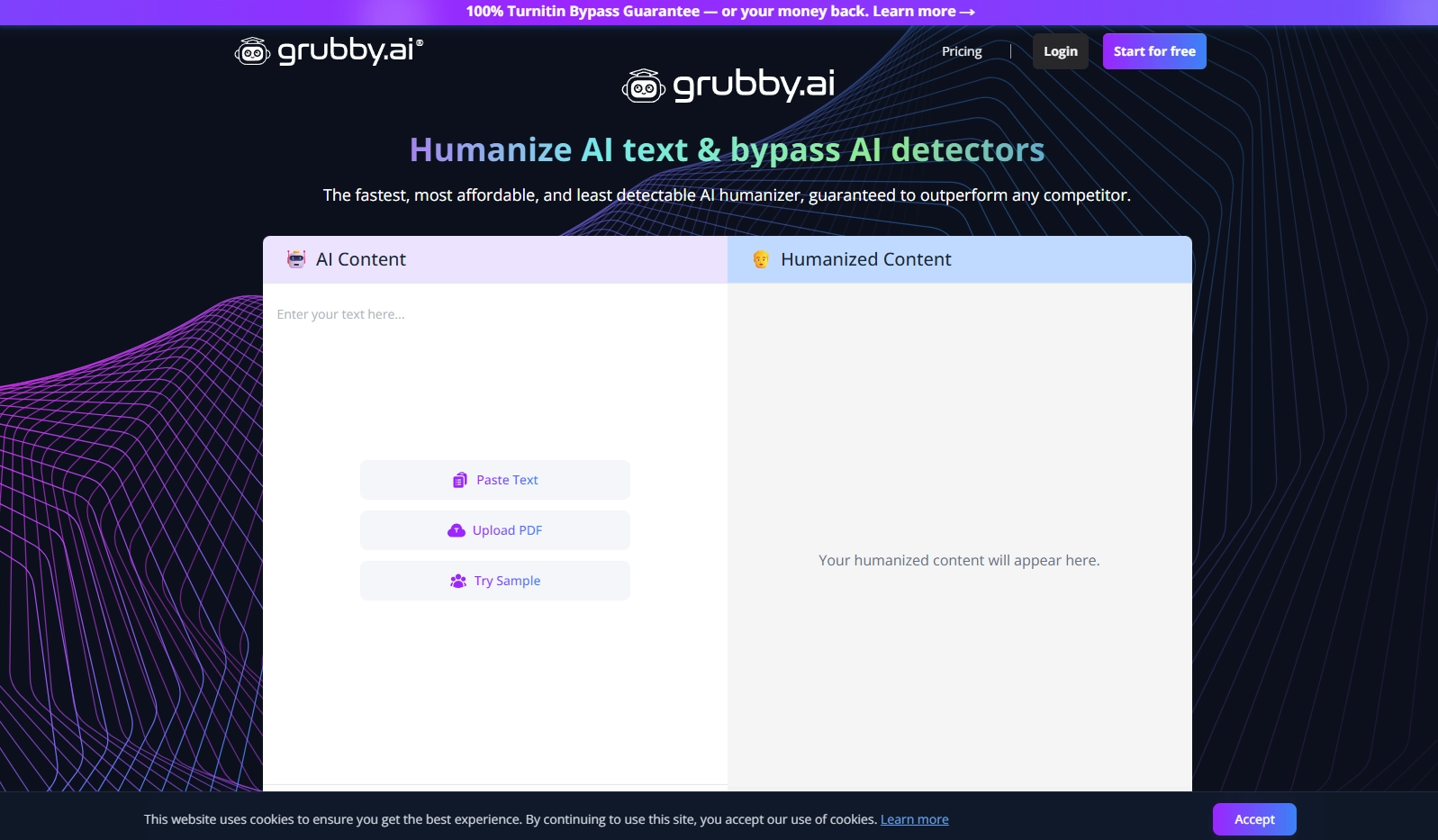
Using it is simple. You paste your text or upload a PDF, pick a mode and click Humanize. You then see the rewrite next to your original, so you can compare the two before you copy anything.
Grubby works with English text. Its FAQ says it can only humanize AI text in English, so keep that in mind if you write in another language.
How to use Grubby AI
- Create an account on grubby.ai. You can sign up with Google or with your email address, and you don't need a card.
- Paste your text into the AI Content box, upload a PDF, or click Try Sample to see how it works first.
- Pick a mode. On a paid plan, you also pick a rewrite level.
- Click Humanize. Grubby says a rewrite takes about 10 seconds.
- Compare the rewrite with your original, edit anything you want to keep from your version, and copy the result.
If your text is longer than your plan's input limit, humanize it in parts. On Essential that means sections of up to 500 words.
Grubby AI features
Humanizer modes
The humanizer on Grubby's homepage has three modes, named GPTZero, ZeroGPT and Academic (Turnitin). On the paid plans you also choose a rewrite level. Essential includes Simple only, while Pro and higher plans add Standard and Enhanced.
The modes are the main thing you adjust. There are no settings for tone, audience or citations, which keeps the tool easy to learn and quick to use.
PDF upload
You can upload a PDF instead of pasting text, which is handy if your draft is already saved as a PDF. The same per-input limits apply, so a long PDF still goes through in parts.
AutoTyper
AutoTyper comes with every paid plan. It types your text into a Google Doc for you over a period you choose, from a few hours up to a week. Essential includes 5,000 AutoTyper words a month, and Enterprise has no limit. If your course reviews how a document was written, for example with Turnitin Clarity, check your school's rules before you use it.
Turnitin guarantee
Paid plans include a Turnitin guarantee. If Turnitin flags text that Grubby humanized, Grubby refunds the cost of your subscription. The guarantee has its own terms, so read them before you rely on it.
Grubby AI pros and cons
Grubby does a few things well, and a few details are worth checking before you pay.
Pros
- Low price on annual billing, from US$6.99 a month.
- A free plan with 300 words a month and no card required.
- A simple two-pane layout with PDF upload.
- Input limits of up to 2,500 words on the higher plans.
Cons
- It works with English text only.
- Essential limits each input to 500 words.
- Monthly plans renew every four weeks, so there are 13 payments a year.
- There are no settings for citations or technical terms.
How much does Grubby AI cost?
Grubby AI pricing starts at US$14.99 on monthly billing, and the annual plans cost about half as much. Monthly plans renew every four weeks, so there are 13 payments a year. Here are Grubby's prices on 2 October 2026:
| Plan | Monthly (billed every 4 weeks) | Annual (per month) | Humanizer words | Words per input |
|---|---|---|---|---|
| Free | US$0 | US$0 | 300 a month | None stated |
| Essential | US$14.99 | US$6.99 (US$83.88 a year) | 10,000 | 500 |
| Pro | US$19.99 | US$8.99 (US$107.88 a year) | 30,000 | 1,500 |
| Unlimited | US$24.99 | US$11.99 (US$143.88 a year) | Unlimited, up to 30,000 a day | 2,500 |
| Enterprise | US$79.99 | US$39.99 (US$479.88 a year) | Unlimited | 2,500 |
The free plan works as a free trial, since you only need to sign up and there's no card required. If you'd use it every week, I'd go with Pro on annual billing, which gives you 30,000 words a month for US$8.99.
Annual billing makes the biggest difference on Pro. Paying every four weeks costs US$259.87 a year, while the annual plan costs US$107.88.
Is Grubby AI worth it?
Grubby AI is worth it for casual writing, especially on annual billing. For academic work, a humanizer built for research writing is a better fit.
For casual writing
If you write emails, blog posts, product descriptions or social posts, Grubby gives you a quick rewrite at a low price. The interface takes a minute to learn, and the free plan lets you test it before you pay.
For academic writing
Grubby is a general-purpose humanizer, so it handles a methods section the same way it handles a blog post, and it has no settings for citations or technical terms. In a research paper, you want your citations and defined terms to stay exactly as you wrote them, and you may need to show your supervisor what changed. A humanizer built for research writing does both.
Tips for humanizing academic writing
Whatever tool you use, these habits keep your paper in good shape:
- Keep a copy of your original draft and compare the rewrite with it line by line.
- Check that every citation, number and defined term is still correct. Our free AI citation checker helps with the references.
- Read the result out loud. If a sentence doesn't sound like you, edit it by hand.
- Disclose the AI help the way your university or journal asks. Our AI disclosure statement guide has wording you can adapt.
For a wider view, our 2026 humanizer comparison looks at Grubby next to eleven other tools on academic text.
A Humanizer Built for Research Writing
Designed to lower AI scores on Turnitin, GPTZero and Originality.ai while citations and technical terms stay in place, with tracked-changes export on Academic Plus.
Try ProofreaderPro.ai FreeGrubby AI Humanizer vs. ProofreaderPro Humanizer
The main difference is focus. Grubby is a general-purpose humanizer, and the ProofreaderPro humanizer is built for academic writing.
| Feature | ProofreaderPro.ai | Grubby AI |
|---|---|---|
| Built for | Academic and research writing | General-purpose humanizing |
| Citations | Keeps APA, MLA, Chicago and IEEE formats | Not listed |
| Technical terms | Freeze terms on Academic Plus | Not listed |
| Modes | Academic on Academic; General, Academic, Corporate, Creative and Blog/SEO on Academic Plus | GPTZero, ZeroGPT and Academic (Turnitin), with Simple, Standard and Enhanced levels by plan |
| Languages | Multilingual humanizing on Academic Plus | English |
| Words per input | 500 on Academic, 1,000 on Academic Plus | 500 to 2,500, by plan |
| Tracked changes | .docx export with tracked changes on Academic Plus | Not listed |
| Other tools | AI proofreader, paraphraser, summarizer, translator and citation tools | AutoTyper for Google Docs |
| Price | US$19 or US$29 a month (US$169 or US$259 a year) | US$14.99 to US$79.99 every 4 weeks, or US$6.99 to US$39.99 a month billed yearly |
| Free plan | 250 words a month of editing; the humanizer starts on Academic | 300 humanizer words a month |
Pick Grubby if you want a quick rewrite of casual English text at a low price. Pick ProofreaderPro.ai if your writing has citations or field-specific terms, or if your supervisor wants to review the changes.
ProofreaderPro.ai also keeps everything in one place. You can proofread a chapter, humanize the parts that need it, check your citations and translate your abstract in the same editor, then export a Word file with tracked changes.
Grubby AI Humanizer Alternatives
The most common comparisons are Grubby AI vs Undetectable.ai, Grubby AI vs Walter Writes AI, Grubby AI vs QuillBot and Grubby AI vs StealthWriter. Each of these humanizers suits a slightly different kind of writing, and we've written about all of them.
| Tool | Best for | Our write-up |
|---|---|---|
| ProofreaderPro.ai | Academic writing with citations and technical terms | Academic AI humanizer |
| Undetectable.ai | Humanizing and checking a score in one place | Undetectable AI alternative |
| Walter Writes AI | Matching your own writing voice from a sample | Walter Writes alternative |
| QuillBot Humanizer | People who already paraphrase with QuillBot | QuillBot Humanizer alternative |
| StealthWriter | Rewrites with a deep scan option | StealthWriter alternative |
| WriteHuman | Quick one-click rewrites | WriteHuman alternative |
| Monica | People who already use the Monica AI assistant | Monica AI humanizer review |
| HIX Bypass | People who use the HIX AI writing suite | HIX Bypass alternative |
Grubby AI vs Undetectable.ai
Both are general-purpose humanizers for everyday writing. Undetectable.ai lets you humanize text and check its AI score in one place. Grubby keeps the humanizer simple and adds PDF upload, AutoTyper and a Turnitin guarantee on paid plans. If you like checking a score as you go, try Undetectable.ai. If you want a low annual price, Grubby starts at US$6.99 a month.
Grubby AI vs Walter Writes AI
Walter Writes AI learns your writing voice from a sample before it rewrites anything, which suits personal essays and other writing where your voice matters. Grubby works the same way for every user, with modes and rewrite levels instead of a voice sample. For quick rewrites, Grubby is the simpler of the two.
Grubby AI vs QuillBot
QuillBot's humanizer is part of QuillBot, along with its paraphraser and grammar checker, so it makes sense if you already use QuillBot Premium for those. Grubby is a standalone humanizer with PDF upload and AutoTyper. If you only need humanizing, Grubby's annual plans are a low-cost way to get it.
Grubby AI vs StealthWriter
StealthWriter is another general-purpose humanizer, with a deep scan option for more thorough rewrites. Both tools suit casual writing. The easiest way to choose is to run the same paragraph through both free plans and keep the version you prefer.
For academic writing, I'd start with ProofreaderPro.ai, since it's built around citations and technical terms. For casual writing, any of these tools, Grubby included, will do the job.
Frequently asked questions
Q: Is Grubby AI free?
Grubby AI has a free plan with 300 words a month. You need to sign up, but you don't need a card. For more words, paid plans start at US$14.99 every four weeks, or US$6.99 a month on annual billing.
Q: Does Grubby AI have a free trial?
Grubby's free plan works as a free trial. You get 300 words a month after you sign up, with no card needed, so you can test the humanizer before you choose a paid plan.
Q: Is Grubby AI legit and safe to use?
Yes, Grubby AI is a real, paid service from Study Solutions A16 LLC. As with any online tool, read its privacy policy before you upload documents, and follow your school's rules on AI-assisted writing.
Q: How many words can I humanize with Grubby AI?
It depends on your plan. Essential includes 10,000 words a month and Pro includes 30,000, while Unlimited and Enterprise have no monthly cap. The Unlimited plan has a fair-use limit of 30,000 words a day.
Q: Does Grubby AI work on long documents?
Yes, but in parts. Each input is limited to 500 words on Essential, 1,500 on Pro and 2,500 on Unlimited and Enterprise, so you humanize a long document section by section.
Q: Can I upload a PDF to Grubby AI?
Yes. The humanizer accepts a PDF upload as well as pasted text. Your plan's per-input word limit still applies.
Q: Does Grubby AI work in other languages?
Grubby's FAQ says it can only humanize English text. For other languages, you need a humanizer with multilingual support, such as ProofreaderPro.ai on the Academic Plus plan.
Q: What is Grubby AI's AutoTyper?
AutoTyper is a feature on Grubby's paid plans that types your text into a Google Doc over a period you choose, from a few hours up to a week. Essential includes 5,000 AutoTyper words a month, and Enterprise has no limit.
Q: How do I cancel a Grubby AI subscription?
You cancel from your account dashboard on grubby.ai. Grubby's Terms say requests through other channels, such as contact forms or social media messages, don't count, so use the dashboard. You keep access until the end of the period you've paid for.
Q: What is the best Grubby AI alternative for academic writing?
ProofreaderPro.ai is the best Grubby AI alternative for academic writing, because its humanizer keeps citations and technical terms in place and exports tracked changes. For casual writing, Undetectable.ai and WriteHuman are common picks.
Humanize your AI-assisted writing while protecting citations, terminology, and academic tone.

Dana is a content creator at ProofreaderPro, where she runs the daily blog and writing operations. She writes the articles on how the online editing platform works, and she handles customer messages every day, with a five-star satisfaction score to show for it.