NoteGPT AI Humanizer Review (2026): Free Plan, Styles and Limits
Our NoteGPT AI Humanizer review covers the free tool, its styles and limits, NoteGPT plans from US$9.99 a month, and how it compares with ProofreaderPro.

NoteGPT AI Humanizer is a free rewriting tool inside NoteGPT, a study and productivity app best known for summarizing YouTube videos, PDFs and lectures. It suits students and writers who already use NoteGPT and want a quick way to make AI drafts sound more natural. For a thesis chapter or a journal paper, an academic humanizer that keeps citations and technical terms in place is a better fit.
Its biggest strengths are a free version with no sign-up and settings for length, similarity, style and output language, and its plans are priced for the whole NoteGPT app.
What is NoteGPT?
NoteGPT is an AI app for learning and work, made by NoteGPT Inc. Its founder and CEO is Hongyuan Cao. The main product turns long content into notes: it summarizes YouTube videos, transcribes audio and video, summarizes PDFs and builds mind maps. Around that core it has an AI chat, an AI detector, a homework helper, quiz and flashcard makers, and tools for slides, images, voices and video.
The humanizer is one tool in that set. You paste text or upload a document, choose a few settings and get a rewrite that NoteGPT describes as more natural and human-like. NoteGPT says the tool helps content "perform better with popular AI detectors like GPTZero, Turnitin, Originality.ai, and Copyleaks". It markets the humanizer to students, bloggers, marketing teams, office workers, job seekers and non-native English writers.
NoteGPT is a notes and study company, and the humanizer is one of its smaller tools. That matters for how you judge it. You get many tools for one price, and the humanizer is built for general writing.
How the NoteGPT AI Humanizer works
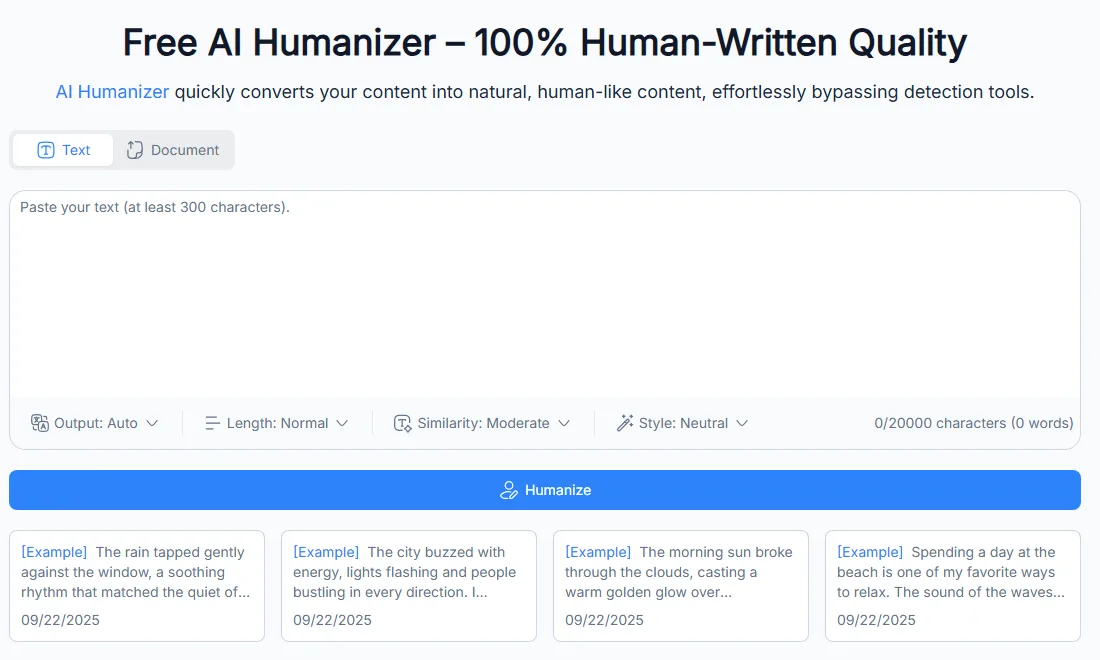
You can use the NoteGPT AI Humanizer without an account. The page has two tabs, Text and Document. In the Text tab you paste at least 300 characters, choose your settings and click Humanize. In the Document tab you upload a PDF, PowerPoint, Word or TXT file of up to 40 MB.
The text box shows a counter of up to 20,000 characters. NoteGPT's FAQ says the free version processes up to 10,000 characters per run, which is about 1,500 to 1,700 words of English. A long chapter takes several runs either way.
After a run, the page keeps your recent results in a list under the box. The sample texts on the page are short narrative paragraphs about rain, a city at night, a park and a beach.
The four settings
The settings sit under the text box, and each one changes the rewrite in a different way:
| Setting | Options | What it changes |
|---|---|---|
| Output | Auto, plus more than 35 output languages such as English, Spanish, Arabic, Hindi, Chinese and Indonesian | The language of the rewrite |
| Length | Concise, Normal, Expanded | Whether the rewrite is shorter, about the same or longer than your text |
| Similarity | Low, Moderate, High | How closely the rewrite follows your original wording |
| Style | Neutral, Academic, Business, Creative, Technical, Friendly, Informal, Reference, Custom | The tone of the rewrite |
The Style menu is the most useful setting for students. It has an Academic option, and Custom lets you describe your own tone. NoteGPT's page describes the menu as nine tones plus custom control.
The Similarity setting is worth testing on your own text. High similarity keeps more of your original wording, which helps when a paragraph is already close to what you want. Low similarity changes more and gives a stronger rewrite.
What the humanizer doesn't do for a paper
The humanizer rewrites wording and tone. It isn't a proofreader or a citation tool, so the checks a paper needs after any rewrite are still yours. Compare the output with your original and confirm that every citation, number, quotation and technical term came back exactly as you wrote it.
For a document upload, check the formatting too. Headings, footnotes, tables and reference lists often need attention after any tool processes a whole file.
Who NoteGPT's humanizer suits
NoteGPT's humanizer fits people who already live in the NoteGPT app. If you summarize lectures and YouTube videos in NoteGPT, it's convenient to rewrite your notes into a draft in the same place.
It suits these jobs well:
- Rewriting short AI drafts of emails, blog posts and social posts into a friendlier tone.
- Turning notes or summaries into readable paragraphs in another language, using the Output setting.
- Making a cover letter or a short personal statement sound less generic, then editing it yourself.
- Trying a humanizer for free, with no sign-up, before you decide whether you need a paid tool.
It's a weaker fit for long academic documents. A 10,000-character run limit on the free version means a 6,000-word chapter takes four or five runs. A general rewrite is also more likely to change the words a paper depends on, such as a statistic, a field term or a cited author's name. Our guide on how to humanize AI text covers what to check in each case.
How to get better results from NoteGPT's humanizer
The settings make a bigger difference than most people expect, so match them to the job. These combinations are a sensible starting point:
| Job | Length | Similarity | Style |
|---|---|---|---|
| A nearly finished paragraph that sounds a little stiff | Normal | High | Academic or Neutral |
| A rough AI draft of an essay section | Normal | Moderate | Academic |
| A blog post or newsletter | Normal | Low or Moderate | Friendly or Creative |
| A work email | Concise | Moderate | Business |
| Notes you want turned into connected prose | Expanded | Low | Neutral |
Start with High similarity on text you've already edited. It changes less, so you keep more of your own wording and spend less time fixing the result. Move to Moderate or Low only for passages that still sound like a template.
Work in sections of about 1,500 words, which fits inside one free run. A section is also easier to compare with your original than a whole document. Read the original and the rewrite side by side, and look for three things: changed numbers, changed names and claims that became stronger or weaker than you meant.
Use the Custom style when none of the presets fits your field. A short description such as "formal, cautious, third person, keeps technical terms" gives the rewrite a clearer target than the general Academic preset.
After the rewrite, run a proofread. Any rewriting tool can introduce small grammar slips, and a separate grammar pass catches them. Our free grammar checker works for a quick check, and the AI proofreader handles a full paper with tracked changes.
Writing in another language with the Output setting
The Output setting lets you rewrite text into another language in the same step. That's handy if you take notes in your first language and write in English, or the other way round.
Rewriting and translating at once changes more of the text than either step alone. Check technical terms carefully, because a term that has a fixed translation in your field can come back as a general word. For papers, it's often safer to translate first, fix the terms, then humanize the translated text. Our guide to academic writing for non-native speakers has more on keeping field terms consistent.
Humanize a Chapter Without Losing Your Citations
ProofreaderPro.ai's humanizer is designed to lower AI scores on academic text while citations stay in format and frozen terms stay exactly as written. Plans start at US$19 a month.
Try the academic humanizerNoteGPT pricing: Free, Pro, Unlimited and Max
NoteGPT's humanizer is free to use without an account, and NoteGPT's paid plans cover the humanizer along with the rest of the app. These were NoteGPT's prices on 20 October 2026:
| Plan | Monthly billing | Yearly billing | Humanizer use |
|---|---|---|---|
| Free | US$0 | US$0 | Free runs of up to 10,000 characters each |
| Pro | US$9.99 a month | US$108 a year (US$9 a month) | Part of 1,000 Basic Quotas a month, shared with summaries, transcription and chat |
| Unlimited | US$29 a month | US$239 a year (about US$19.92 a month) | Unlimited |
| Max | US$99 a month | US$829 a year (about US$69 a month) | Unlimited |
The plans differ mostly in the rest of the app. Pro adds 100 Premium Credits a month for premium transcription, speech, images, video and chat with premium models. Unlimited adds 2,800 Premium Credits, and Max adds 10,000. NoteGPT also has Education pricing and a group discount called SaveTogether, and it runs limited-time sales on yearly plans.
NoteGPT's refund rule is short. Refunds are only available within 24 hours of the first purchase, the refund equals the amount paid minus the value of Premium Credits used, and promotional purchases are non-refundable. If you buy during a sale, decide within the first day.
Under NoteGPT's Terms of Use, you keep ownership of the output you create with the service.
Is a paid NoteGPT plan worth it for the humanizer alone?
For the humanizer alone, the free version covers most short jobs. A paid plan makes sense when you use NoteGPT's other tools every week, such as YouTube summaries and transcription, and want unlimited humanizer runs on top. If humanizing papers is the main reason you'd pay, compare it with a humanizer built for academic writing first.
NoteGPT AI Humanizer pros and cons
NoteGPT's humanizer has clear strengths for casual use and a few limits for academic work.
Pros:
- You can use it free, with no account, for runs of up to 10,000 characters.
- It takes whole documents, including PDF, PowerPoint and Word files of up to 40 MB.
- The Style menu has an Academic preset and a Custom option for your own tone.
- The Output setting covers more than 35 languages.
- It's part of a large study app, so summaries, transcripts and rewrites are in one place.
Cons:
- It's a general rewriter, so you need to check citations, numbers and terms after every run.
- Long papers take several runs on the free version.
- Paid plans are priced for the whole app, so you pay for tools you may not use if you only want the humanizer.
- Refunds are only possible within 24 hours of the first purchase.
NoteGPT AI Humanizer vs. ProofreaderPro Humanizer
NoteGPT's humanizer is a free general rewriter inside a study app, and ProofreaderPro.ai's humanizer is built for research writing. The difference shows on cited papers and long chapters.
| Feature | ProofreaderPro.ai | NoteGPT AI Humanizer |
|---|---|---|
| Built for | Theses, journal papers and other academic writing | General writing inside a notes and study app |
| Price | US$19 or US$29 a month (US$169 or US$259 a year) | Free, or US$9.99 to US$99 a month as part of NoteGPT plans |
| Words per run | 500 on Academic, 1,000 on Academic Plus | Up to 10,000 characters per free run |
| Monthly allowance | 25,000 or 50,000 words | Shared quotas on Pro, unlimited on Unlimited and Max |
| Modes and tones | Academic mode; five modes and an intensity scale from Mild to Aggressive on Academic Plus | Eight preset styles, including Academic, plus Custom |
| Citations | Keeps APA, MLA, Chicago, IEEE and Turabian citations in format | General rewrite, so check citations after each run |
| Technical terms | Freeze terms on Academic Plus | Similarity setting from Low to High |
| Languages | 60+ languages on Academic Plus | Output in more than 35 languages |
| Reviewing changes | Tracked changes view and .docx export on Academic Plus | Rewritten text to copy |
| Other tools | AI proofreader, paraphraser, summarizer, translator and citation tools | YouTube and PDF summaries, transcription, AI detector, notes and media tools |
NoteGPT is free for short texts and has far more media and study tools. For students who want one app for lecture notes, summaries and quick rewrites, that's a good deal.
For a paper, ProofreaderPro.ai keeps what reviewers check. Academic Plus keeps citations in their original style, freezes your technical terms and shows every change as a tracked edit, so you can accept or reject each one. We explain the citation side in how our humanizer keeps academic citations.
NoteGPT AI Humanizer Alternatives
The best NoteGPT alternative depends on what you write. If you want another free tool for short texts, there are several. If you write papers, an academic humanizer saves you the citation checks. For a wider view, see our ranking of the best AI humanizers.
| Tool | Best for | Our write-up |
|---|---|---|
| ProofreaderPro.ai | Academic writing with citations and technical terms kept | Academic AI humanizer |
| Scribbr AI Humanizer | Students who want a free tool from an academic editing company | Scribbr AI Humanizer Review |
| ZeroGPT AI Humanizer | A free rewrite next to a free AI detector | ZeroGPT AI Humanizer Review |
| HumanizeAI.pro | A simple humanizer with writing levels | HumanizeAI.pro Review |
| Clever AI Humanizer | Free rewrites of everyday text | Clever AI Humanizer Review |
| Semihuman | A humanizer with a built-in five-detector check | Semihuman AI Humanizer Review |
| Humanize.ai | Free unlimited standard rewrites with a low-cost paid plan | Humanize.ai Review |
NoteGPT's AI detector and humanizer on one site
NoteGPT also has an AI detector, and its humanizer page says the tool checks whether text looks AI-written before it rewrites. Checking a rewrite with the same company's detector is quick, and it tells you little about what your university's detector will say. Check important work on the detector your institution uses, or on two independent ones. Our guide to reducing your AI detection score explains how scores differ between tools.
Frequently asked questions
Q: Is NoteGPT AI Humanizer free?
Yes. You can use it without an account, and NoteGPT's FAQ says the free version processes up to 10,000 characters per run. Paid NoteGPT plans start at US$9.99 a month, or US$108 a year, and include the humanizer with the rest of the app.
Q: Does NoteGPT AI Humanizer have an academic style?
Yes. The Style menu has an Academic option, along with Neutral, Business, Creative, Technical, Friendly, Informal, Reference and Custom. Check citations, numbers and field terms after every run, because the tool is a general rewriter.
Q: Can NoteGPT humanize a whole document?
Yes. The Document tab takes PDF, PowerPoint, Word and TXT files of up to 40 MB. Check the formatting, footnotes and reference list after the rewrite.
Q: What languages does NoteGPT AI Humanizer support?
The Output setting has Auto and more than 35 languages, including English, Spanish, Arabic, Hindi, Chinese, Indonesian, Japanese and Turkish. Auto keeps the language of your input.
Q: Can I get a refund from NoteGPT?
Only within 24 hours of your first purchase, and the refund is the amount paid minus the value of any Premium Credits you used. Promotional purchases aren't refundable.
Q: Who owns the text NoteGPT's humanizer produces?
You do. NoteGPT's Terms of Use say users keep ownership of the output they get from the service.
Q: Is NoteGPT AI Humanizer good for research papers?
It's fine for short, informal drafts, and it's a weaker fit for cited research papers. For a paper, use an academic humanizer that keeps citations in format and lets you freeze technical terms, then proofread the result.
Q: What is the minimum text length for NoteGPT AI Humanizer?
The text box asks for at least 300 characters, which is about 50 words of English.
Citation-safe humanizing with frozen technical terms, five modes, an intensity scale and tracked changes you can export on Academic Plus.

Dana is a content creator at ProofreaderPro, where she runs the daily blog and writing operations. She writes the articles on how the online editing platform works, and she handles customer messages every day, with a five-star satisfaction score to show for it.