Humanize.ai Review (2026): Free Standard and Advanced Mode
Humanize.ai review: a free Standard humanizer, a paid Advanced mode with 10,000 words for US$9 a month or US$60 a year, refunds and ProofreaderPro compared.

Humanize.ai is a free AI humanizer from Humanize AI LLC that rewrites AI text into a more natural style, with a low-cost paid plan for its stronger Advanced mode. It suits people who want quick, free rewrites of emails, marketing copy, reports and social posts. For a thesis or a journal paper, an academic humanizer that keeps citations and technical terms in place is a better fit.
Its free Standard humanizer covers most everyday rewrites, and the paid plan adds a stronger Advanced mode for US$9 a month or US$60 a year.
What is Humanize.ai?
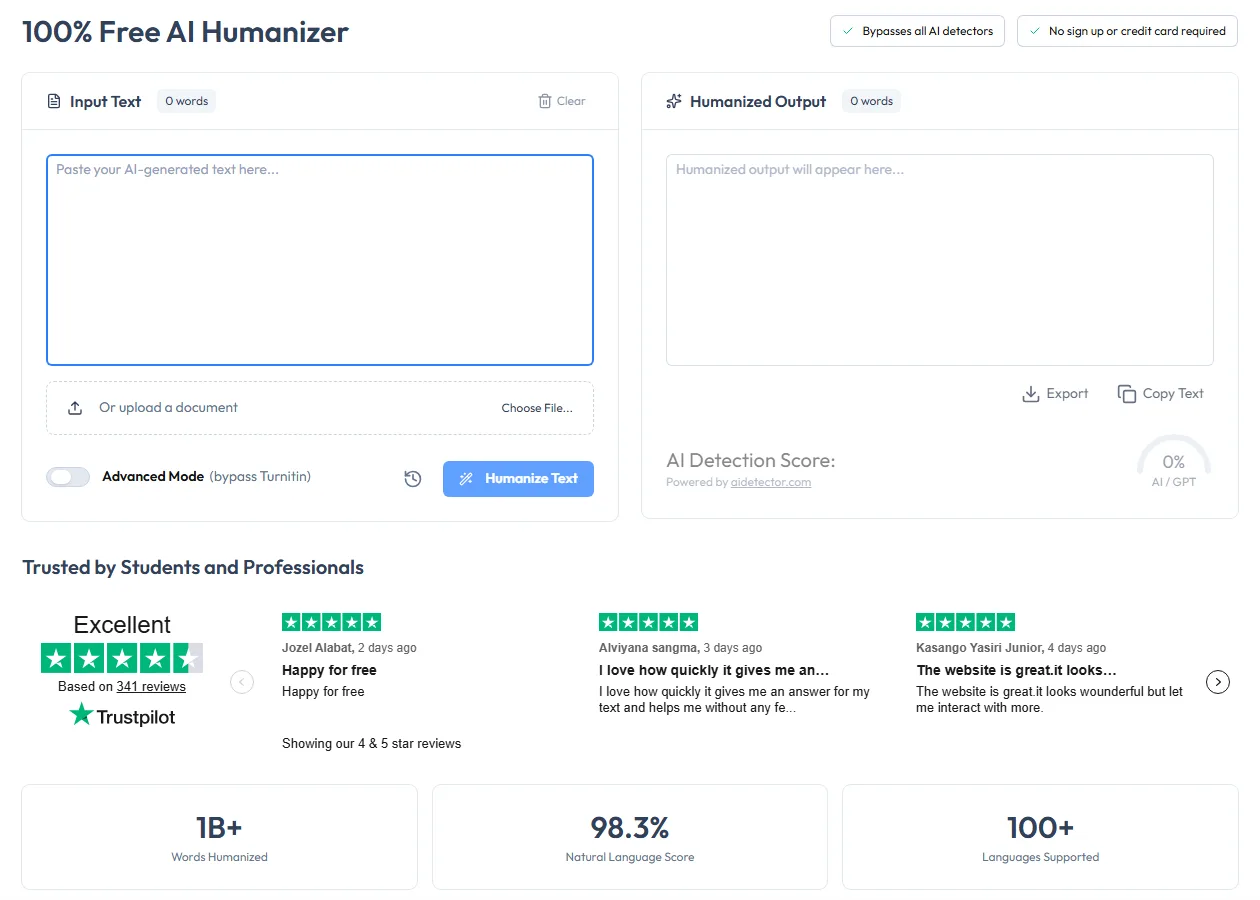
Humanize.ai is a web-based AI humanizer run by Humanize AI LLC. You paste AI-generated text, or upload a document, and the tool returns a version that Humanize.ai describes as more natural and human-like. The page shows the input and output side by side, with an AI detection score under the output.
Humanize.ai's homepage calls it a "100% Free AI Humanizer" with unlimited words, and says you need no sign-up or credit card. Humanize.ai's workflow has three steps. You generate text with ChatGPT or another AI assistant, paste it into Humanize.ai and copy the result for emails, documents or any other use.
The site lists four main uses: business emails, marketing content, reports and documents, and social media posts. The tool is built for everyday professional writing, and its features follow from that.
Is Humanize.ai the same as HumanizeAI.pro or AIHumanize.io?
No. Humanize.ai, HumanizeAI.pro and AIHumanize.io are three separate tools with similar names. People often mix them up, so check the address bar before you compare prices or features.
| Site | Who runs it | Our review |
|---|---|---|
| humanize.ai | Humanize AI LLC | This review |
| humanizeai.pro | A separate company | HumanizeAI.pro Review |
| aihumanize.io | A separate company | AIHumanize.io Review |
If a feature or a price you read about doesn't match what you see on humanize.ai, you may be looking at one of the other two.
Two details on the page help you tell them apart. Humanize.ai's header says "Humanize AI" with the line "Transform AI text into human-like content" under it, and the footer names Humanize AI LLC. The pricing page also has a single plan, with Standard and Advanced humanizers in it, which is simpler than the tiered plans on the other two sites.
Standard and Advanced humanizers
Humanize.ai has two humanizers, Standard and Advanced. The Standard humanizer is the free one on the homepage. The Advanced humanizer is a switch on the same page, labeled "Advanced Mode (bypass Turnitin)", and it's part of the paid plan.
| Standard humanizer | Advanced humanizer | |
|---|---|---|
| Cost | Free, and unlimited on the paid plan | Paid plan only |
| Words | Unlimited, according to Humanize.ai | 10,000 words a month, with refills of 10,000 words for US$9 |
| Detectors Humanize.ai names | ZeroGPT, AiDetector.com and AiChecker.com | Turnitin, Originality.ai and Copyleaks |
| How you turn it on | The default | The Advanced Mode switch |
The detector names in the table are Humanize.ai's own lists on its pricing page. They tell you which detectors each humanizer is aimed at. Detectors update their models on their own schedule, and Turnitin added detection aimed at humanizer output in August 2025, so any result can change over time.
Using Humanize.ai step by step
Humanize.ai has one screen and a short workflow:
- Paste your text into Input Text, or upload a document with Choose File.
- Turn on Advanced Mode if you have the paid plan and want the stronger rewrite.
- Click Humanize Text.
- Read the result in Humanized Output and check the AI Detection Score below it.
- Copy the text or export it.
The word counters above each box show the length of the input and the output, so you can see whether the rewrite came back shorter or longer. A history button next to Humanize Text keeps your earlier runs. That helps when you want to go back to an earlier version of the same paragraph and compare it with the latest one.
For long text, work in sections. A section is easier to compare with your original, and you can check that each one still says what you meant before you move on.
When to use Standard and when to use Advanced
Start with the free Standard humanizer for everything, and switch to Advanced only for text that still sounds generic after a Standard run. That keeps your 10,000 Advanced words for the passages that need them.
The Advanced allowance goes further than it sounds if you use it this way. 10,000 words covers about three 3,000-word documents a month, or many short emails and posts. If you run out, a refill costs US$9 for another 10,000 words.
For comparison, ProofreaderPro.ai's Academic plan costs US$19 a month for 25,000 words, about US$7.60 per 10,000 words. Humanize.ai is cheaper per word for everyday writing, and ProofreaderPro.ai includes academic settings, the proofreader and citation tools for research writing.
How to check a Humanize.ai rewrite before you use it
Read every rewrite before you send or submit it. These checks take a few minutes:
- Compare the meaning. Read your original and the output side by side, one paragraph at a time.
- Check names, numbers and dates. Any rewrite can change a figure or a name, and those errors are easy to miss.
- Look at the word counters. A large change in length often means the rewrite added or dropped content.
- Check the tone. A business email should still sound professional, and a report should still sound precise.
- Proofread the result. Our free grammar checker catches small slips, and the AI proofreader handles longer documents.
If a paragraph fails one of these checks, fix it by hand. Running it through the humanizer again changes the wording a second time, and it can move further from what you meant.
The built-in AI detection score
Under the output, Humanize.ai shows an AI Detection Score, with a note that it's powered by aidetector.com. The score appears as a gauge for AI or GPT text.
It's a useful quick check, and it comes from one detector. Your university or client may use a different one, and different detectors often give different scores for the same text. Turnitin is licensed to institutions, so no outside tool can show you your university's Turnitin score.
A 0% reading on the gauge means aidetector.com rated the text as human, and it isn't proof of how the text was written. Save your original and the rewrite together, so you can show what you changed if anyone asks.
If a score matters, check the final text on the detector your institution uses, or on two independent ones. Our guide to reducing your AI detection score explains what each detector's percentage means.
An Academic Humanizer for Papers and Theses
ProofreaderPro.ai's humanizer is designed to lower AI scores on academic text while citations stay in format and frozen terms stay exactly as written. Plans start at US$19 a month.
Try the academic humanizerHumanize.ai pricing and refunds
Humanize.ai has one paid plan, billed monthly or yearly. These were Humanize.ai's prices on 20 October 2026:
| Billing | Price | What's included |
|---|---|---|
| Free | US$0 | Standard humanizer |
| Monthly | US$9 a month | Standard humanizer with unlimited words, Advanced humanizer with 10,000 words a month |
| Yearly | US$5 a month, billed US$60 a year | The same, with a 44% saving |
| Refill | US$9 for 10,000 words | More Advanced words in the same month |
The yearly plan is the better deal if you'll use Advanced mode for more than a few months. At US$60 a year, it costs less than seven months of monthly billing. The monthly plan suits a one-off project, such as a single report, a product launch or a short campaign, that you can cancel when it ends.
Humanize.ai's refund terms are strict. Its Terms of Use say all payments are final and non-refundable, except where the law requires otherwise. You can cancel any time from the My Account section, and cancelling stops future charges without refunding payments already made. Use the free Standard humanizer first to decide whether the tool fits your writing. It needs no sign-up or card, according to Humanize.ai, so testing it costs nothing.
The figures on the homepage
Humanize.ai's homepage shows three figures: "1B+ Words Humanized", a "98.3% Natural Language Score" and "100+ Languages Supported". These are Humanize.ai's own figures, so test the tool on your own text before you rely on it.
Who Humanize.ai suits
Humanize.ai fits people who want free rewrites for everyday writing:
- Professionals who turn formal AI drafts into friendlier emails.
- Marketers who rewrite AI copy for ads, landing pages and newsletters.
- Teams that make AI-written reports easier to read.
- Social media writers who want posts to sound personal.
It's a weaker fit for academic papers. The Standard and Advanced humanizers are general rewriters built for everyday writing. A paper needs its citations, statistics and field terms to come back exactly as written, so check every one after a run. Our guide on how to humanize AI text covers the checks.
Humanize.ai and AI policies at work and school
Many employers, universities and journals now have AI policies, and humanizing text doesn't change what those policies ask of you. Read the policy that applies to your writing before you use any AI tool on it.
For work writing, most policies are about accuracy and confidential information. Don't paste confidential client or company text into any online tool your employer hasn't approved.
For academic writing, many policies allow AI help with language and ask you to disclose it. The ideas, analysis and sources need to be yours. Our guide to writing an AI-use disclosure statement has wording you can adapt for papers and theses.
Humanize.ai pros and cons
Humanize.ai is easy to start with and cheap to upgrade, and a few limits matter for academic work.
Pros:
- The Standard humanizer is free, and Humanize.ai says it has unlimited words with no sign-up.
- The paid plan is low cost, at US$9 a month or US$60 a year.
- You can paste text or upload a document, and export the result.
- An AI score from aidetector.com appears under every output.
Cons:
- Advanced mode is limited to 10,000 words a month, with refills at US$9.
- All payments are final and non-refundable.
- It has no settings for citations, technical terms or academic tone.
- The built-in score comes from one detector, so check important work elsewhere.
Humanize.ai vs. ProofreaderPro Humanizer
Humanize.ai is a low-cost general humanizer, and ProofreaderPro.ai's humanizer is built for research writing. The difference shows on cited papers and long chapters.
| Feature | ProofreaderPro.ai | Humanize.ai |
|---|---|---|
| Built for | Theses, journal papers and other academic writing | Emails, marketing copy, reports and social posts |
| Price | US$19 or US$29 a month (US$169 or US$259 a year) | Free, or US$9 a month or US$60 a year |
| Words | 25,000 or 50,000 a month, 500 or 1,000 per pass | Standard unlimited, Advanced 10,000 a month on the paid plan |
| Rewrite control | Academic mode; five modes and an intensity scale from Mild to Aggressive on Academic Plus | Standard or Advanced |
| Citations | Keeps APA, MLA, Chicago, IEEE and Turabian citations in format | General rewrite, so check citations after each run |
| Technical terms | Freeze terms on Academic Plus | General rewrite |
| Languages | 60+ languages on Academic Plus | 100+, according to Humanize.ai |
| Reviewing changes | Tracked changes view and .docx export on Academic Plus | Side-by-side output with export |
| Other tools | AI proofreader, paraphraser, summarizer, translator and citation tools | AI score from aidetector.com |
Humanize.ai is cheaper, and its free Standard humanizer is enough for many everyday rewrites. If you write emails and marketing copy, it's a practical choice.
For a paper, ProofreaderPro.ai keeps what reviewers check. Academic Plus keeps citations in their original style and freezes your technical terms. It shows every change as a tracked edit, so you can accept or reject each one. We explain the citation side in how our humanizer keeps academic citations.
Humanize.ai Alternatives
The best Humanize.ai alternative depends on whether you want another free tool, more control or academic features. For a wider view, see our ranking of the best AI humanizers.
| Tool | Best for | Our write-up |
|---|---|---|
| ProofreaderPro.ai | Academic writing with citations and technical terms kept | Academic AI humanizer |
| HumanizeAI.pro | Nine tones and writing levels at a low price | HumanizeAI.pro Review |
| AIHumanize.io | Modes plus a lock for keywords and citations | AIHumanize.io Review |
| Clever AI Humanizer | Free rewrites of everyday text | Clever AI Humanizer Review |
| Undetectable AI | A long-running humanizer with its own detector | Undetectable AI alternative |
| NoteGPT AI Humanizer | Free rewrites with style presets inside a study app | NoteGPT AI Humanizer Review |
| Semihuman | A readability slider and a five-detector check | Semihuman AI Humanizer Review |
Frequently asked questions
Q: Is Humanize.ai free?
Yes. The Standard humanizer is free, and Humanize.ai says it has unlimited words with no sign-up or credit card. The Advanced humanizer is part of the paid plan, which costs US$9 a month or US$60 a year.
Q: What is Advanced Mode on Humanize.ai?
It's Humanize.ai's stronger humanizer, turned on with a switch above the Humanize Text button. The paid plan includes 10,000 Advanced words a month, and refills cost US$9 for another 10,000 words.
Q: Is Humanize.ai the same as HumanizeAI.pro?
No. They're separate tools from different companies. Humanize.ai is run by Humanize AI LLC, and HumanizeAI.pro and AIHumanize.io are other sites with similar names.
Q: Can I get a refund from Humanize.ai?
Usually not. Humanize.ai's Terms of Use say all payments are final and non-refundable, except where the law requires otherwise. You can cancel any time to stop future charges.
Q: Where does Humanize.ai's AI score come from?
The AI Detection Score under the output is powered by aidetector.com, according to the page. It's one detector's estimate, so check important work on the detector your institution uses.
Q: Can I upload a document to Humanize.ai?
Yes. The input box has a document upload next to the text field. Check the formatting, headings and any references after the rewrite.
Q: Is Humanize.ai good for academic papers?
It's fine for short, informal drafts, and it's a weaker fit for cited papers, because it has no settings for citations or technical terms. For a thesis or journal paper, use an academic humanizer that keeps citation formats and lets you freeze terms.
Q: How many languages does Humanize.ai support?
Humanize.ai's homepage says it supports more than 100 languages. Test it on your own language before you rely on it for important writing.
Citation-safe humanizing with frozen technical terms, five modes, an intensity scale and tracked changes you can export on Academic Plus.

Dana is a content creator at ProofreaderPro, where she runs the daily blog and writing operations. She writes the articles on how the online editing platform works, and she handles customer messages every day, with a five-star satisfaction score to show for it.