Bypass AI Humanizer Review (2026): Modes, Pricing, Refunds
Bypass AI humanizer review: Humanizer 2.0's three writing modes, per-plan word limits, a 3-day refund window and how plans compare for everyday writing.

Bypass AI is a general-purpose AI humanizer built for everyday writing, such as blog posts, marketing copy, emails and student assignments. It runs on what it calls Humanizer 2.0, with three writing modes and a word limit that depends on your plan.
In a Bypass AI humanizer review, the facts that decide what you'd buy are structural. There are three plans, three named modes, a Purpose setting, more than 30 languages and a 3-day refund window.
What is Bypass AI?
Bypass AI is a web-based humanizer at bypassai.ai. The tool rewrites text you paste or upload, with the stated goal of making AI-drafted writing sound more natural. The underlying job is the one every humanizer does: vary sentence length, swap predictable transitions, and adjust phrasing that sounds machine-written.
The site also lists an API in its main menu and runs an affiliate program under Earn With Us. A marketer rewriting a product description and a student rewriting a paragraph pick from the same three Modes and the same Purpose list. One account covers both kinds of writing.
Bypass AI's humanizer modes and settings
The humanizer tool has two selectors above the text box: a Mode setting and a Purpose setting. Both change the rewrite's tone and phrasing.
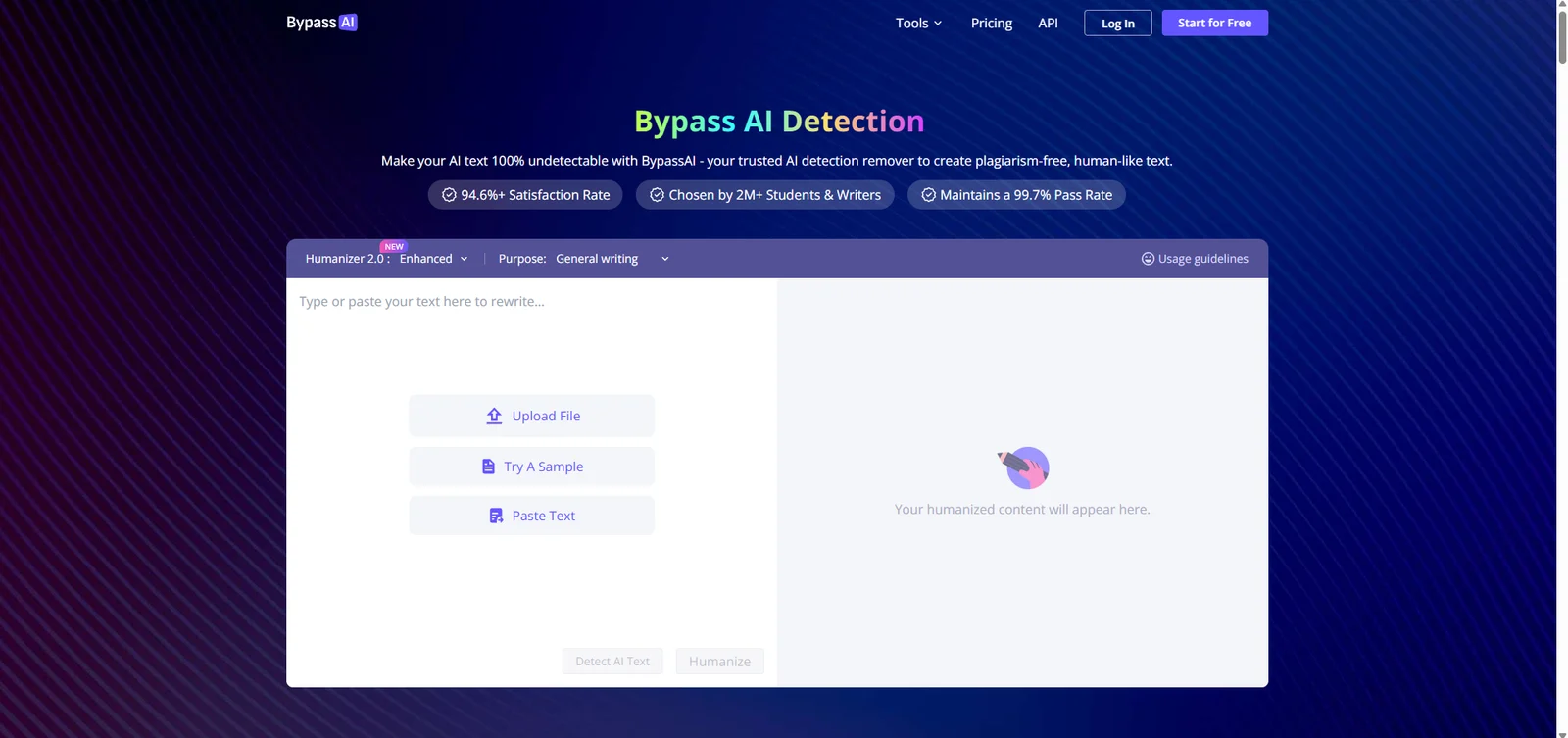
Humanizer 2.0 and three modes
The tool is labeled Humanizer 2.0, marked as new on the site, and it's the same engine on every plan. Below that is a Mode selector with three named levels: Simple, Standard and Enhanced. Every plan, including Basic, includes all three modes, so the choice isn't gated by price. Enhanced is the mode shown by default on the homepage tool.
The pricing page lists the three modes as a feature on every plan card, next to lines for standard rewriting, plagiarism-free output and priority support. The most reliable way to judge the difference between Simple, Standard and Enhanced is to run the same paragraph through all three and compare the results side by side.
The Purpose setting
A second dropdown, labeled Purpose, defaults to General writing. It tells the tool what kind of text you're rewriting, similar to the content-type or tone menus other humanizers use. The default setting covers blog posts, emails and everyday writing. Our guide to humanizing AI text without losing meaning explains what a tool is changing when it varies sentence structure this way.
Using Mode and Purpose together
The two selectors work as a pair. Start with Standard and the default General writing purpose for emails and posts, and compare the result with Enhanced on the same paragraph. Enhanced, the default, is the choice for stiff AI drafts that need more change, while Simple suits a light polish of text you mostly wrote yourself. Keep the combination that sounds most like you, and use it for the rest of the document so the tone stays consistent.
A built-in checker
Every plan description lists a built-in checker, described as integrated with GPTZero, ZeroGPT and Copyleaks. That's a separate feature from the Detect AI Text button next to Humanize on the main tool. Two of those three detectors have their own guides on our blog: whether Copyleaks catches AI writing and how accurate ZeroGPT's score is.
Word limits per plan
Each plan sets a different per-run limit: 500 words on Basic, 1,500 on Pro, and no limit on Unlimited. A 3,000-word blog draft needs six runs on Basic, two on Pro, and one on Unlimited. Our free word counter is a quick way to see which bracket a draft falls into without opening Bypass AI first. For a student, a 2,500-word essay on Basic takes five runs and uses 2,500 of the plan's 3,000 monthly words, so Basic covers about one essay a month.
How to humanize text with Bypass AI
The workflow runs in three steps, and you can start it three ways. Paste text directly, upload a file, or load a sample text to see the output quality before you commit your own writing.
- Open the tool and set the Mode and Purpose you want.
- Paste, type or upload the text you want rewritten.
- Click Humanize, then compare the result with your original before you use it anywhere.
An optional Detect AI Text button appears next to Humanize, so you can check a score before and after in the same window.
The Try A Sample option is worth using before you commit your own draft to a plan you haven't tested yet. It loads a pre-written passage into the text box. You can then see how a given Mode and Purpose combination rewrites that sample before you paste in anything of your own. Upload File accepts a document instead of pasted text, which saves a copy-paste step if your draft is already saved as a Word file or a PDF.
Bypass AI pricing and refunds
Bypass AI's prices on 2 October 2026, shown in USD, with a lower rate on yearly billing:
| Plan | Monthly billing | Yearly billing (per month) | Words per month | Words per input |
|---|---|---|---|---|
| Basic | US$9.99 | US$6.99 | 3,000 | 500 |
| Pro | US$19.99 | US$9.99 | 30,000 | 1,500 |
| Unlimited | US$69.99 | US$9.99 | Unlimited | Unlimited |
On yearly billing, Unlimited and Pro cost the same: US$9.99 a month. Unlimited still removes the word cap entirely, which makes it the better deal of the two once you commit for the year. On monthly billing, Unlimited costs US$69.99 a month, far more than Pro's US$19.99. The plan that looks like the obvious top tier is only a good deal once you commit to yearly billing.
A heavy user benefits most from Unlimited's lack of a monthly word cap. Think of a content team publishing daily, or anyone who rewrites multiple long drafts in a single week. Someone who humanizes only a handful of short posts a month fits comfortably inside Basic's 3,000-word monthly allowance. That works out to roughly six full runs at the 500-word input limit, with a little room left over most months. Bypass AI's FAQ says the rewriting quality stays the same across plans, and only the word limits change between them. The decision comes down to volume.
Refunds and cancellation
Bypass AI's refund window is 3 days (72 hours) from purchase, and only if you've used fewer than 1,000 words. A request outside either limit isn't eligible. Refunds go through contact@bypassai.ai, with your order details and a reason, and Bypass AI says it processes them within 3 business days of confirming your request. Keep the order email from your purchase, since that's where the details are.
Plans renew automatically. To stop a renewal, contact support before your next billing date. Every plan lists priority support as one of its included features, alongside the three modes and the built-in checker.
An Academic Humanizer With Citations Built In
ProofreaderPro.ai's academic humanizer is designed to lower AI scores while keeping APA, MLA, Chicago, IEEE and Turabian citations in place, from US$19 a month.
See the academic humanizerWho uses Bypass AI
Bypass AI's own site describes four kinds of users: students, bloggers and journalists, marketing professionals, and entrepreneurs. Each uses the tool for a different kind of writing.
A student might run a stiff-sounding paragraph through the tool before turning in an assignment. Graded work usually calls for something built around citations and academic register instead, which our piece on humanizing a student essay covers in more depth. A blogger or content marketer cares more about a draft that ranks well and sounds natural than about any single score. Our guide to humanizing content for SEO covers that angle directly. Entrepreneurs and marketing teams use it for emails, product copy and social captions, and our guide to humanizing business writing covers that in more depth.
Bypass AI's humanizer works in more than 30 languages, including Arabic, Chinese, French, German, Hindi, Japanese, Portuguese and Spanish. A false positive on human-written text isn't unique to any one tool's users, and our guide to AI detector accuracy covers how often that happens and to whom. A flag on text you wrote yourself calls for evidence. Our piece on appeal letters for a false AI flag covers what to gather and who to send it to.
Bypass AI Humanizer vs. ProofreaderPro Humanizer
Bypass AI rewrites everyday text in three modes, aimed at blog posts, marketing copy and emails. ProofreaderPro.ai puts academic writing at the center, and its humanizer leaves citations as they are.
| Feature | ProofreaderPro.ai | Bypass AI |
|---|---|---|
| Made for | Essays, theses and journal papers | Blog posts, marketing copy, emails and everyday writing |
| Modes | General and Academic on Academic; five modes and five intensity levels on Academic Plus | Simple, Standard and Enhanced on every plan, plus a Purpose setting |
| Limit per run | 500 words on Academic, 1,000 on Academic Plus | 500 words on Basic, 1,500 on Pro, unlimited on Unlimited |
| Citations | Keeps APA, MLA, Chicago, IEEE and Turabian formats in place | General rewrite, written for blog, marketing and everyday text |
| Price | US$19 or US$29 a month (US$169 or US$259 a year) | US$9.99 to US$69.99 a month, or US$6.99 to US$9.99 a month on yearly billing |
Bypass AI's lower plans suit short-form writing. A blog paragraph or an email fits inside even the Basic plan's 500-word limit, and Unlimited on yearly billing is cheaper per month than either ProofreaderPro.ai plan. A thesis chapter or a journal submission has different needs. The reference list has to survive the rewrite untouched, and Academic Plus adds frozen field terms and a tracked-changes file for a supervisor.
Bypass AI Humanizer Alternatives
Bypass AI's closest alternatives are other general-purpose humanizers built for everyday and marketing writing.
| Tool | Best for | Our write-up |
|---|---|---|
| ProofreaderPro.ai | Academic writing with citations to keep | Academic AI humanizer |
| Undetectable AI | A widely known general humanizer and detector pair | Undetectable AI alternative |
| GPTinf | Paraphrasing with keywords frozen in place | GPTinf alternative |
| Smodin | A multilingual suite of student writing tools | Smodin alternative |
| Conch AI | Notes, flashcards and a writing assistant in one app | Conch AI alternative |
| Netus AI | Content writers who paraphrase and humanize | Netus AI alternative |
| Walter Writes | Rewrites that learn your voice from a writing sample | Walter Writes alternative |
Bypass AI vs Undetectable AI
Both are general-purpose humanizers with their own built-in checker. Undetectable AI has been running longer and is the more widely recognized name of the two. Bypass AI's Mode and Purpose selectors give you several named settings to choose from on one screen. Either one suits a marketer or blogger who wants a quick rewrite. For most readers the deciding factor is price at the volume they need, since both price their plans around word quotas.
Bypass AI vs GPTinf
GPTinf is known for paraphrasing with keywords frozen in place, so the words you choose stay untouched. Bypass AI offers a Purpose setting and three Modes on every plan, including Basic. If you need certain terms locked, GPTinf's approach fits. If you want named settings for tone and depth in one place, Bypass AI fits better.
Frequently asked questions
Q: Is Bypass AI free?
Bypass AI gives new accounts free words to try the humanizer, according to its own FAQ. A paid plan starts at US$9.99 a month, or US$6.99 a month billed yearly.
Q: Is Bypass AI legit?
Yes. Bypass AI is a working subscription product with a published Pricing page, a Refund Policy, a Privacy Policy and support at contact@bypassai.ai. Its FAQ says the pricing page lists every charge in full.
Q: Does Bypass AI offer refunds?
Yes, within 3 days (72 hours) of purchase, as long as you've used fewer than 1,000 words. Email contact@bypassai.ai with your order details to start the request.
Q: How do I cancel Bypass AI?
Plans renew automatically, so you contact support at contact@bypassai.ai before your next billing date to stop the renewal. Keep the reply as your record that the renewal was cancelled.
Q: What's the difference between Bypass AI's Basic, Pro and Unlimited plans?
The plans differ mainly in word quotas and price. Basic gives 3,000 words a month and a 500-word input cap for US$9.99. Pro gives 30,000 words and a 1,500-word cap for US$19.99. Unlimited removes both caps for US$69.99, or US$9.99 a month on yearly billing.
Q: Is Bypass AI the same as HIX Bypass or BypassGPT?
No. Bypass AI, HIX Bypass and BypassGPT are three separate companies that each built a name around the same word. They aren't the same product, their pricing and word limits differ, and a plan with one doesn't carry over to another.
Q: What languages does Bypass AI support?
More than 30, including Arabic, Chinese, French, German, Hindi, Japanese, Portuguese and Spanish. Bypass AI lists the full set on its homepage, running from Danish and Dutch through Thai, Turkish and Ukrainian.
Q: What are Bypass AI's three modes?
Bypass AI's Humanizer 2.0 has three modes: Simple, Standard and Enhanced, and every plan includes all three. Enhanced is selected by default on the homepage tool.
Q: Does Bypass AI have an API?
Yes. Bypass AI lists an API in its main menu, next to the humanizer and its pricing page, for developers who want to add the rewrite to their own tools.
Q: What does the Purpose setting do?
It tells the tool what kind of writing you're rewriting, defaulting to General writing for blog posts, emails and everyday text. Changing it alongside the Mode selector is how you adjust the tone of a rewrite on Bypass AI.
Q: What payment methods does Bypass AI accept?
Bypass AI's FAQ says it accepts major credit cards and other common payment methods, and that the pricing page lists every charge in full, with none held back until checkout.
A humanizer built for academic writing, with citation formats kept in place and settings built around research papers.

Dana is a content creator at ProofreaderPro, where she runs the daily blog and writing operations. She writes the articles on how the online editing platform works, and she handles customer messages every day, with a five-star satisfaction score to show for it.