Clever AI Humanizer Review (2026): Free Limits and Your Data
Clever AI Humanizer review: a free tool with 3,000 words per request, two styles and three languages. What its Terms say about your text, plus academic picks.

Clever AI Humanizer is a free AI humanizer from CleverFiles Inc., and it suits bloggers, students and small teams who want unlimited rewrites without a subscription. Each request takes up to 3,000 words in English, Spanish or Portuguese, and there's no paid plan at all yet.
Because everything is free, a Clever AI humanizer review comes down to what the free tool does and what CleverFiles does with your text. It also has to place the tool next to paid academic options. In short, it gives clean general rewrites, it keeps your text for 30 days, and it's a good everyday tool for general writing.
What is Clever AI Humanizer?
Clever AI Humanizer is a free web tool at cleverhumanizer.ai that improves the tone, sentence structure, clarity and readability of AI-assisted drafts. It's run by CleverFiles Inc., a Delaware corporation, according to its Terms of Service. The tool used to live at aihumanizer.net, which now redirects to the new address, so you may see both names in search results.
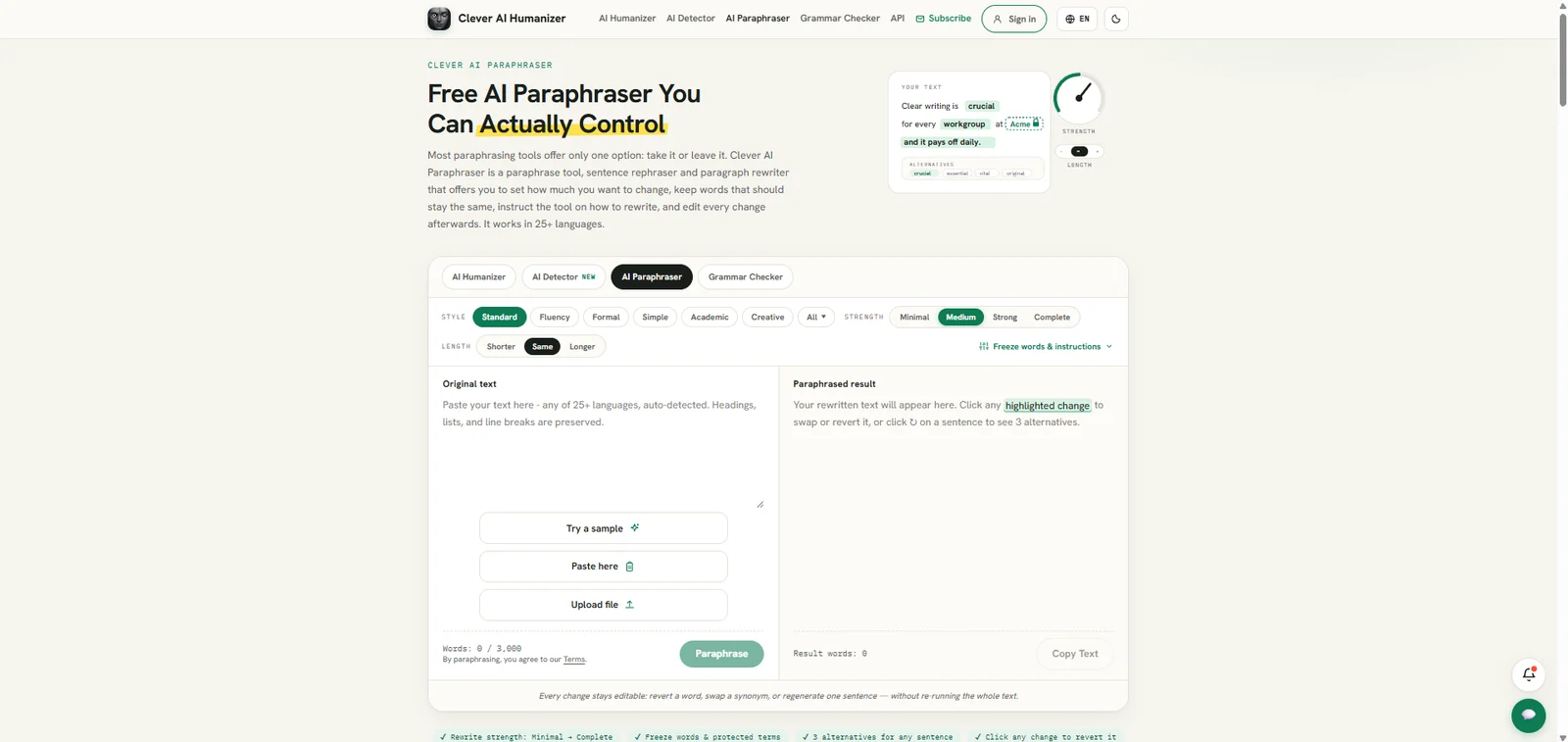
The humanizer is one of four free tools under the Clever AI Tools name, next to Clever AI Detector, a paraphraser and a grammar checker. You can switch between them on the same page. CleverFiles also offers free embeddable widgets that put the detector or the humanizer on your own website.
How to use Clever AI Humanizer
- Open cleverhumanizer.ai. You can start without an account.
- Add your draft with the Paste here button, an uploaded file or the built-in sample.
- Pick a writing style: Normal or Clear & Structured.
- Click humanize and read the result in the right-hand pane.
- Copy the result, or switch to the AI Detector tab to check it on the same page.
What the free humanizer does
Two writing styles
Clever has two writing styles. Normal is the default rewrite for everyday text. Clear & Structured tightens sentence structure for a more formal result, which suits a report, a work email or a how-to article. Both aim at the same changes: varied sentence length, smoother transitions and fewer of the stiff patterns that make AI text easy to spot. For a newsletter or a product description, Normal keeps a friendly tone. For a policy summary or a progress report, Clear & Structured gives you shorter, more orderly sentences. Our guide to making AI writing sound human shows those changes in detail, if you'd like to make them by hand too.
3,000 words per request
Each request takes up to 3,000 words, and there's no monthly cap. That's a larger free limit than most free tools we've reviewed, such as Scribbr's 125 words or Originality.ai's 1,000. A 1,500-word blog post goes through in one request, and a 7,500-word report takes three. Longer requests keep more context in each pass, so the transitions between sections usually need less fixing. When a document is longer than 3,000 words, split it at a heading or a natural break, so each request covers complete sections.
Clever's own page also has a plain warning: the humanizer "may make mistakes, because humans do too." Read every result before you use it, especially names, figures and quotes.
English, Spanish and Portuguese
The text box accepts English, Spanish and Portuguese, and the rewrite comes back in the same language. Some paid tools cover 60 or more languages, so check the list before you paste a draft in another language. If you write in another language and also publish in English, our guide to multilingual humanizing for international researchers covers the options.
Paraphraser and grammar checker
The paraphraser and the grammar checker are in the same tool switcher, and both are free. They do different jobs from the humanizer. A paraphraser rewords a passage, usually to restate a source in new words. A humanizer changes rhythm and tone so an AI draft sounds more natural. If you paraphrase sources for coursework, our guide to paraphrasing versus plagiarism explains where the line is. Run the grammar checker last, after any rewrite, since that's when new errors are most likely to appear.
History with a free account
You can use the humanizer without an account. With a free account, your past humanizations are saved as content history, so you can return to an earlier version later. Your account settings let you delete single entries or your whole history.
Clever AI Detector
Clever AI Detector is the second free tool on the site. It checks up to 10,000 words per run, with unlimited runs and no sign-up, and it shows a probability score with sentence-level signals. Clever states that its detector shows probability, not proof, and that no AI checker is fully accurate.
Clever's own article on how humanizers work goes further. It ran one ChatGPT paragraph through three detectors before and after humanizing, and the scores after humanizing ranged from about 30% to about 70% AI depending on the detector. The article also says no humanizer can guarantee a 0% AI score, because detectors use different scoring methods. That matches our summary of the 2026 research on whether humanizers work. If you want to know what detectors measure in the first place, our explainer on perplexity in AI detection covers the main signal.
A practical way to use the pair is to run the detector first on the whole draft, then humanize only the sentences it marks. That keeps the parts you already like untouched and saves you rereading text that didn't need changing.
Free widgets and a coming API
Clever's site quotes users who describe it as a good fit for bloggers and small agencies, and the widgets show who CleverFiles has in mind. It offers two embeddable widgets, an AI Detector and an AI Humanizer, in light, dark or automatic themes. You sign up, register your website, pick a widget and copy a script or iframe snippet into WordPress, Webflow, Ghost or plain HTML. The widgets are free within fair-use and per-request limits, and the small "Powered by Clever" line has to stay visible. Widget owners can review usage history, and the text visitors submit is kept for the history period set in the widget.
There's also a free badge for article footers that marks content as human-verified. CleverFiles says a public API is coming, with endpoints for detecting and humanizing text and examples in curl, Python and JavaScript. For bloggers and small agencies who run their own sites, the widgets are an unusual extra. Our guide to humanizing SEO content covers what to keep when you rewrite articles for search.
A Humanizer for Theses, With Citations Kept in Format
ProofreaderPro.ai's academic humanizer is designed to lower AI scores while citations, frozen terms and your academic tone stay in place.
Compare the academic humanizerIs Clever AI Humanizer free and safe to use?
Yes, Clever AI Humanizer is free, and its Terms explain clearly what happens to your text. On 2 October 2026, everything on the site cost nothing:
| Tool | Price | Limit |
|---|---|---|
| AI Humanizer | Free | 3,000 words per request, no monthly cap |
| AI Detector | Free | 10,000 words per check, unlimited runs |
| Paraphraser and grammar checker | Free | Fair use |
| Website widgets and badge | Free | Fair-use and per-request limits |
CleverFiles' Terms say the services are currently free and that paid plans may come later. If they do, the Terms already set out automatic renewal, cancellation at the end of the term and advance notice of price changes. They also include a 14-day withdrawal right where the law gives one. Paid fees would otherwise be non-refundable.
On data, the Terms say text you submit is stored for 30 days and then deleted, and that deleting your account deletes it too. If you use the tool without an account, CleverFiles stores only the first 100 characters of your input, for two days. The Terms also say CleverFiles doesn't use your text to train AI models and doesn't sell user data. They're equally direct that CleverFiles can't promise nobody will ever read what you submit, and they ask you not to paste confidential material. That's sensible advice for any free tool: keep unpublished research data, patient details or client documents out of it.
Clever AI Humanizer vs. ProofreaderPro Humanizer
Clever is a free, general humanizer with a generous word limit. ProofreaderPro.ai is a paid academic humanizer built to keep citations and technical terms in place and to record each change.
| Feature | ProofreaderPro.ai | Clever AI Humanizer |
|---|---|---|
| Made for | Essays, theses and journal papers | Blog posts, emails, reports and everyday writing |
| Styles or modes | General and Academic on Academic; General, Academic, Corporate, Creative and Blog/SEO on Academic Plus | Normal and Clear & Structured |
| Words per run | 500 on Academic, 1,000 on Academic Plus | Up to 3,000 |
| Languages | 60+ on Academic Plus | English, Spanish and Portuguese |
| Citations | Keeps APA, MLA, Chicago, IEEE and Turabian formats | General rewrite |
| Price | US$19 or US$29 a month (US$169 or US$259 a year) | Free |
Clever wins on price and on words per request, and for a blog post or a report it's hard to beat a free 3,000-word rewrite. A 3,000-word section is one request on Clever, three passes on Academic Plus and six on Academic. If you write in English, Spanish or Portuguese and rarely cite sources, Clever may be all you need. Academic work asks for different things. ProofreaderPro.ai keeps in-text citations such as (Okafor, 2022) or [7] in their style. On Academic Plus it also freezes field terms and exports a Word file with tracked changes your supervisor can review. It also works in 60+ languages on Academic Plus. Our guide to humanizing AI text for academic writing shows the full process on a research draft.
Clever AI Humanizer Alternatives
Most people who look at Clever want a free humanizer, so the closest alternatives are the other free tools, each with a different limit or extra. Here's how they compare in use:
| Tool | Best for | Our write-up |
|---|---|---|
| ProofreaderPro.ai | Academic papers with citations and field terms | Academic AI humanizer |
| Scribbr | Free paragraph rewrites next to Scribbr's citation tools | Scribbr AI humanizer review |
| ZeroGPT | A free humanizer next to a popular free detector | ZeroGPT AI humanizer review |
| Originality.ai | Free rewrites with four tones and a URL input | Originality.ai humanizer review |
| QuillBot | Paraphrasing and humanizing in a familiar suite | QuillBot humanizer write-up |
| HumanizeAI.pro | Several tones at a low paid price | HumanizeAI.pro review |
| GPTinf | Paraphrasing with keywords frozen in place | GPTinf alternative |
Clever AI Humanizer vs Scribbr
Both are free and need no account. Scribbr's humanizer takes 125 words per paste and runs on QuillBot's engine, next to Scribbr's citation generator and plagiarism checker. Clever takes 3,000 words per request and adds two writing styles and three languages. For a full blog post, Clever saves a lot of pasting. For one paragraph of an essay while you're citing on Scribbr, Scribbr is right there.
Clever AI Humanizer vs ZeroGPT
Both pair a free humanizer with a free detector. ZeroGPT's detector is the better-known name, and its Advanced humanizer is a paid upgrade through Undetectable AI. Clever keeps everything free, with a 10,000-word detector, a 3,000-word humanizer and website widgets. If you want everything at no cost, Clever goes further. If you already use ZeroGPT's detector every day, its humanizer is one click away.
Frequently asked questions
Q: Is Clever AI Humanizer free?
Yes. Clever AI Humanizer is free, with up to 3,000 words per request and no monthly cap. CleverFiles' Terms say paid plans may come later, with advance notice.
Q: Is Clever AI Humanizer legit?
Yes. Clever AI Humanizer is run by CleverFiles Inc., a Delaware corporation, with published Terms of Service, a Privacy Policy and a support address at support@cleverhumanizer.ai.
Q: Is Clever AI Humanizer safe?
CleverFiles' Terms say submitted text is stored for 30 days and then deleted, that it isn't used to train AI models and that user data isn't sold. The Terms also ask you not to submit confidential material, since they can't promise nobody will ever read it.
Q: Does Clever AI Humanizer work?
It works as a quick, free rewrite that improves tone, rhythm and readability. Clever's own article says no humanizer can guarantee a 0% AI score, and detector results after humanizing vary by detector.
Q: Is Clever AI Humanizer good?
It's good for blog posts, emails and reports, with a 3,000-word limit and two writing styles at no cost. For cited academic work, use a humanizer that keeps citations in format.
Q: How many words can Clever AI Humanizer take?
Up to 3,000 words per request, with no monthly cap. The Clever AI Detector checks up to 10,000 words per run.
Q: What languages does Clever AI Humanizer support?
English, Spanish and Portuguese. The rewrite comes back in the same language you paste.
Q: Does Clever AI Humanizer save my text?
Yes, for 30 days if you're signed in, and you can delete single entries or your whole history in your account settings. Without an account, CleverFiles stores only the first 100 characters of your input, for two days.
Q: Does Clever AI Humanizer have a paraphraser?
Yes. Clever AI Tools include a free paraphraser and a free grammar checker next to the humanizer and the AI Detector, and you switch between them on the same page.
Q: Is aihumanizer.net the same as Clever AI Humanizer?
Yes. The tool used to be at aihumanizer.net, and that address now redirects to cleverhumanizer.ai.
Q: Can I add Clever AI Humanizer to my website?
Yes. CleverFiles offers free embeddable AI Humanizer and AI Detector widgets for WordPress, Webflow, Ghost and plain HTML, as long as the "Powered by Clever" line stays visible.
Academic humanizing with citations kept in format, 60+ languages and tracked changes on Academic Plus.

Dana is a content creator at ProofreaderPro, where she runs the daily blog and writing operations. She writes the articles on how the online editing platform works, and she handles customer messages every day, with a five-star satisfaction score to show for it.