WriteHybrid AI Humanizer Review (2026): Four Modes and Plans
WriteHybrid AI Humanizer review: Academic, Marketing, Casual and Technical modes, 500 free words a month and plans from US$16. How it differs from WriteHuman.

WriteHybrid is an AI humanizer with four writing modes, Academic, Marketing, Casual and Technical, for students and professionals who want the rewrite to match the register of their draft. It gives you 500 free words every month after sign-up, and paid plans start at US$16 a month billed annually.
Two things are worth knowing before you read any WriteHybrid AI humanizer review. First, it isn't WriteHuman: the names are close, but they're different companies, and WriteHybrid's own site points that out. Second, WriteHybrid shows the rewrite side by side with your original, so you can check each change before you copy anything.
What is WriteHybrid?
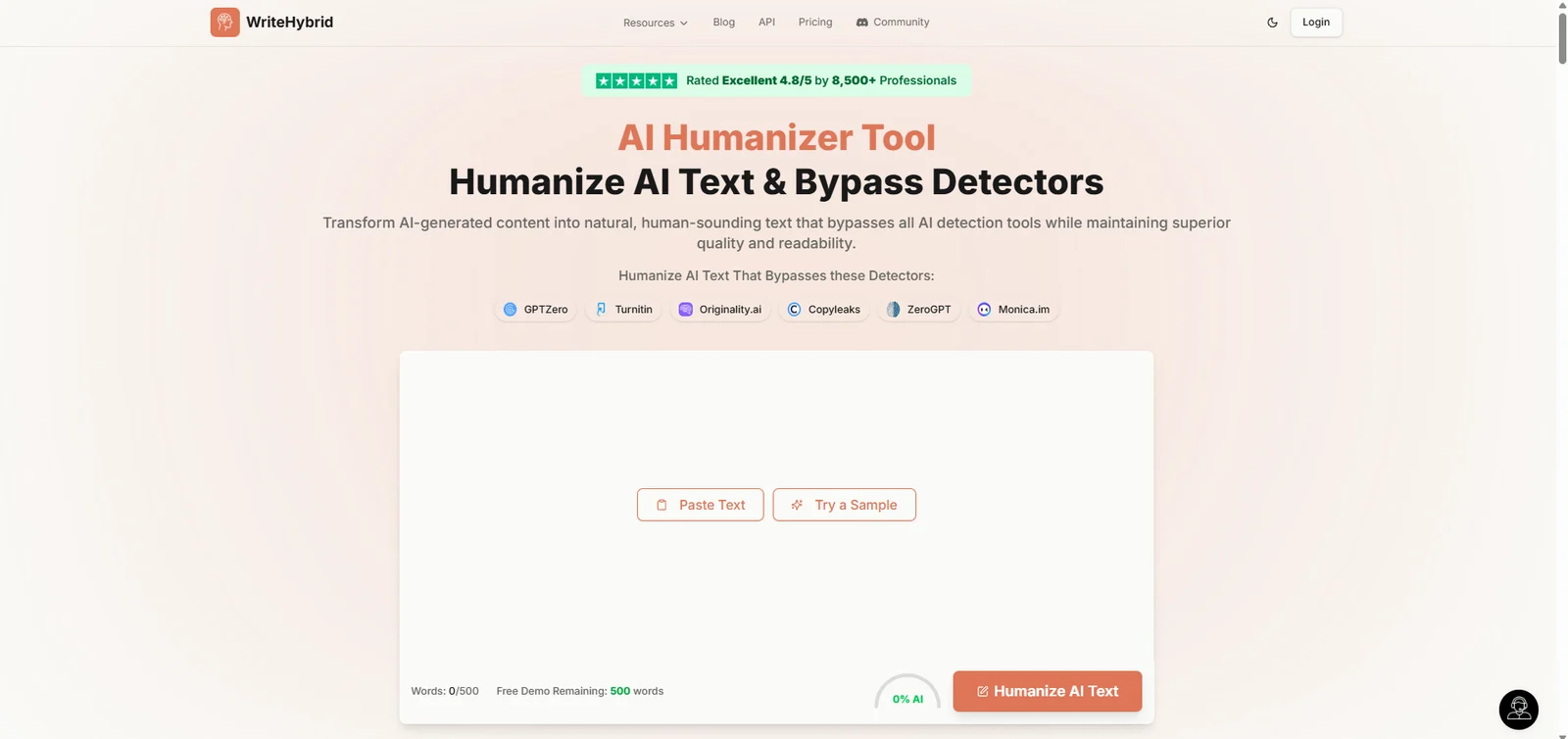
WriteHybrid is a web-based humanizer that rewrites AI-generated text from ChatGPT, Claude and other tools into more natural writing. You choose one of four modes, paste or load a sample text, and review the output next to your draft. The service is for users aged 18 or over, or younger users with a guardian's consent, and support runs through team@writehybrid.com and a Discord community. Subscription fees are billed in advance through WriteHybrid's payment provider.
WriteHybrid also runs a large editorial section with its own reviews, head-to-head comparisons and guides about other humanizers and AI detectors. The guides are grouped by topic, such as student picks, free tiers and detection questions. That's useful context for its readers, and it shows who WriteHybrid sees as its competition: WriteHuman, Undetectable AI, StealthWriter and QuillBot, among others.
WriteHybrid or WriteHuman?
They're different products from different companies, and each has its own free tier, plans and support. WriteHybrid's own comparison describes them as "different companies, similar names." WriteHuman is known as a simple one-box humanizer for quick rewrites. WriteHybrid is built around named modes, a recurring free tier and paid plans with API access. If a review or a price you've seen doesn't match what you find, check which of the two it was about.
Four modes and the side-by-side view
Academic, Marketing, Casual and Technical
The mode menu decides the register of the rewrite, and it's the main control WriteHybrid gives you. Academic suits essays, reports and papers. Marketing suits landing pages, product copy and ads. Casual suits emails, posts and messages, and for work email in particular, our guide to humanizing business writing covers what to keep formal. Technical suits documentation, manuals and process write-ups, where precise terms matter more than style.
Picking the right mode is the most useful thing you can do with WriteHybrid. WriteHybrid says its humanizer favors readable, meaning-preserving rewrites over aggressive word swaps, and the mode is how you tell it which register to keep. For students writing in a second language, the Academic mode can smooth stiff phrasing. Our guide to academic writing for non-native speakers covers the habits that make the biggest difference by hand.
Side-by-side review
After a rewrite, WriteHybrid shows your original and the new version next to each other. That makes it easy to spot a changed number, a lost term or a sentence that drifted from your meaning before you copy the result. Reviewing changes before you accept them is a good habit with any rewriting tool. It matters most in Technical mode, where a changed unit or version number can break a set of instructions. It's the same idea as tracked changes, which our guide to tracked-changes proofreading in DOCX files applies to a whole document.
The AI score gauge and WriteHybrid's own advice
WriteHybrid shows an AI score gauge on the humanizer page. Its own copy is unusually direct about what such scores can and can't do. It says no humanizer can guarantee a result against every checker, because detectors update, disagree and behave differently on different texts. That matches our explainer on whether any tool can promise a 0% AI score. Treat any single score, including the gauge, as an estimate.
A first rewrite, step by step
- Create a free account; the free plan doesn't ask for card details.
- Paste your text, or click "Try a Sample" to see how a mode works first.
- Choose Academic, Marketing, Casual or Technical.
- Click "Humanize AI Text".
- Read the side-by-side output and fix anything that changed your meaning before you copy it.
- Keep your original draft, so you can compare the two versions again later if a question comes up.
WriteHybrid's guides
WriteHybrid's editorial section goes beyond product pages. It has guides on topics such as what to do when an essay is wrongly flagged as AI and whether colleges use AI detectors, alongside its reviews of other tools. If you're dealing with a false flag on your own writing, our appeal letter template for false AI-detection flags gives you wording to start from.
Free words, referrals and the API
The free plan gives you 500 words every month after sign-up, and it renews each month, so it works as an ongoing free tier with no end date. WriteHybrid says you can earn extra free words by referring other users. That's a cheap way to stretch the free plan if you only need a few paragraphs a month.
Paid plans raise the monthly allowance a long way, and the Pro and Agency plans add priority processing and multiple rewrite tones. Agency adds team access, dedicated support and custom tones, for a group that shares one account. WriteHybrid also offers custom plans with API access for teams that need more than 150,000 words a month. Its comparison pages mention the API as one of its differences from WriteHuman.
WriteHybrid's plans and word allowances
The free tier covers 500 words each month. After that, Starter costs US$19 a month, or US$16 a month when you pay for a year. WriteHybrid says annual billing gives you two months free. WriteHybrid's plans on 2 October 2026:
| Plan | Monthly | Annual (per month) | Words a month | What it adds |
|---|---|---|---|---|
| Free | US$0 | US$0 | 500 | Recurring free words after sign-up |
| Starter | US$19 | US$16 | 20,000 | Basic processing, email support |
| Pro | US$49 | US$41 | 60,000 | Priority processing, multiple rewrite tones |
| Agency | US$99 | US$83 | 150,000 | Team access, dedicated support, custom tones |
Paid annually, Starter costs US$192 a year, Pro US$492 and Agency US$996, which you pay upfront for the whole year. Here's what those allowances cover. The free 500 words is one short piece a month, such as a cover letter or a few paragraphs. Starter's 20,000 words covers about six 3,000-word essays. Pro's 60,000 suits a freelancer or a graduate student humanizing several long documents a month, and Agency's 150,000 suits a small team.
I'd pick Starter on annual billing for most individual users, and Pro only if you need the extra tones or more than 20,000 words a month.
For a team, the Agency plan's 150,000 words a month splits into about 30,000 words each for five writers. That's enough for a small agency humanizing a few long articles per writer every week, with custom tones set up for each client's voice.
Who WriteHybrid suits
- Students get a renewing 500 free words, the Academic mode and the side-by-side view, which together make it easy to try on a short assignment.
- Marketers and bloggers get the Marketing and Casual modes, and Pro's extra tones for different channels.
- Technical writers get a Technical mode, which is rare among humanizers and suits manuals and documentation.
- Small teams and agencies get shared access, custom tones and dedicated support on Agency, and an API through a custom plan.
Refunds and cancellation
WriteHybrid's Refund Policy says purchases are final, because the service is digital, unless the law requires otherwise. You can still ask for a refund if you have a valid reason, such as a technical error, by emailing team@writehybrid.com with your account details. You can cancel any time from your account dashboard. Premium features stay on until the end of the billing period, and no further charges are made.
An Academic Mode That Also Protects Your References
ProofreaderPro.ai's humanizer is designed to lower AI scores on academic writing while citations stay in their original style and frozen terms stay exactly as written.
Compare the academic humanizerWriteHybrid AI Humanizer vs. ProofreaderPro Humanizer
WriteHybrid and ProofreaderPro.ai both have an Academic mode and cost US$19 a month at the entry level, which makes this a close comparison. The difference is what each one protects in an academic draft.
| Feature | ProofreaderPro.ai | WriteHybrid |
|---|---|---|
| Made for | Essays, theses and journal papers | Essays, marketing copy, casual writing and technical documents |
| Modes | General and Academic on Academic; General, Academic, Corporate, Creative and Blog/SEO on Academic Plus | Academic, Marketing, Casual and Technical |
| Reviewing changes | Tracked changes to view and export as .docx on Academic Plus | Side-by-side view of original and rewrite |
| Words a month at the entry price | 25,000 on Academic at US$19 | 20,000 on Starter at US$19 |
| Citations and terms | Keeps APA, MLA, Chicago, IEEE and Turabian citations; freeze terms on Academic Plus | General rewrite in the chosen mode |
| Free use | 250 words a month of editing; the humanizer starts on Academic | 500 humanizer words a month |
| Price | US$19 or US$29 a month (US$169 or US$259 a year) | US$19, US$49 or US$99 a month, or from US$16 a month billed annually |
At US$19 a month, ProofreaderPro.ai's Academic plan includes 25,000 words to WriteHybrid Starter's 20,000. WriteHybrid's free tier is more generous for trying the humanizer, and its Marketing and Technical modes cover non-academic work well. If you write in several registers, from client emails to technical notes, WriteHybrid's four modes cover more ground for the same price. For a paper, the deciding factors are citations and change records. ProofreaderPro.ai keeps references such as Vancouver's numbered citations in place, which our Vancouver citation guide explains for medical writing. On Academic Plus you also get frozen terms and a tracked-changes Word file your supervisor can review line by line.
WriteHybrid AI Humanizer Alternatives
WriteHybrid's own comparison pages cover WriteHuman, Undetectable AI, StealthWriter and QuillBot, which makes them the natural alternatives. HumanizeAI.pro and BypassGPT are other general humanizers in its price range.
| Tool | Best for | Our write-up |
|---|---|---|
| ProofreaderPro.ai | Academic papers with citations and field terms | Academic AI humanizer |
| WriteHuman | One-box, one-click rewrites | WriteHuman alternative |
| Undetectable AI | A well-known humanizer with its own detector | Undetectable AI alternative |
| StealthWriter | A deep scan that shows sentence-level detector risk | StealthWriter alternative |
| QuillBot | Paraphrasing and grammar with a humanizer tab | QuillBot humanizer write-up |
| HumanizeAI.pro | Nine tones at a low price | HumanizeAI.pro review |
| BypassGPT | High-volume rewriting for web content | BypassGPT alternative |
Humanizer or paraphrasing suite: WriteHybrid and QuillBot
QuillBot is a paraphrasing and grammar suite with a humanizer tab, and WriteHybrid is a dedicated humanizer with four modes. WriteHybrid itself notes that many writers use both: QuillBot for paraphrasing sources and checking grammar, and a humanizer for AI drafts. If you already pay for QuillBot, try its humanizer first. If humanizing is your main job, WriteHybrid's modes and side-by-side view are built for it.
One tuned version or several: WriteHybrid and StealthWriter
StealthWriter gives you several rewrite variants and a deep scan that shows sentence-level risk. WriteHybrid gives you one rewrite tuned to the mode you choose and a side-by-side view of the changes. If you like picking from several versions, StealthWriter suits you. If you want one register-matched version to review, WriteHybrid is the simpler workflow.
Frequently asked questions
Q: Is WriteHybrid free?
Yes, WriteHybrid gives you 500 free words every month after sign-up, with no credit card needed. Paid plans start at US$16 a month billed annually.
Q: Is WriteHybrid good?
WriteHybrid is good for matching a rewrite to a register, with four modes and a side-by-side view for checking changes. Theses and papers with reference lists need citation protection on top of an Academic mode.
Q: Is WriteHybrid legit?
Yes. WriteHybrid publishes Terms of Service, a Refund Policy and a Cancellation Policy, and it offers support by email and through a Discord community. Payments go through a third-party payment provider.
Q: Is WriteHybrid the same as WriteHuman?
No. WriteHybrid and WriteHuman are different companies with similar names. WriteHybrid's own comparison page says so, and the two have different modes, plans and features.
Q: What modes does WriteHybrid have?
WriteHybrid has four modes: Academic, Marketing, Casual and Technical. Pro and Agency plans also add multiple rewrite tones, and Agency adds custom tones.
Q: How many words do WriteHybrid's plans include?
The free plan includes 500 words a month, Starter 20,000, Pro 60,000 and Agency 150,000. Custom plans with API access cover more.
Q: Does WriteHybrid have an API?
Yes. WriteHybrid offers custom plans with API access for teams that need more than 150,000 words a month.
Q: Does WriteHybrid show an AI score?
Yes. WriteHybrid shows an AI score gauge on the humanizer page, and it says no humanizer can guarantee a result against every checker, so treat the gauge as an estimate.
Q: Which WriteHybrid plan should I choose?
Start with the free 500 words a month to judge the modes. Starter suits most individual users, Pro suits heavy users who want extra tones, and Agency suits teams that share an account.
Q: Can WriteHybrid humanize technical documents?
Yes. WriteHybrid has a Technical mode for documentation, manuals and process write-ups. Check numbers, units and product names in the side-by-side view before you use the rewrite.
Q: Does WriteHybrid work with ChatGPT and Claude text?
Yes. WriteHybrid works with text from ChatGPT, Claude and other AI tools, and you pick the mode that fits the register of the draft.
Q: Can I get a refund from WriteHybrid?
Only in limited cases. WriteHybrid says purchases are final unless the law requires otherwise or you have a valid reason, such as a technical error, which you raise with team@writehybrid.com.
Q: How do I stop my WriteHybrid subscription?
Cancel from your account dashboard. Premium features stay on until the end of your billing period, and WriteHybrid makes no further charges.
Academic humanizing with citations kept in format, 25,000 words a month from US$19 and tracked changes on Academic Plus.

Dana is a content creator at ProofreaderPro, where she runs the daily blog and writing operations. She writes the articles on how the online editing platform works, and she handles customer messages every day, with a five-star satisfaction score to show for it.