Solvely AI Humanizer Review (2026): Free Limits and Study Tools
Solvely AI Humanizer review: 500 free words a day in a homework-help app, Academic Mode on Pro plans, pricing from US$12.99 a month, and who it suits.

Solvely is a homework-help and AI study app for students. Its AI Humanizer is one tool in a sidebar that also includes an AI detector, a paraphraser, a citation generator and a grammar checker. The humanizer rewrites AI-generated text so it sounds more natural, and it's free for up to 500 words a day with no account.
This Solvely AI Humanizer review covers how the tool works, what the rest of the Solvely app includes, and what Pro costs across its three billing cycles. It also looks at how the free daily limit compares with a dedicated academic humanizer.
What is Solvely?
Solvely is built by Aignite Inc., according to its Terms of Service. Solvely calls itself "AI study tools for students" on its own homepage. Its main features are a Homework Solver with step-by-step answers, a Study Tools feature that turns uploaded files into flashcards and quizzes, and an Exam Predictor. It also has AI Live Notes for lecture recordings, and a Writing Assistant that bundles the humanizer with an AI detector and several other writing tools.
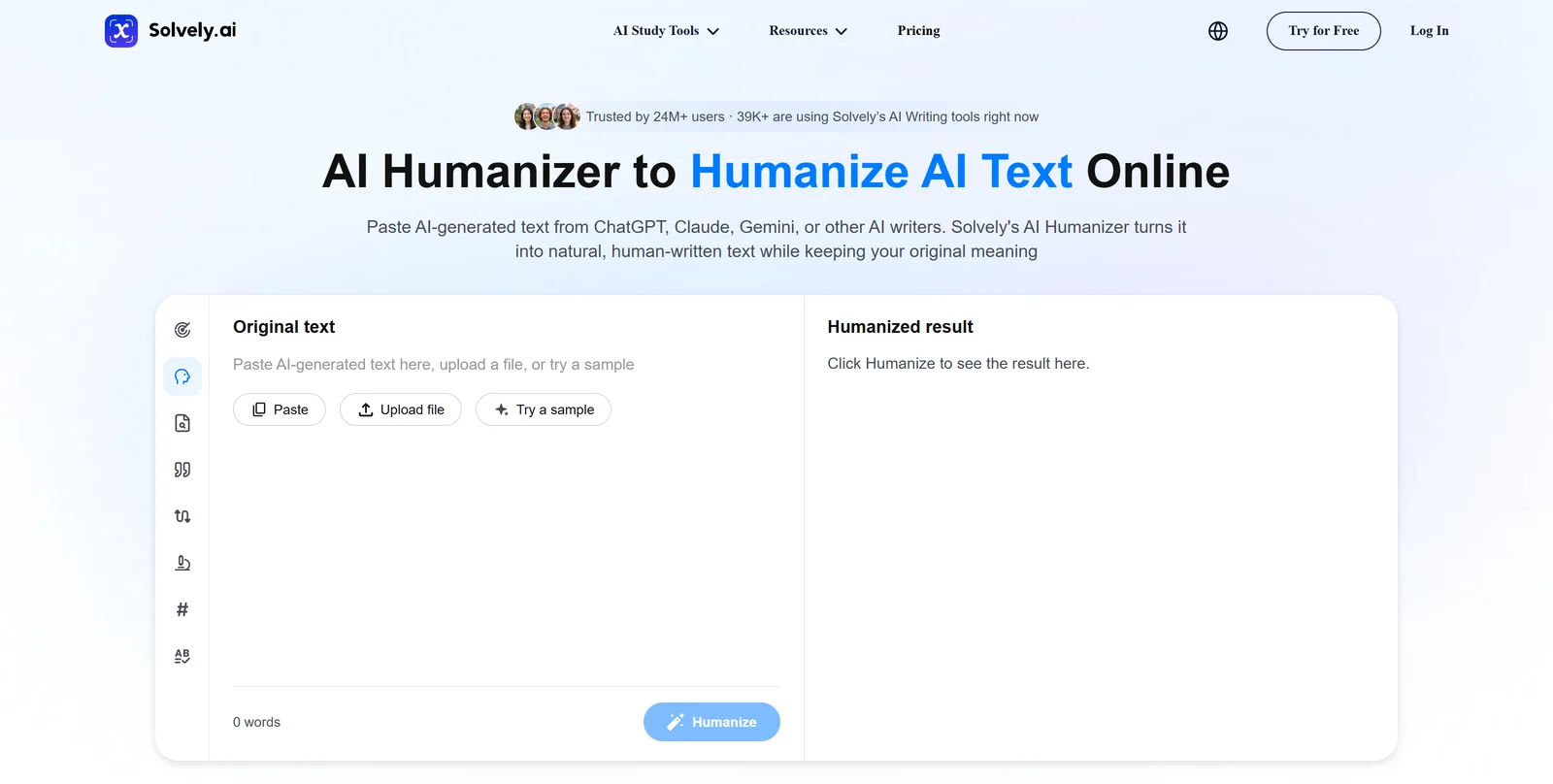
Open the humanizer and you land on a two-pane layout: Original text on the left, Humanized result on the right. The Paste, Upload file and Try a sample buttons are above the text box, with a running word count below it. A left-hand toolbar lists the rest of the Writing Assistant: AI Detector, AI Humanizer, Plagiarism Checker, Citation Generator, AI Paraphraser, AI Research, Word Counter and Grammar Checker. Switching tools doesn't mean leaving the page.
Solvely names four kinds of people the humanizer suits: students, writers and bloggers, freelancers, and researchers and academics. Students check an assignment before they submit it, writers and bloggers polish AI drafts, and freelancers deliver work that clients might run through a checker. Researchers and academics use it to humanize literature reviews or grant proposals, and a thesis chapter or a journal manuscript belongs to that last group. For that group, Academic Mode matters most, and it's part of Pro.
How Solvely's AI Humanizer works
Using the humanizer takes three steps on Solvely's own page. Paste AI-generated text from ChatGPT, Claude, Gemini, Copilot or another AI writer. Click "Humanize AI Text." Review the result before you copy it out. Solvely recommends running its AI Detector first and humanizing only the flagged sections.
The humanizer has three modes: Academic, Standard and Creative. Academic Mode is the one built for essays and research papers. Solvely says it keeps citations, technical terminology and argument structure in place while it changes the sentence-level phrasing. Standard suits everyday writing like emails and posts. Creative targets blog and marketing copy. Solvely's own FAQ lists Academic Mode as a Pro feature, next to unlimited words and document upload, so the free tier uses Standard-style rewriting.
The free version needs no account: paste up to 500 words a day, no credit card, no trial to expire. The cap resets every day. A 3,000-word essay would take six separate days of pasting to clear on the free tier alone, longer still if you also recheck sections with the detector in between. Pro removes the daily cap and adds file upload, so a full chapter goes in as one document instead of several manual pastes.
A student working through an assignment this way can run the humanizer over a paragraph, check it against an instructor's expectations, and move to the next section. Our guide to humanizing AI text for students covers how to make that section-by-section pass without losing your own argument along the way.
Solvely says pasted text is processed in real time and discarded afterward, and that it isn't used to train its models.
Solvely's other AI writing and study tools
The humanizer shares its toolbar with several other tools. Solvely's AI Detector checks the same pasted text against three engines at once: ZeroGPT, Turnitin and GPTZero, each with its own percentage score. The free version returns full ZeroGPT results with no sign-up. Pro adds the Turnitin and GPTZero engines and removes the word limit. A single detector's score can move around between runs, which is also true of ZeroGPT on its own. Turnitin's AI indicator is a separate check your instructor may run after you submit.
The AI Paraphraser shares the same toolbar, with five rewrite styles: Standard, Fluent, Academic, Shorter and Custom. A Plagiarism Checker, Word Counter, Grammar Checker, Citation Generator and an AI Research tool fill out the Writing Assistant. A student drafting a paper in Solvely can move from a citation lookup, to a plagiarism check, to a humanized paragraph, without switching apps. If your citations need to stay in APA format through all of that editing, check the reference list again after any rewrite. No humanizer or paraphraser guarantees a format stays intact on its own.
Outside writing, Solvely's bigger draw for most students is the Homework Solver. Solvely says it cross-checks each step-by-step answer across several AI models. Study Tools turns uploaded PDFs, slide decks, photos of problem sets or a YouTube lecture link into flashcards and quizzes. Exam Predictor builds mock tests around the topics it expects to matter, and AI Live Notes transcribes a recorded lecture into notes. All of it runs on the same Pro subscription as the humanizer, across a web app, iOS, Android, and Chrome and Edge extensions.
A general detector check can flag natural phrasing from a non-native writer as AI-written. Our piece on why detectors flag non-native writers explains why that happens and what to do about a false flag. That risk matters more for Solvely's "Researchers & Academics" persona than for the students the rest of the app is built around.
How much does Solvely cost?
Solvely sells one subscription, called Pro or "Solvely Unlimited" depending on the page. It unlocks the Homework Solver, Study Tools, Exam Predictor, AI Live Notes and every Writing Assistant tool, including the humanizer, together. The humanizer isn't sold on its own.
The free Starter plan gives a new account 2 solves for homework help, tracked as a "Gem balance" that resets if a Pro subscription lapses. That's separate from the 500-words-a-day humanizer allowance, which needs no account at all.
Solvely's Pro prices on 5 October 2026, billed in three ways:
| Plan | Price | What it includes |
|---|---|---|
| Starter (free) | No charge | 2 homework solves, 500 words a day in the humanizer with no account |
| Pro, weekly | US$3.99 for the first week, then US$8.99 a week | Unlimited humanizer words, Academic Mode, document upload, all Writing Assistant tools, Homework Solver, Study Tools, Exam Predictor, AI Live Notes |
| Pro, monthly | US$12.99 a month | Same as weekly Pro |
| Pro, yearly | US$67.99 a year | Same as weekly Pro, marked as a 56% saving against the monthly rate |
For more than a few weeks of use, monthly or yearly billing costs less. A year on the weekly rate costs about US$462: the first week at US$3.99 plus 51 weeks at US$8.99. Twelve monthly payments cost US$155.88, and the yearly plan is US$67.99.
An Academic Humanizer for Papers With Reference Lists
ProofreaderPro.ai's academic humanizer is designed to lower AI scores while your citations and technical terms stay exactly as you wrote them, from US$19 a month.
See the academic humanizerRefunds, cancellation and Solvely's Honor Code
Solvely's Terms of Service say subscription fees are charged in advance and are non-refundable, including after you cancel, unless a specific offer states otherwise at the time of purchase. A free trial that needs a card on file renews automatically at the plan's regular price once the trial ends. Cancel before the trial ends to avoid that. Solvely limits new users to one free trial each.
Canceling a web subscription means opening your account page, selecting "Manage," and canceling through the Stripe customer portal. You can pause it the same way. A subscription bought through the Apple App Store follows Apple's own cancellation steps instead. App Store subscriptions can be canceled but not paused.
Solvely also publishes its own Honor Code, separate from its Terms. It says its tools exist to support learning. It also asks users to check their school's or employer's own policy on AI tools before relying on one for graded work. The Honor Code lists prohibited uses directly: submitting live exam questions for answers and passing AI output off as your own original work on an assessment. It also bans getting around Solvely's usage limits. Solvely says it can investigate suspected misuse, and suspend or terminate an account over it.
That's worth reading before you lean on any humanizer for coursework. A tool with a natural writing style and intact citations still has to match your own school's rules on using AI responsibly on a Turnitin-checked paper. Those rules vary by institution and even by instructor.
Solvely AI Humanizer vs. ProofreaderPro Humanizer
Solvely's humanizer is one tool inside a homework-help app, built mainly for K-12 and college students working through assignments and exam prep. ProofreaderPro.ai is a dedicated academic editor. Its humanizer is built specifically to protect citations and technical terms while it lowers AI-detection scores.
| Feature | ProofreaderPro.ai | Solvely |
|---|---|---|
| Made for | Essays, theses and journal papers | Homework help and general writing, with a humanizer as one tool among many |
| Citations | Keeps APA, MLA, Chicago, IEEE and Turabian formats | Protected in Academic Mode, a Pro-only feature |
| Free humanizing | None; the humanizer starts on Academic at US$19 a month | 500 words a day, no account needed |
| Modes | General and Academic on Academic; five modes and five intensity levels on Academic Plus | Academic, Standard and Creative |
| Tracked changes | Word export with tracked changes on Academic Plus | None stated |
| Price | US$19 or US$29 a month (US$169 or US$259 a year) | US$12.99 a month or US$67.99 a year for Pro |
A thesis chapter or a journal submission needs the same reference list after a rewrite as before it. A dedicated academic humanizer is built for that job. ProofreaderPro.ai's Academic Plus plan exports a Word file with tracked changes you can review line by line, so a supervisor or co-author sees exactly what changed. On Solvely, citation handling is part of Academic Mode on Pro.
A single paragraph in an email or a blog post is well within Solvely's free daily allowance, no subscription needed. A chapter, a manuscript or anything with a reference list changes the calculation. The gap between the two tools then comes down to citation handling and an audit trail, more than price alone.
Solvely AI Humanizer Alternatives
Solvely's closest alternatives are other all-in-one student apps and essay-writing suites that bundle a humanizer with study or writing tools.
| Tool | Best for | Our write-up |
|---|---|---|
| ProofreaderPro.ai | Citation-safe humanizing for theses and journal papers | Academic AI humanizer |
| Ryne AI | A coin-based student platform with chat, an essay composer and a note taker | Ryne AI humanizer review |
| Conch AI | Notes, flashcards and a writing assistant with a humanizer built in | Conch AI alternative |
| JustDone | A 35+ tool writing and study bundle with an Academic style built in | JustDone AI humanizer review |
| EssayDone | Essay generation and humanizing with an intensity setting, for high school and college work | EssayDone AI humanizer review |
| StudyTexter | A full-paper writer with a free humanizer and a GPTZero score built into the result | StudyTexter AI humanizer review |
| Scribbr AI Humanizer | A free, no-account humanizer for short paragraphs from a citation-generator company | Scribbr AI humanizer review |
Solvely vs Ryne AI
Both are student platforms where the humanizer is one tool among chat, notes and essay help. Both cap the free humanizer with a daily or per-request word limit. Ryne's free plan allows 250 words per humanizer request; Solvely's free allowance is 500 words a day. Ryne adds a bundled AI Reports feature that runs four detectors into one PDF, while Solvely splits that job out to its own AI Detector page. Either one fits a student who already wants the rest of the bundle.
If you write for search traffic, our guide to humanizing AI text for SEO content covers that case on its own.
Frequently asked questions
Q: Is Solvely's AI humanizer free?
Yes. Solvely's AI Humanizer works without an account for up to 500 words a day, with no credit card and no trial that expires. Pro removes that daily cap and adds Academic Mode and document upload.
Q: Does Solvely's AI humanizer work?
It rewrites AI-generated text into different phrasing while keeping the original meaning, which is what Solvely says it's built to do. The result depends on the source text and the mode you pick. Academic Mode keeps citations and technical terms in place; Standard and Creative change more of the sentence structure.
Q: Is Solvely AI humanizer good?
It's a solid free option for a quick paragraph, since it needs no account and the daily limit resets every day. For a full essay or a paper with a reference list, the 500-word daily cap and the Pro-only Academic Mode both matter. A dedicated academic humanizer with no daily cap may suit the job better.
Q: Is Solvely legit?
Yes. Aignite Inc. operates Solvely, with a published Terms of Service, Privacy Policy and Honor Code, and a Pro subscription billed through Stripe or the Apple and Google app stores.
Q: How much does Solvely cost?
Solvely Pro costs US$12.99 a month, US$67.99 a year, or US$3.99 for the first week and US$8.99 a week after that. The free Starter tier includes 2 homework solves and the 500-words-a-day humanizer with no account.
Q: Does Solvely offer a free trial?
Solvely's weekly plan opens at a discounted US$3.99 for the first week. A free trial that requires a card renews automatically at the regular price unless you cancel before it ends, and Solvely limits new accounts to one free trial.
Q: How do I cancel my Solvely subscription?
Open your account page, select "Manage" and cancel through the Stripe customer portal if you subscribed on the web. If you subscribed through the Apple App Store, cancel there instead, following Apple's own subscription settings.
Q: Does Solvely offer refunds?
Its Terms of Service say fees are non-refundable once charged, including after cancellation, unless a specific offer states otherwise when you buy it.
Q: What AI tools does Solvely's humanizer work with?
Solvely says it works with text from ChatGPT, GPT-4o, Claude, Gemini, Copilot, LLaMA, Jasper and other AI writers.
Q: Can I use Solvely's humanizer without creating an account?
Yes, for up to 500 words a day. A Pro account removes that cap and adds Academic Mode, document upload and the rest of the Solvely study suite.
Q: Is Solvely allowed for schoolwork?
That depends on your school's own policy on AI tools, which Solvely's Honor Code tells users to check for themselves. The Honor Code says its tools exist to support learning. It prohibits using them for live exam answers or passing AI output off as your own original work on a graded assessment.
An academic humanizer that keeps APA, MLA, Chicago, IEEE and Turabian citations in place, with five modes and tracked-changes export on Academic Plus.

Dana is a content creator at ProofreaderPro, where she runs the daily blog and writing operations. She writes the articles on how the online editing platform works, and she handles customer messages every day, with a five-star satisfaction score to show for it.