Super Humanizer Review (2026): Lite vs Ultra and Free Words
Super Humanizer review: a free, no-signup humanizer with 1,200 words per run, Lite and Ultra modes, seven purposes and clean-up settings. Plans and refunds.

Super Humanizer is a free AI humanizer for bloggers, marketers, students and professionals who want quick rewrites without creating an account. Each free run takes up to 1,200 words, with no limit on how many runs you do, and paid plans add longer inputs and a stronger engine.
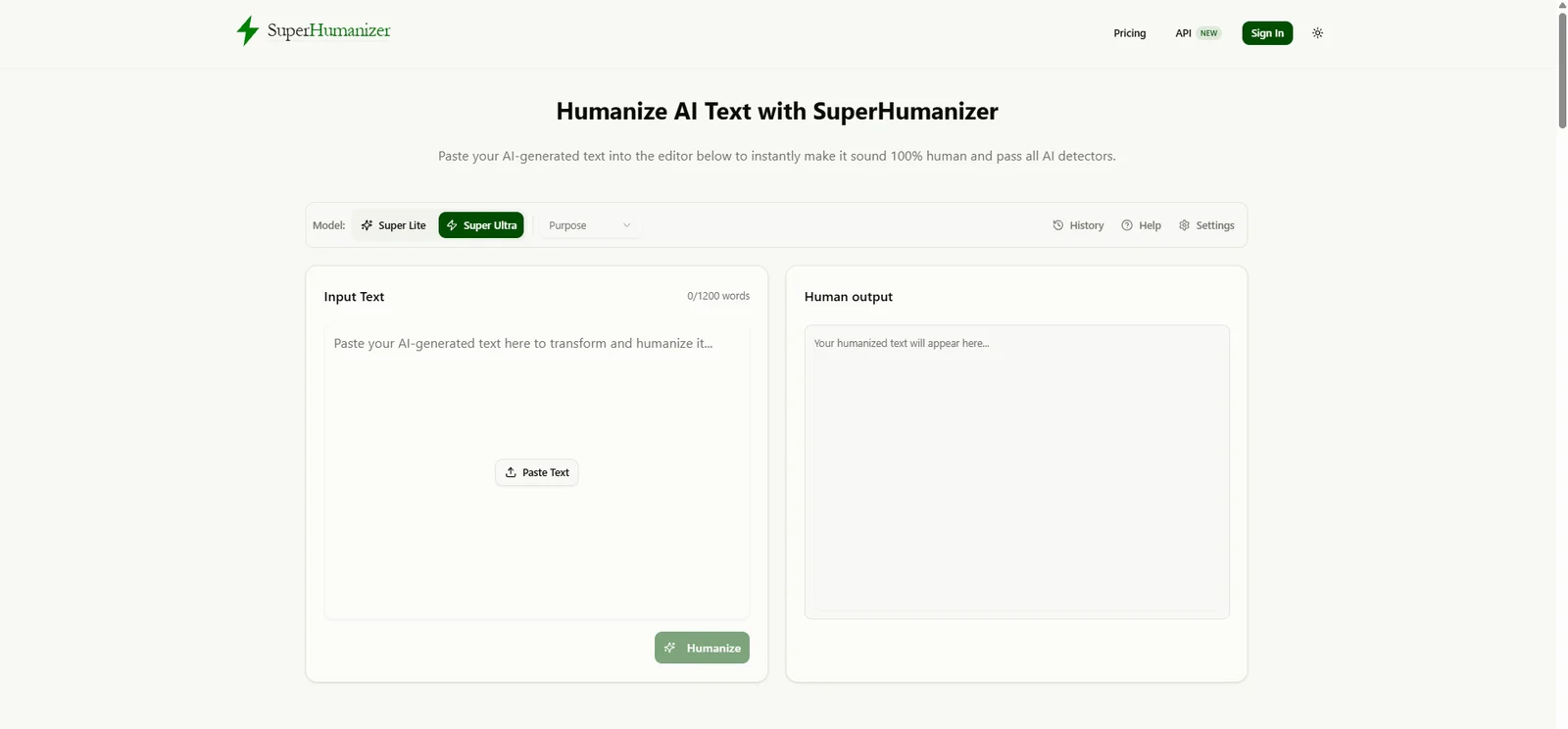
Two choices shape every result, and they're worth understanding before you read any Super Humanizer review: the mode and the purpose. Super Lite is a fast, single-step rewrite, while Super Ultra checks its own output before showing it. The purpose menu sets the register, from Academic and Formal to Friendly and Engaging. A third feature worth knowing is the settings panel, which cleans up invisible characters, dashes and emojis.
What is Super Humanizer?
Super Humanizer is a web tool at superhumanizer.ai that rewrites text from ChatGPT, Claude, Gemini, Jasper and other AI tools so it sounds more natural. The site writes the name as one word, SuperHumanizer. Its Terms say it's operated by Kamranali Limited, a company registered in England and Wales, and that text you submit is sent to third-party AI providers for processing.
Next to the humanizer, Super Humanizer has its own AI score checker, a free Chrome extension that needs no sign-up, an API for developers and a community space for feedback. The API is a recent addition, aimed at apps and sites that want to send text to the humanizer directly. The tool also works in any modern browser on phones and tablets, so you can humanize a draft away from your desk. Super Humanizer says it trained its humanizer on 15 million human-written samples, from which it selected 1 million high-quality texts.
Who Super Humanizer is for
Super Humanizer names five groups. Content creators and bloggers use it to refine AI-drafted articles. Marketers and copywriters use it on sales copy. Website owners and SEO professionals use it to improve readability. Business professionals use it on emails, reports and presentations. Students and academics, in Super Humanizer's words, can use it to understand and practice clear, authentic writing. For that last group, the habits worth practicing alongside any tool are in our academic writing style guide.
Is Super Humanizer legit?
Yes. Super Humanizer is run by a registered UK company, publishes Terms of Service with a refund policy, and takes payments through Paddle. Support answers at support@superhumanizer.ai. The current Terms of Service took effect on 23 September 2025.
Super Lite, Super Ultra and the Purpose menu
Two modes
Super Lite rewrites your text in one step, so it's the quicker option for a short paragraph or a caption. Super Ultra, which Super Humanizer recommends, validates the output in the background against its quality standards before it appears in the editor. It takes a little longer, and it's the mode to use for anything you'll publish or submit. A good habit is to test a purpose with Super Lite first, then switch to Super Ultra once you've found the purpose that fits.
Super Humanizer lists the changes its engine makes: breaking repetitive AI structures, replacing robotic wording with simpler vocabulary, improving flow, cutting filler and repetition, and varying sentence length. That last change is what detectors measure as burstiness, which our explainer on burstiness in AI writing covers in plain terms.
Seven purposes
The Purpose menu has seven options: General, Academic, Blog, Formal, Informal, Friendly and Engaging. Academic and Formal give the rewrite a more formal register. Blog and Engaging suit web content and newsletters. Informal and Friendly suit emails and social posts. A cover letter can go either way: choose Formal for a law firm or a bank, and Friendly for a startup or a creative agency. If you're unsure how formal a passage sounds before or after the rewrite, our free formality checker gives you a quick reading.
Picking sentence alternatives
After a rewrite, you can click any sentence in the output to see alternative versions and pick the one you like. That's a useful way to fix a single awkward line without humanizing the whole passage again. If one sentence comes back too casual for a report, for example, you can swap in a more formal alternative and leave the rest of the rewrite as it is. You can also press Ctrl + Enter, or ⌘ + Enter on a Mac, to run the humanizer from the keyboard.
A first rewrite
- Open superhumanizer.ai. You don't need an account for the free tier.
- Paste your text, up to 1,200 words, or click Paste to pull it from your clipboard.
- Choose Super Lite or Super Ultra, and pick a purpose such as Academic or Friendly.
- Click Humanize, or press Ctrl + Enter.
- Click any sentence you'd like to change and choose an alternative, then proofread the result.
The settings panel: text clean-up
The settings panel is one of Super Humanizer's more useful extras. It has options to:
- Detect and style headings, and break up long paragraphs.
- Remove invisible characters, such as zero-width spaces and soft hyphens.
- Convert em and en dashes to regular hyphens.
- Remove emojis and special characters that aren't on a standard keyboard.
- Remove extra spaces and excess line breaks.
- Synchronize scrolling between the input and the output, so the same paragraph stays lined up on both sides while you compare them.
These clean-ups matter because pasted AI text often contains hidden characters and typographic habits that look odd in an essay or a CMS. Em dashes are a common example. If you only want that one fix, our free em dash remover does it on its own, and our AI word cleaner strips the words ChatGPT overuses.
Super Humanizer pricing: free, Basic, Pro and Advanced
Super Humanizer's free tier allows unlimited runs of up to 1,200 words each, with no sign-up. Paid plans raise the input limit, add a monthly word allowance and move up to a Premium Engine. Super Humanizer says yearly billing saves 60%. Its prices on 2 October 2026:
| Plan | Monthly | Yearly (per month) | Words a month | Words per input | Engine |
|---|---|---|---|---|---|
| Free | US$0 | US$0 | Unlimited runs | 1,200 | Super Lite and Super Ultra |
| Basic | US$12 | US$4.80 (US$57.60 a year) | 15,000 | 1,500 | Super Ultra mode |
| Pro | US$19 | US$7.60 (US$91.20 a year) | 50,000 | 3,000 | Premium Engine |
| Advanced | US$39 | US$15.60 (US$187.20 a year) | 200,000 | 5,000 | Premium Engine |
All paid plans include access to all of Super Humanizer's AI models and a 7-day money-back guarantee. For most people the free tier is enough: 1,200 words covers a long blog post or a short essay in one run. A 3,500-word report takes three free runs, two full ones and a final run of about 1,100 words, and you can process them back to back. Pro is the plan to look at if you want the Premium Engine or inputs of up to 3,000 words. On yearly billing it costs less than US$8 a month.
Is a paid plan worth it?
For many users, no. The free tier already allows unlimited runs of 1,200 words, so Basic's main gain is 300 more words per input and a 15,000-word monthly allowance. Pro is the first plan with a clear step up: 3,000-word inputs and the Premium Engine for US$91.20 a year. Advanced makes sense only for heavy users, such as an agency that humanizes more than 50,000 words a month. Try the free tier on your own writing first, then pay only if the input limit or the engine is holding you back.
Refunds and cancellation
Super Humanizer's Terms offer a 7-day refund if you've used fewer than 2,000 words on your account. To ask for one, email support@superhumanizer.ai with your payment receipt or a screenshot of your account. Paddle processes refunds on Super Humanizer's behalf. You can cancel any time from your account dashboard, without contacting support.
What happens to your text
The Terms say submitted text goes to third-party AI providers for processing. They also say Super Humanizer doesn't store or sell your input text unless you save it in your account history. As with any online tool, keep confidential material, such as unpublished research data or client documents, out of the box.
Humanize Your Dissertation, Citations and All
ProofreaderPro.ai's academic humanizer is designed to lower AI scores while footnotes, in-text citations and frozen terms stay exactly as you wrote them.
Humanize a dissertation chapterSuper Humanizer vs. ProofreaderPro Humanizer
Super Humanizer is a free, general humanizer with useful clean-up settings. ProofreaderPro.ai charges for its humanizer and focuses on academic drafts, where citations must keep their style and every edit may need a record.
| Feature | ProofreaderPro.ai | Super Humanizer |
|---|---|---|
| Made for | Essays, theses and journal papers | Blog posts, marketing copy, emails and general writing |
| Modes or purposes | General and Academic on Academic; five modes and five intensity levels on Academic Plus | Super Lite and Super Ultra, plus seven purposes including Academic |
| Words per run | 500 on Academic, 1,000 on Academic Plus | 1,200 free, 1,500 to 5,000 on paid plans |
| Citations | Keeps APA, MLA, Chicago, IEEE and Turabian formats | General rewrite |
| Reviewing edits | Tracked changes, viewable and exportable as .docx on Academic Plus | Click any sentence for alternatives |
| Price | US$19 or US$29 a month (US$169 or US$259 a year) | Free; paid plans from US$4.80 a month billed yearly |
Super Humanizer gives you more words per run for free than ProofreaderPro.ai allows on its paid plans, and its clean-up settings are handy. For a thesis or dissertation, the question is whether the reference style survives. ProofreaderPro.ai keeps footnote and author-date citations in their original format, which matters most in long humanities theses that follow Turabian, as our Turabian citation guide shows. Academic Plus adds term freezing and a Word file of tracked changes, so a supervisor can see every edit.
Super Humanizer Alternatives
People who choose Super Humanizer mostly want a free humanizer that works without an account. The closest alternatives are the other free tools, plus the writing suites that include a humanizer.
| Tool | Best for | Our write-up |
|---|---|---|
| ProofreaderPro.ai | Academic papers with citations and field terms | Academic AI humanizer |
| Clever AI Humanizer | Free rewrites of up to 3,000 words in three languages | Clever AI humanizer review |
| ZeroGPT | A free humanizer next to a popular free detector | ZeroGPT AI humanizer review |
| Originality.ai | Free rewrites with four tones and a URL input | Originality.ai humanizer review |
| HumanizeAI.io | Low-cost plans with a keyword freezer | HumanizeAI.io review |
| QuillBot | Paraphrasing and grammar with a humanizer inside | QuillBot humanizer write-up |
| Grammarly | Grammar and tone help across your apps | Grammarly AI humanizer alternative |
Two free tools: Super Humanizer and Clever AI Humanizer
Both work without an account and cost nothing for everyday use. Clever takes up to 3,000 words per request in English, Spanish or Portuguese, with two writing styles and a free detector. Super Humanizer takes 1,200 words per free run, with two modes, seven purposes, sentence alternatives and its clean-up settings. Clever handles longer pieces in one go. Super Humanizer gives you more control over the result.
A free humanizer or a writing suite: Super Humanizer and QuillBot
QuillBot is a writing suite with a paraphraser, a grammar checker, an AI detector and a humanizer, and its Premium plan opens the full humanizer. Super Humanizer is a standalone humanizer whose free tier already takes 1,200 words a run. If you paraphrase and check grammar every day, QuillBot keeps everything in one place. If you only need humanizing, Super Humanizer's free tier covers a lot.
Frequently asked questions
Q: Is Super Humanizer free?
Yes. Super Humanizer's free tier allows unlimited runs of up to 1,200 words each, with no account needed. Paid plans start at US$4.80 a month on yearly billing.
Q: Is Super Humanizer good?
Super Humanizer is good for everyday rewrites, with two modes, seven purposes and sentence-by-sentence alternatives at no cost. For papers with citations, choose a humanizer that keeps the reference style intact.
Q: What's the difference between Super Lite and Super Ultra?
Super Lite rewrites in a single step for a quick result. Super Ultra validates the output in the background before showing it, so it's slower, and Super Humanizer recommends it.
Q: Does Super Humanizer have an AI detector?
Yes. Super Humanizer has its own AI score checker, which it says was trained on millions of samples. Treat its score, like any detector's, as one estimate.
Q: Does Super Humanizer have a Chrome extension?
Yes. Super Humanizer offers a free Chrome extension, with no sign-up needed, so you can humanize text in other sites and apps.
Q: How many words can Super Humanizer take at once?
The free tier takes 1,200 words per run, with no limit on the number of runs. Basic takes 1,500, Pro 3,000 and Advanced 5,000.
Q: Does Super Humanizer offer refunds?
Yes, within 7 days of purchase, as long as you've used fewer than 2,000 words on your account. Email support@superhumanizer.ai with your receipt, and Paddle processes the refund.
Q: Does Super Humanizer work on mobile?
Yes. Super Humanizer says the humanizer works on all devices and browsers, so you can use it on a phone or tablet without installing anything.
Q: Does Super Humanizer have an API?
Yes. Super Humanizer has added an AI Humanizer API for developers, listed on its site next to the pricing page.
Q: Can Super Humanizer remove em dashes?
Yes. The settings panel has an option that converts em and en dashes to regular hyphens, next to options that remove invisible characters, emojis and extra spaces.
Q: Is Super Humanizer safe to use?
Super Humanizer's Terms say your text goes to third-party AI providers for processing and isn't stored or sold unless you save it to your account history. Keep confidential material out of any free online tool.
Q: Who runs Super Humanizer?
Super Humanizer is operated by Kamranali Limited, a company registered in England and Wales, according to its Terms of Service.
Built for dissertations and papers: citations kept in format, frozen terms and tracked changes on Academic Plus.

Dana is a content creator at ProofreaderPro, where she runs the daily blog and writing operations. She writes the articles on how the online editing platform works, and she handles customer messages every day, with a five-star satisfaction score to show for it.