Kipper AI Humanizer Review (2026): Pricing, Tools and Refunds
Kipper AI Humanizer review: a humanizer built into a student detector, one plan at US$0.99 a day, the study tools it includes, refunds, and who it suits.

Kipper AI is a study and writing suite for students, and its humanizer is part of its AI detector. You scan a draft, see which parts look AI-written, and rewrite those parts with one click. It suits students who want an essay writer, a detector, flashcards and practice exams in one subscription, billed at US$0.99 a day.
This Kipper AI humanizer review covers how the detector and the humanizer work together, the Text Enhancer and the study tools in the same plan. It also covers the price and what Kipper's own Terms say about refunds and schoolwork.
What is Kipper AI?
Kipper AI is a web app for students, run by ECHELON DIGITAL INC. according to the footer on every page. You sign up with a Google account, and one paid plan opens every tool. Kipper says more than a million students have joined.
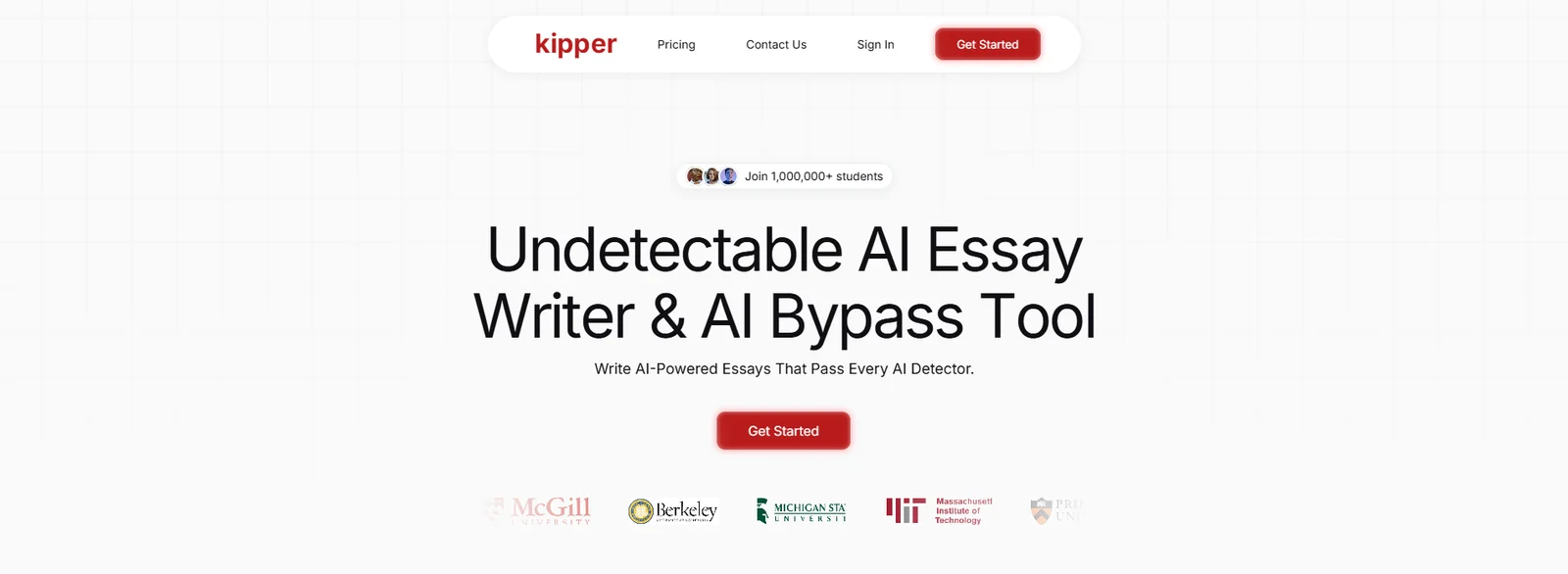
The tools fall into two groups. The writing group has the Essay Writer, the AI Detector with its humanizer, the Text Enhancer and the Citation Finder. The study group has the Summarizer, the AI Teacher, AI Flashcards, AI Exam and a Math Solver. The site itself comes in English, French, Portuguese, Italian, Indonesian, Filipino, German and Spanish.
Is Kipper AI legit?
Yes. Kipper AI is a working subscription service from ECHELON DIGITAL INC., with published Terms of Service, a Refund Policy and a Privacy Policy, and a support page for questions. Kipper's Terms say you need to be at least the age of majority where you live, or have a parent's consent, to use the platform.
How Kipper's AI detector and humanizer work together
Kipper's humanizer is part of the AI Detector, so every rewrite starts with a scan:
- Paste text from ChatGPT or another AI writer into the AI Detector.
- Read the AI detection score and the sections Kipper marks as AI-generated.
- Click to humanize the marked sections.
- Scan the new version again, and repeat until you're happy with the text.
That loop is quick for a short assignment, because you only rewrite the parts the detector marks. It also means the detector decides which sentences change. If you want a passage rewritten whatever its score, the Text Enhancer is the tool for that.
Kipper's Terms describe the detector's results as information only, not a final verdict on where a text came from. They also ask users not to use a detector score to penalize anyone without a proper investigation. That's good advice for any detector. Two detectors can give the same paragraph very different scores, as our 2026 test of AI detector accuracy shows.
The Text Enhancer
The Text Enhancer is a one-click rewriter for writing you want to polish. You upload or paste your text, pick a tone from Kipper's list, and the tool rewrites it with better word choice and sentence structure and fixes mistakes along the way. Use it on a stiff paragraph you wrote yourself, or on a draft that needs a different register. If you only need to move a draft into a formal academic register, our free academic tone converter handles that one job.
The Essay Writer and the Citation Finder
The Essay Writer starts from a title or topic, drafts the paper with sources and in-text citations, and lets you edit it inside Kipper, with the detector built in. The Citation Finder works from your topic or an uploaded paper. It suggests references from scholarly articles, books and journals, formatted in APA or MLA, and you can add them to your document.
Check every suggested reference yourself before you keep it. Open the source, confirm it says what your sentence claims, and match the details in your reference list. AI tools sometimes suggest references that don't exist, and our guide to auditing AI-suggested citations explains how to catch them. Our guide to APA, MLA, Chicago and IEEE covers the format differences.
Kipper's study tools: summaries, AI Teacher, flashcards and practice exams
Most of what the plan buys is study help, and these tools work well together for exam season.
- Summarizer: turns a YouTube lecture, a PDF, a book chapter, an article or pasted text into a short summary of the main points.
- AI Teacher: answers questions about material you upload, such as a lecture video or an article, at any hour.
- AI Flashcards: builds a deck from a file, a subject or a URL.
- AI Exam: writes a three-part practice exam with multiple-choice, short-answer and long-answer questions, then grades it and gives feedback.
- Math Solver: listed on the pricing page as part of the plan.
In a typical week, you summarize two recorded lectures and ask the AI Teacher about the parts you didn't follow. Then you turn the summaries into flashcards and sit a practice exam before the real one. For a long reading, our guide to summarizing a research paper with AI explains what a summary tends to leave out, so you know which sections to read in full.
Kipper AI pricing: one plan billed at US$0.99 a day
Kipper AI has one paid plan. On 5 October 2026 Kipper's pricing page listed it like this:
| Plan | Price | What it includes |
|---|---|---|
| Monthly Plan | US$0.99 a day, billed monthly | Unlimited access to the AI Teacher, Writing Assistant, Summarizer, Text Enhancer, Flashcards, Practice Exam and Math Solver |
At US$0.99 a day, a 30-day month costs US$29.70 and a 31-day month costs US$30.69. A full year costs about US$361 if you keep the plan running. Kipper takes all major credit cards, and its pricing page says it doesn't accept PayPal or cryptocurrency.
The plan suits a student who uses several of the tools every week. The daily price is the same whether you open one tool or all of them. It's best value when you use the summaries, flashcards and practice exams together.
Who Kipper AI suits
Kipper suits a student in a content-heavy course, such as biology, history or psychology, who wants to turn lectures and readings into revision material quickly. It also suits someone who'd otherwise pay for a separate flashcard app, a summarizer and a tutoring chatbot. It's a weaker match for a postgraduate writing a thesis, where the main job is editing one long document with many references. For that job, an editor that works on your own draft and keeps your citations in place is the closer fit. Our guide to humanizing an AI-assisted research paper covers that workflow step by step.
Cancelling and refunds
Kipper says you can cancel your subscription in one click, at any time. Its Terms of Service say refunds aren't available, and they ask you to make sure you're happy with the platform before you subscribe. So decide during your first days whether the tools fit your course, and cancel before the next billing date if they don't. A quick test is to run one real lecture through the Summarizer, ask the AI Teacher three questions about it, and sit an AI Exam on the same material. That shows you in an evening whether the study tools match how your course is taught.
If a payment is declined, Kipper's Terms say access is paused until a payment goes through, and Kipper may try the card again. Keep your card details up to date if you plan to stay subscribed through the term.
What Kipper's Terms say about schoolwork
Kipper's Terms say it never recommends its tools for academic misconduct, and they ask users to follow their institution's policies on AI. They say generated or humanized text shouldn't be submitted for academic credit as your own work. Anything the Essay Writer drafts is a starting point that you must review and substantially rewrite in your own voice. They also make you responsible for checking that any content is original and properly cited.
That matches the advice we give for any AI writing tool. Check your course rules first, keep your sources, and say which tools you used where your course asks. Our guide to writing an AI-use disclosure statement shows how to word that disclosure.
Rewrite Your Own Draft and Keep Every Source
ProofreaderPro.ai's academic humanizer is designed to lower AI scores while APA, MLA, Chicago, IEEE and Turabian citations stay in their format, from US$19 a month.
Try the academic humanizerKipper AI Humanizer vs. ProofreaderPro Humanizer
Kipper puts a detector-led humanizer inside a student study suite. ProofreaderPro.ai is an academic editor whose humanizer is built for drafts you've written with AI help, with citation formats kept in place.
| Feature | ProofreaderPro.ai | Kipper AI |
|---|---|---|
| Made for | Essays, theses and journal papers | Students who want writing and study tools in one plan |
| How a rewrite starts | You paste your draft and choose a mode | You scan a draft in the AI Detector and humanize the marked sections |
| Modes or tones | General and Academic on Academic; General, Academic, Corporate, Creative and Blog/SEO on Academic Plus | A list of tones in the Text Enhancer |
| Citations | Keeps APA, MLA, Chicago, IEEE and Turabian formats in a rewrite | Citation Finder suggests references in APA or MLA |
| Tracked changes | Tracked changes you can view and export as .docx on Academic Plus | None stated |
| Price | US$19 or US$29 a month (US$169 or US$259 a year) | US$0.99 a day, billed monthly |
The two tools do different jobs. Kipper is the bigger study bundle, with summaries, flashcards and practice exams in the same plan. ProofreaderPro.ai is the narrower writing tool, and its humanizer works on a draft you already have, keeping in-text citations such as (Lee, 2023) in their format. For a thesis chapter, the tracked-changes file is often the deciding feature, because your supervisor can accept or reject each edit in Word.
Kipper AI Humanizer Alternatives
Kipper's closest alternatives are other student suites that combine an essay tool, a detector and a humanizer, plus the writing assistants students often compare with it.
| Tool | Best for | Our write-up |
|---|---|---|
| ProofreaderPro.ai | Humanizing your own academic drafts with citations kept in format | Academic AI humanizer |
| JustDone | A study app with 35+ tools and a humanize, detect and refine loop | JustDone AI humanizer review |
| Litero | A writing assistant for students that guides a paper from sources to final draft | Litero AI humanizer review |
| EssayDone | An essay writer with a humanizer and an intensity setting | EssayDone AI humanizer review |
| Conch AI | Notes, flashcards and study sets with a humanizer included | Conch AI alternative |
| QuillBot | Paraphrasing and grammar with a humanizer, at a low yearly price | QuillBot humanizer write-up |
| Grammarly | A free humanizer with a custom voice, next to Grammarly's AI Detector | Grammarly AI humanizer guide |
Kipper AI and Conch AI
Both are study apps first, with a humanizer and a detector included. Conch offers a free plan with 10 credits a day and a yearly Limitless plan at US$144, while Kipper bills US$0.99 a day on one plan. Conch's Chat cites the page each answer came from, and Kipper's AI Exam grades a three-part practice test. If you mostly revise from your own notes and slides, Conch fits that routine. If you want practice exams and lecture summaries, Kipper covers those.
Kipper AI and JustDone
JustDone and Kipper both join an essay tool, a detector and a humanizer in one dashboard. JustDone has more writing tools, and Kipper adds study tools such as AI Teacher and flashcards. Choose by what you'll use most during a term: writing help, or study help.
Frequently asked questions
Q: Is Kipper AI free?
Kipper AI lets you create a free account, and full access to the tools comes with the paid Monthly Plan at US$0.99 a day, billed monthly. The pricing page lists one paid plan.
Q: How much does Kipper AI cost?
Kipper AI costs US$0.99 a day, billed monthly, which is US$29.70 for a 30-day month. That one plan gives unlimited access to every tool.
Q: Where is the humanizer in Kipper AI?
Kipper's humanizer is part of the AI Detector. You scan a draft, Kipper marks the sections it scores as AI-generated, and you humanize those sections with one click.
Q: Is Kipper AI legit?
Yes. Kipper AI is run by ECHELON DIGITAL INC. and publishes Terms of Service, a Refund Policy and a Privacy Policy.
Q: Is Kipper AI good?
Kipper AI is good value if you'll use its study tools as well as its writing tools. One daily price covers the Summarizer, AI Teacher, flashcards, practice exams and the detector. For a paper with a long reference list, an academic humanizer that keeps citation formats suits that job better.
Q: How do I cancel my Kipper AI subscription?
Kipper says you can cancel your subscription in one click, at any time, from your account. Cancel before your next billing date to stop the next charge.
Q: Does Kipper AI give refunds?
No. Kipper's Terms of Service say refunds aren't available, so try the tools early in your first billing period before you decide to keep the plan.
Q: How accurate is Kipper's AI detector?
Kipper's Terms describe its detector results as information only, not a definitive verdict, and advise against penalizing anyone on a score alone. Treat the score as one opinion and compare it with how you wrote the text.
Q: Which payment methods does Kipper AI accept?
Kipper accepts all major credit cards. Its pricing page says it doesn't take PayPal or cryptocurrency.
Q: Can I use Kipper AI for schoolwork?
Kipper's Terms ask users to follow their institution's AI policies and say humanized or generated text shouldn't be submitted for credit as your own work. Use its study tools freely, check your course rules before you use any writing tool, and disclose AI help where your course asks.
Q: Which citation styles does Kipper's Citation Finder support?
Kipper's Citation Finder formats references in styles such as APA and MLA. Check each suggested source yourself before you add it to your reference list.
For drafts you wrote with AI help: citations kept in format, frozen terms and tracked-changes export on Academic Plus.

Dana is a content creator at ProofreaderPro, where she runs the daily blog and writing operations. She writes the articles on how the online editing platform works, and she handles customer messages every day, with a five-star satisfaction score to show for it.