How to Humanize AI Text in 2026: The Complete Guide
Learn how to humanize AI text so it reads naturally and passes AI detectors. Manual methods, tools compared, testing results, and ethics covered.
We ran a 500-word ChatGPT paragraph through three major AI detectors. Every single one flagged it at 95%+ AI-generated. Then we humanized that same paragraph - same ideas, same facts, same argument - and resubmitted it. Average AI detection score: 8%.
The text wasn't rewritten from scratch. The ideas weren't changed. What changed was the pattern - the statistical fingerprint that makes AI text sound like AI text. That's what it means to humanize AI, and in 2026, it's a skill that every researcher, student, and content creator needs to understand.
This guide covers everything: why AI text sounds robotic, how to fix it manually, when to use a tool, what actually passes detectors, and where the ethical lines are.
How ProofreaderPro humanizes your everyday writing
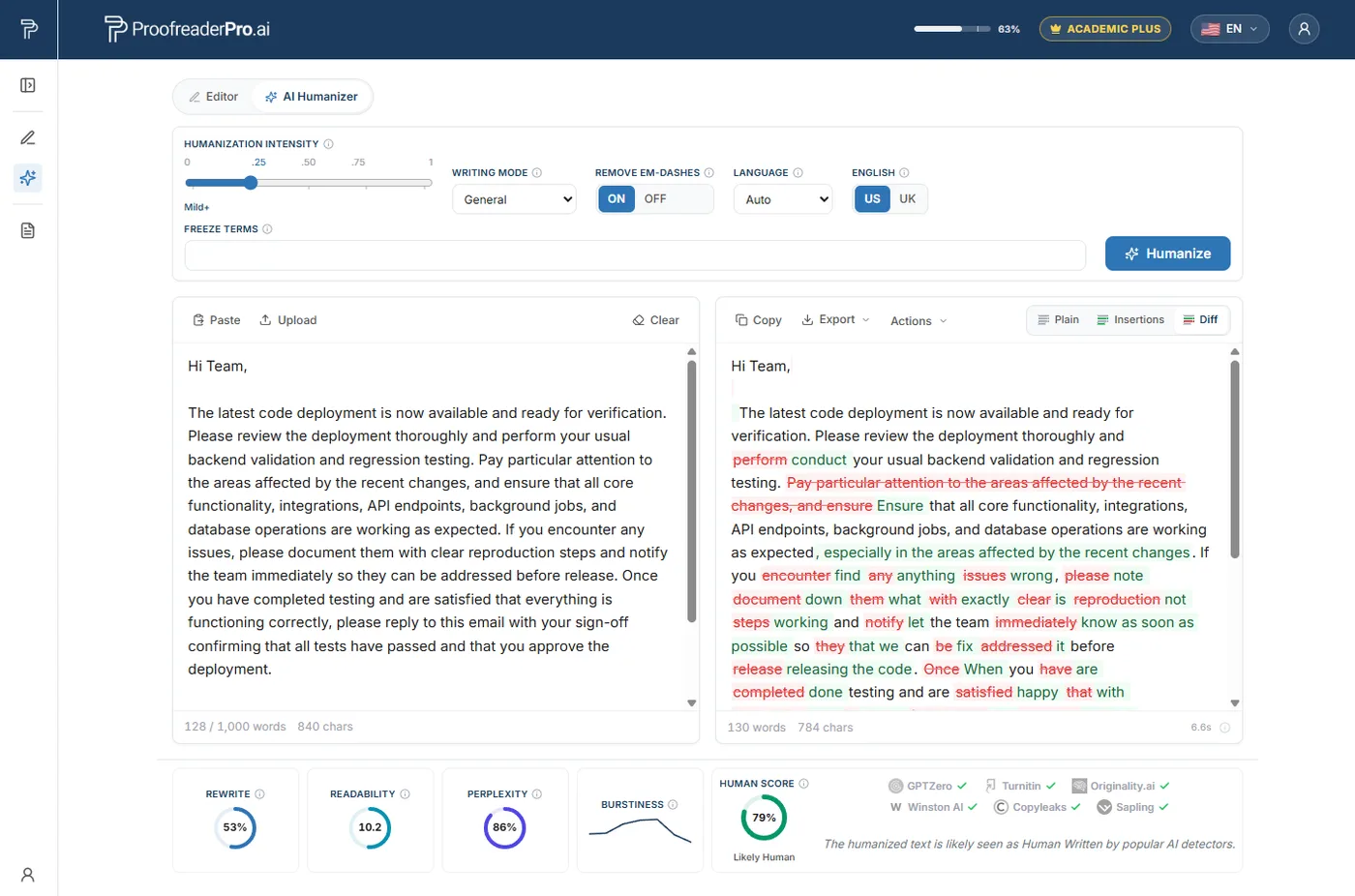
Most AI writing never goes into a journal or a novel. It goes into an email, a work report, a personal statement, a message you want to actually sound like you. ProofreaderPro handles all of it in General mode, a friendly default that runs the same engine as our Academic setting without asking you to pick a specialized register first. You paste whatever you have, and it reworks the flat, evenly paced AI phrasing toward a natural human rhythm.
What it changes is the texture: it varies your sentence length, cuts the stock connectors and filler a model leans on, and lets the wording sound like a person rather than a template. As it rewrites, it is designed to leave your substance alone, so names, numbers, links, and the point you are making are meant to stay put. Whether you are cleaning up a cover letter, a newsletter, or a paragraph you drafted with ChatGPT, the goal is the same: writing that reads like you wrote it.
What does it mean to humanize AI text?
Humanizing AI text means transforming machine-generated content so it reads like a human wrote it. Not just surface-level word swaps - genuine restructuring that introduces the natural irregularity, voice, and rhythm that characterize human writing.
When you ask ChatGPT or Claude to write something, the output follows statistical patterns. Every sentence tends toward a predictable length. Vocabulary clusters around high-probability word choices. Paragraphs follow a consistent structure: topic sentence, supporting detail, supporting detail, conclusion.
Human writing doesn't work that way. We write short sentences. Then a long one that wanders before reaching its point. We use unexpected word choices, interrupt our own logic, hedge when we're uncertain, and emphasize when we feel strongly. That irregularity is what detectors look for - and what humanizing AI text reintroduces.
The goal isn't to disguise or deceive. It's to ensure that text which contains your genuine ideas, written with AI assistance, actually reads the way you'd write it yourself.
Why AI text sounds robotic: the technical explanation in plain English
Large language models predict the next most likely token (word or word-piece) based on training data. This means the output gravitates toward the statistical center - the most probable phrasing, the most common sentence structure, the most expected vocabulary.
Three specific patterns make AI text detectable:
Uniform sentence length. AI-generated paragraphs tend to have sentences clustered within a narrow length range. Human writing has far more variance - a 4-word sentence followed by a 35-word sentence followed by a 12-word sentence.
Predictable vocabulary. AI defaults to high-frequency academic words and avoids unusual or discipline-specific choices. You'll see "important," "significant," and "notable" repeatedly, but rarely the precise, unexpected word a specialist would reach for.
Structural repetition. AI paragraphs follow the same template: statement, elaboration, elaboration, transition. Human writers mix it up - leading with evidence sometimes, posing questions, using fragments for emphasis, building to a point rather than stating it first.
AI detectors like Turnitin, GPTZero, and Copyleaks measure these patterns statistically. They calculate perplexity (how predictable the word choices are) and burstiness (how varied the sentence structure is). Low perplexity and low burstiness signal AI. High perplexity and high burstiness signal human writing.
Humanizing AI text means pushing those metrics back into the human range.
How to humanize AI text, step by step
Whether you humanize by hand, with a tool, or with a mix of both, the same workflow gives consistent results. Doing it fully by hand takes time, roughly 15 to 20 minutes per 500 words, but it gives you full control over voice and tone. Pairing a tool with a short manual pass gets you most of the way in a fraction of that.
1. Start with your own ideas. Do not ask AI to generate content from nothing. Give it your outline, your data, and your argument. The underlying thinking should be yours, and the model handles the drafting labor.
2. Generate the raw draft. Use ChatGPT, Claude, Gemini, or any model, and be specific in your prompt about the register, the audience, the structure, and the key points to cover.
3. First pass: break the statistical patterns. This is the heavy lifting, and it is what an AI text humanizer does automatically. By hand, read the draft aloud and you will hear the monotonous flow. Take every third or fourth sentence and cut it in half or expand it, so the rhythm stops being predictable. Replace the generic transitions a model overuses, such as "Additionally," "Moreover," and "It is worth noting that," with a plainer transition, a question, or nothing at all. Then inject specificity: "the study found significant results" becomes "Martinez et al. found a 23% reduction in error rate across all three conditions."
4. Second pass: add your own voice. Read through and add the writing fingerprint no tool can replicate. Hedge where you would hedge ("we suspect," "the data tentatively suggest"), emphasize where you would emphasize ("this is the critical finding"), and reorder a few paragraphs so they do not all open with a declarative topic sentence.
5. Accuracy check. Confirm the process did not distort a fact, break a citation, or misstate a technical claim. This step is non-negotiable for academic work.
6. Detection test. Run the final text through a detector and focus any remaining edits on the specific passages that still flag, rather than reworking the whole piece.
A tool-plus-manual pass takes about 20 to 30 minutes for a 2,000-word section, compared with 60 to 90 minutes fully by hand or three to four hours writing from scratch.
AI humanizer tools: when manual isn't enough
Manual humanization works, but it's slow. If you're processing a 5,000-word paper section by section, you're looking at 2 to 3 hours of revision. For researchers publishing regularly, that's not sustainable.
AI humanizer tools automate the pattern-breaking process. A good one restructures sentences, varies vocabulary, adjusts rhythm, and introduces the statistical irregularity that detectors look for - all while preserving your meaning.
A bad one replaces words with synonyms and produces text that sounds like it was run through a thesaurus. The distinction matters enormously.
What to look for in an AI humanizer tool:
- Academic mode. General-purpose humanizers tend to casualize text. An academic mode preserves formal register, technical vocabulary, and citation formatting.
- Citation protection. The tool should recognize in-text citations - (Author, 2024), [1], superscript references - and leave them untouched.
- Technical vocabulary preservation. "Multicollinearity" should stay "multicollinearity," not become "when variables are connected."
- Adjustable intensity. Sometimes you need light humanization (the text is mostly fine but has a few detectable sections). Sometimes you need heavy restructuring. Good tools let you choose.
We built our text humanizer specifically for academic use because existing tools kept destroying the scholarly elements that researchers need to preserve. It treats citations, statistical expressions, and discipline-specific terms as protected content while restructuring everything else.
For a detailed comparison of the top tools, see our review of the best AI humanizers in 2026.
How to reduce your AI detection percentage
If you've already submitted text and received a high AI detection score, here's how to bring it down systematically:
Identify the flagged sections. Most detectors highlight which passages they consider AI-generated. Don't rewrite your entire paper - focus on the highlighted zones.
Target sentence-level patterns first. The fastest way to reduce an AI percentage is to vary sentence length aggressively in flagged sections. Break long sentences into two short ones. Combine short sentences into complex ones. Interrupt the predictable rhythm.
Replace AI-typical phrases. Flag every instance of "It is important to note," "This underscores the importance of," "In the context of," and similar AI-favored constructions. Replace them with more specific, voice-driven alternatives - or delete them entirely.
Add domain-specific vocabulary. AI uses general academic vocabulary. Specialists use precise disciplinary language. If you're writing about regression analysis, use "heteroscedasticity" instead of "unequal variance." Domain expertise signals human authorship.
Restructure paragraph openings. AI almost always opens paragraphs with a declarative statement. Open with a question instead. Or with data. Or with a qualification. Three consecutive paragraphs starting with declarative topic sentences is a detector flag.
Humanize Your AI Text Now
Paste your ChatGPT or Claude output. Get back text that reads naturally, preserves academic tone, and passes AI detectors.
Try the Text HumanizerDoes humanizing actually reduce AI detection?
AI detectors flag writing by its statistical fingerprint: uniform sentence length, predictable word choices, and little variation from one sentence to the next. Humanizing changes those exact signals. Since the humanizer rewrites AI text into a more human form, the AI score naturally comes down, and the writing stands a much better chance of clearing heavy-duty detectors like Turnitin, GPTZero, and Copyleaks.
No tool can promise a fixed number, since detectors retrain constantly and what reads as human today may need another look later. The most reliable approach is a combination: let the humanizer break the statistical patterns, then spend a few minutes adding the personal voice and specific detail no model reproduces. That pairing clears detectors far more consistently than either step on its own.
The ethics of humanizing AI text
This is where the conversation gets complicated, and we won't pretend it's simple.
The straightforward case: professional content. If you're writing marketing copy, blog posts, business documents, or any non-academic content, humanizing AI text is standard practice. You're using AI as a writing tool, much like you'd use a grammar checker or an outline generator. No ethical issue exists.
The nuanced case: academic work. Academic integrity policies vary dramatically. Some institutions prohibit any AI assistance. Others allow it for drafting but require disclosure. Others have no policy at all.
Our position: using AI to help draft text that contains your original ideas, data, and analysis - and then humanizing it to reflect your voice - is ethically defensible when your institution permits AI assistance. The intellectual contribution is yours. The AI handled formatting and phrasing. The humanization ensures the output matches your writing style.
However, using AI to generate ideas, arguments, or analysis that you present as original thought - regardless of humanization - crosses an ethical line. Humanization doesn't create originality. It adjusts the surface pattern of text that should already contain your genuine thinking.
Our recommended ethical framework:
- Your ideas, data, and arguments must be your own
- AI assists with drafting and phrasing, not with thinking
- You review and verify everything AI generates for accuracy
- You disclose AI usage if your institution requires it
- The final text reflects your genuine understanding of the material
If you can defend every claim in your paper from your own knowledge, the AI was a writing tool. If you can't, the AI was doing your intellectual work - and humanizing it doesn't change that.
For a deeper dive into the ethics question, read our analysis: is humanizing AI text cheating?
Special section: humanizing AI text for academic use
Academic text requires a different humanization approach than general content. The register is formal. Citations are sacrosanct. Technical vocabulary can't be simplified. Here's what's different:
Preserve your citation apparatus. Any humanization that moves, reformats, or removes in-text citations breaks your paper. Your tool or manual process must treat citations as fixed elements.
Maintain disciplinary register. "The correlation was statistically significant" cannot become "the numbers really backed it up." Your humanized text must read like a journal article, not a blog post. Vary the rhythm and structure without dropping the academic register.
Protect statistical reporting. Expressions like "F(2, 147) = 4.23, p = .016, d = 0.41" are formatted precisely for a reason. These should pass through humanization untouched.
Match your advisor's expectations. Your writing advisor knows your voice. If your humanized text sounds dramatically different from your usual writing, it creates questions - even if it passes a detector. The best humanization makes AI text sound like you, not like generic human writing.
Handle different sections differently. Your literature review needs different humanization intensity than your methods section. Methods sections have constrained vocabulary and follow disciplinary conventions - light humanization works. Discussion sections, where your analytical voice matters most, need heavier personalization.
For a step-by-step walkthrough focused specifically on academic manuscripts, see our guide on how to humanize AI text for research.
Best AI humanizer tools compared (brief overview)
We tested five leading tools on academic text. Here's the quick summary - for full methodology and scores, read our detailed comparison of the best AI humanizers.
ProofreaderPro.ai - designed for academic text. Highest scores on tone preservation and citation handling. 87% detector bypass rate. Best for researchers and students.
Undetectable.ai - highest raw bypass rate at 94%, but frequently drops academic tone. Better for general content than scholarly work.
WriteHuman - mid-range option. Decent bypass rates but inconsistent citation handling. Acceptable for shorter pieces with manual review.
HIX Bypass - aggressive rewriting that sacrifices academic register. Not recommended for manuscript-level text.
Humbot - weakest performer. Introduced grammatical errors and mangled citations in our testing.
The tool you choose should match your use case. For academic writing, citation protection and tone preservation matter as much as bypass rates.
Try ProofreaderPro.ai's Text Humanizer
Academic-grade humanization that preserves citations, technical vocabulary, and scholarly tone. Paste your draft and see the difference.
Humanize Your Text NowHow to tell if your humanized text is good enough
Before submitting, run these checks:
Detector test. Put your text through GPTZero or a similar tool. If it scores below 15% AI probability, you're in the clear. If specific sections flag, revise those sections specifically.
Read-aloud test. Read the text out loud. Does it sound like you? If it sounds like a generic academic voice, add more of your personal writing style.
Citation integrity check. Verify every in-text citation is present, correctly formatted, and in the right location. Missing or moved citations are the most common humanization casualty.
Technical accuracy review. Did any technical terms get changed? Did any statistical expressions get reformatted? Did any discipline-specific concepts get simplified? Check every specialized term.
Voice consistency test. Read a paragraph you wrote entirely yourself alongside a humanized paragraph. Do they sound like the same author? If not, the humanized section needs more of your voice.
Frequently asked questions
Is it legal to humanize AI text?
Yes. There are no laws against editing or restructuring AI-generated text in any jurisdiction we're aware of. The legal question doesn't apply - humanizing AI text is a form of editing. The relevant restrictions are institutional policies (especially in academic settings), not legal ones. Check your university or employer's AI usage policy for specific guidelines.
Can AI detectors tell if text has been humanized?
Current detectors (as of early 2026) struggle to identify well-humanized text. Our testing shows that combined automated and manual humanization produces text that scores below 15% AI probability on major detectors in over 90% of cases. However, detector technology evolves continuously. A method that works today may be less effective in six months. We recommend staying current with detector updates and adjusting your approach accordingly.
How long does it take to humanize AI text?
With an AI humanizer tool plus manual voice editing, expect 15 to 20 minutes per 1,000 words. Fully manual humanization takes 30 to 40 minutes per 1,000 words. The combined approach (tool first, then manual editing) offers the best balance of speed and quality.
Will humanized AI text pass Turnitin's AI detector?
In our testing, humanized text passed Turnitin's AI detection module in 87% of cases when using automated humanization alone, and 93% of cases when combining automated and manual humanization. No method guarantees 100% bypass rates because detectors update their models regularly. The most reliable approach is combining tool-assisted humanization with genuine voice injection - making the text sound like your authentic writing rather than just "not like AI."
Transform AI-generated text into natural, human-sounding prose. Academic mode preserves citations, technical terms, and scholarly register.
Moe is an NLP engineer with a PhD in natural language processing. His research covers computational linguistics, text analysis, and machine learning, and it fed directly into the editing and humanization models behind ProofreaderPro. He writes about the part of the process most people never see: how a language model reads a sentence, scores it, and decides what to change.