8 Free Alternatives to Grammarly Premium for Academic Writing
Grammarly Pro costs US$12 a month. Compare 8 free alternatives for academic writing, such as ProofreaderPro, LanguageTool, QuillBot and Trinka, by free limits.

The best free Grammarly alternative for academic writing is ProofreaderPro.ai. Its free grammar checker explains every correction, and you can try its academic editor on 250 words a month at every editing level. For general writing, LanguageTool, QuillBot, ProWritingAid, Hemingway Editor, Microsoft Editor and Google Docs all have free versions, each with its own limits.
Grammarly Free is a good everyday checker for spelling and grammar. Most of the features students want for papers, such as full-sentence rewrites, plagiarism checks and citation consistency, are in Grammarly Pro at US$12 a month. If you're looking for free alternatives to Grammarly, it helps to know which of those features you need, because each free tool covers a different part.
Best free Grammarly alternatives compared
Free plans and paid prices as of October 2026:
| Tool | What's free | Free limit | Paid plan | Main focus |
|---|---|---|---|---|
| ProofreaderPro.ai | Grammar, spelling, punctuation and essay checkers, citation tools and the academic editor | Checkers: 2 a day, 250 words each. Editor: 250 words a month | Academic, US$19 a month | Academic and research writing |
| Grammarly Free | Spelling and grammar, tone detection and AI prompts | 100 AI prompts a month | Pro, US$12 a month | Everyday writing in English |
| LanguageTool | Grammar, spelling and basic style checks in 30+ languages | None stated | Premium, up to 150,000 characters per text | Writing in several languages |
| QuillBot | Grammar checker, paraphraser and summarizer | Unlimited grammar checks; paraphrasing up to 100 words in 2 modes | Premium, US$4.17 a month billed annually | Paraphrasing and summaries |
| ProWritingAid | Grammar, spelling and style reports | 500 words at a time; 10 rephrases a day | Premium, US$10 a month billed yearly | Fiction and long-form writing |
| Hemingway Editor | Readability highlights in the web editor | Free web editor | Hemingway Editor Plus, with a 2-week free trial | Short, clear sentences |
| Microsoft Editor | Basic spelling and grammar in Word for the web, Edge and the browser extension | Free with a Microsoft account | Microsoft 365 adds refinements | Word and Outlook users |
| Google Docs | Spelling and grammar suggestions | Free with a Google account | None needed | Docs users, in 6 languages |
| Trinka | Grammar checks for academic and technical writing | Free Basic plan, no card needed | Premium, billed yearly | Academic writing |
ProofreaderPro.ai: a free Grammarly alternative built for academic writing
ProofreaderPro.ai is an academic editing suite for research papers, theses and essays. It proofreads, paraphrases, summarizes, translates and humanizes academic text. The editor keeps APA, MLA, Chicago, IEEE and Turabian citations as you wrote them, and it doesn't change your in-text citations or reference list.
The free checkers work on a paragraph or two at a time. The free grammar checker fixes grammar, spelling and punctuation in up to 250 words. It lists every correction next to your original wording, with a short note on the rule. It makes the smallest correct fix and leaves your vocabulary and sentence order alone. The spell checker, punctuation checker and essay checker work the same way, and each has 2 free checks a day on a free account.
Some tools don't need an account at all. The readability checker scores your text with six formulas, including Flesch Reading Ease and Gunning Fog, and the passive voice checker highlights every passive sentence. The reference format converter turns a reference list from one style into another, such as APA into Vancouver, with no limit on use.
The academic editor is the main product. The free plan gives you 250 words a month, 3 documents, all editing levels, tense conversion, UK and US English and TXT export. That's enough to see how it edits a real paragraph from your paper before you pay for anything.
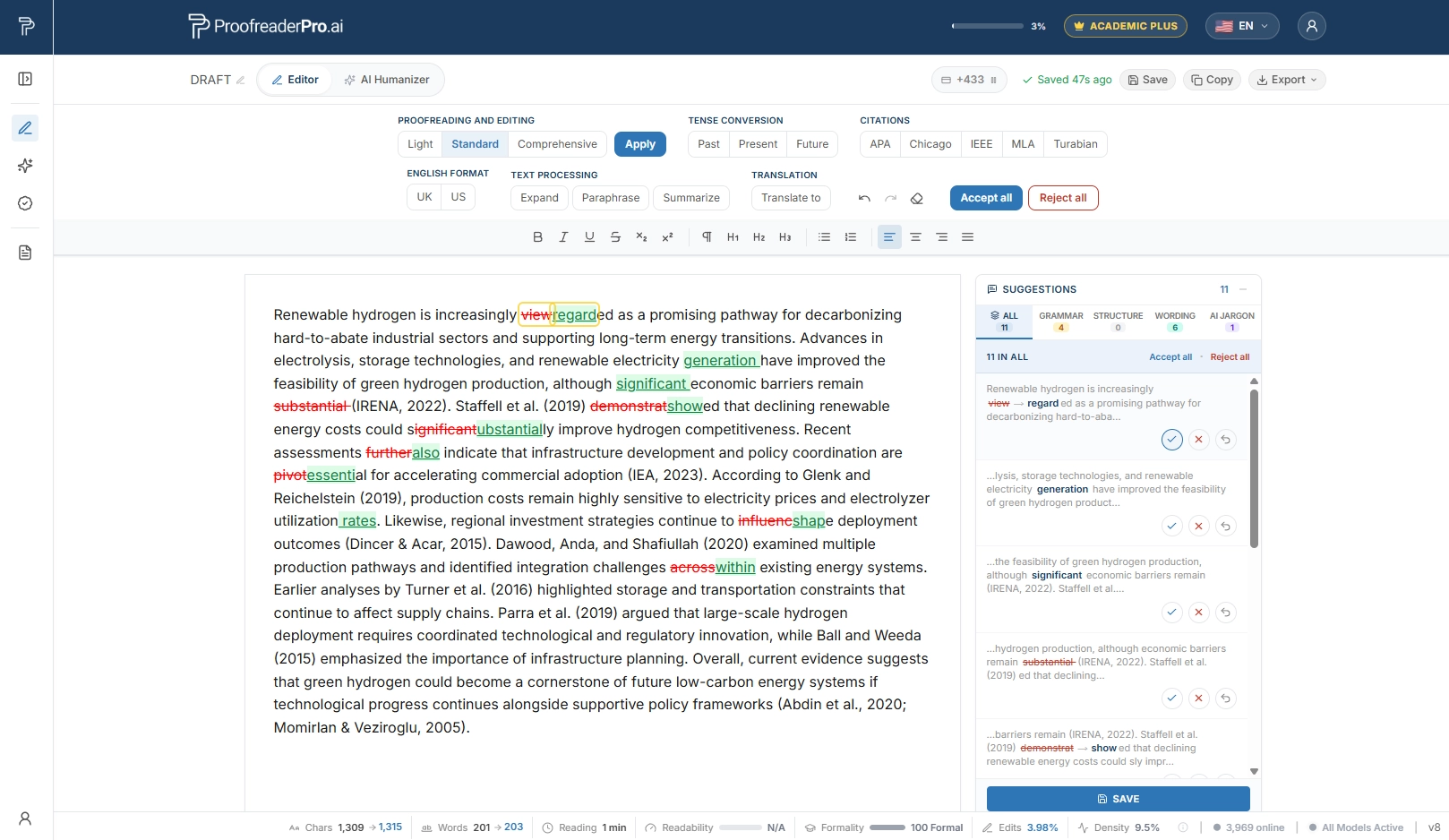
The Academic plan is US$19 a month, or US$169 a year, for 25,000 words. It adds paraphrasing, summarizing, citation tools, file uploads, Word export and the AI humanizer in Academic mode. Academic Plus is US$29 a month, or US$259 a year, for 50,000 words. It adds tracked-changes export, translation in 60+ languages and all five humanizer modes.
Tracked changes matter when someone else reviews your work. Your supervisor or co-authors can open the edited file in Word and accept or reject each change, the same way they review your drafts now. ProofreaderPro.ai doesn't have a browser extension, so you paste text into the editor or upload a file, review the edits and export the result. A checker that runs in your browser is simpler for emails and quick messages.
Other free Grammarly alternatives
LanguageTool
LanguageTool checks grammar, spelling, punctuation and style in more than 30 languages. It has browser add-ons for Chrome, Edge, Firefox and Opera, and add-ons for Google Docs, Word, LibreOffice, Gmail and Thunderbird. The free Basic plan covers grammar and basic style checks. Premium adds more style and punctuation checks, unlimited AI paraphrasing and texts of up to 150,000 characters.
QuillBot
QuillBot's grammar checker is free with unlimited checks, and it corrects grammar in more than six languages. The free plan also lets you paraphrase up to 100 words at a time in two modes, Standard and Fluency, and make basic summaries. Premium costs US$4.17 a month billed annually. It adds every paraphrasing mode, a plagiarism checker with 25,000 words a month, full AI detector access and the humanizer. Our ProofreaderPro.ai vs QuillBot comparison covers how the two handle academic text.
ProWritingAid
ProWritingAid's free plan checks grammar, spelling and punctuation, with suggestions for 500 words at a time. You also get 10 rephrases a day and 2 runs a day of its line editing report. Premium costs US$10 a month billed yearly (US$120) and removes the word limit. Many of its extra features, like Story Canvas and Chapter Critique, are made for fiction writers.
Hemingway Editor
The free Hemingway Editor on the web highlights long sentences, hard-to-read sentences, adverbs, passive voice and words with simpler alternatives. It shows a readability grade as you edit, and it leaves the rewriting to you. Grammar checks and AI fixes are part of Hemingway Editor Plus, which has a 2-week free trial. Our ProofreaderPro.ai vs Hemingway Editor comparison looks at how it treats long academic sentences.
Microsoft Editor
Microsoft Editor is built into Word for the web and Microsoft Edge, and it's also a browser extension for Edge and Chrome. With a free Microsoft account, you get basic spelling and grammar checks in more than 20 languages. A Microsoft 365 subscription adds refinements for clarity, conciseness and formality, and readability statistics in Word for the web.
Google Docs
Google Docs has a spelling and grammar check built in, and it's free with a Google account. Grammar suggestions work in English, Spanish, French, German, Portuguese and Italian. You accept or ignore each suggestion in the document, and you can add words to a personal dictionary.
Trinka
Trinka is a grammar checker for academic and technical writing, with a free Basic plan that needs no card. Its Premium plan adds style guides such as APA and IEEE, a Word add-in and file proofreading. Our ProofreaderPro.ai vs Trinka comparison goes through the differences for research papers.
Academic editing, free to start
Try the editor on 250 words a month for free. Academic is US$19 a month for 25,000 words, with paraphrasing, citation tools and Word export.
Try the AI ProofreaderGrammarly Free vs Pro: free alternatives to Grammarly Premium
Grammarly's paid plan for individuals is now called Pro, and it used to be called Premium. Grammarly Free gives you spelling and grammar corrections, tone detection and 100 AI prompts a month. Pro costs US$12 a month. It adds full-sentence rewrites, tone adjustments, fluency suggestions, citation consistency, plagiarism and AI detection, and 2,000 AI prompts a month.
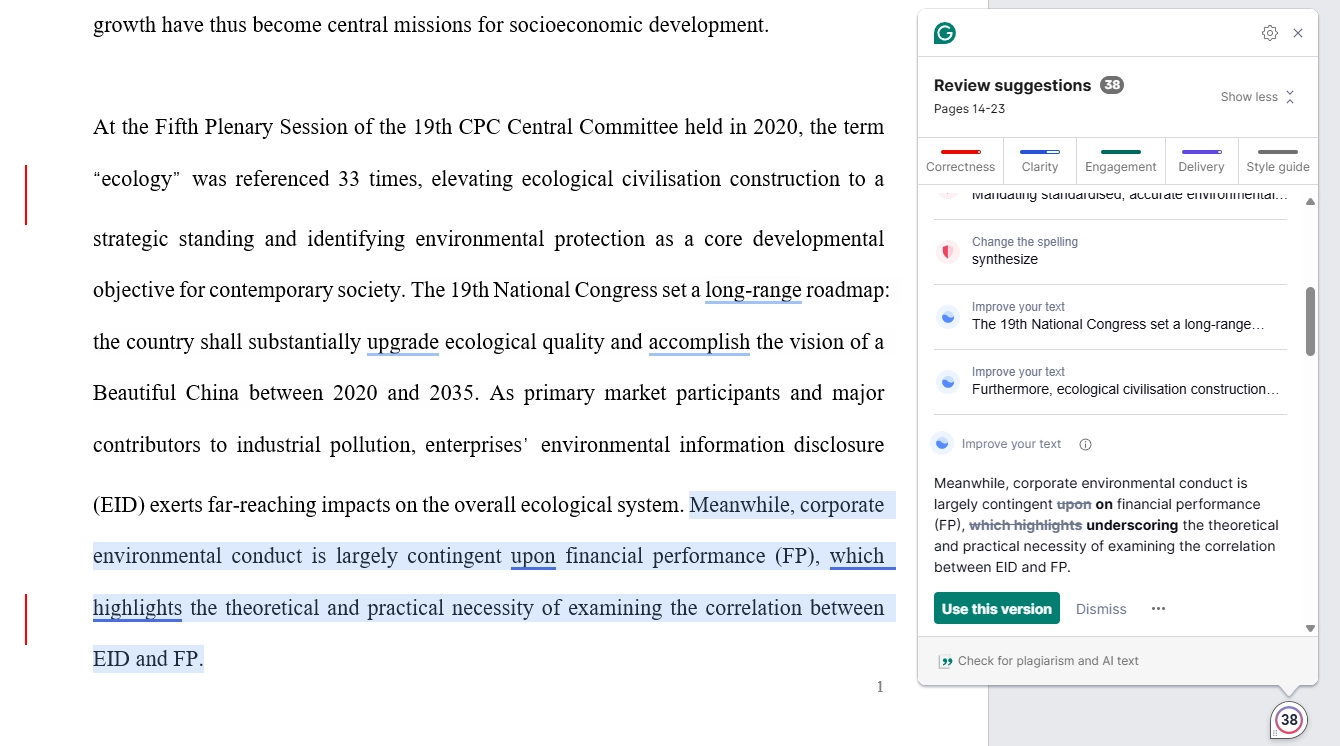
No single free tool has every Pro feature. Most of them have a free option somewhere, with limits:
| Grammarly Pro feature | Free option | Free limit |
|---|---|---|
| Full-sentence rewrites | QuillBot paraphraser; ProWritingAid rephrases | 100 words in 2 modes; 10 rephrases a day |
| Clarity and readability | ProofreaderPro.ai readability checker; Hemingway Editor | No sign-up for either |
| Passive voice | ProofreaderPro.ai passive voice checker | No sign-up |
| Explained grammar fixes | ProofreaderPro.ai grammar checker | 2 checks a day, 250 words each |
| Consistent citations | ProofreaderPro.ai in-text citation fixer | 2 runs a day with a free account |
| Reference list style | ProofreaderPro.ai reference format converter | Unlimited, no account |
The in-text citation fixer corrects and converts every parenthetical and narrative citation in your text to APA 7, MLA 9, Chicago author-date or Harvard, and it lists each change. It handles commas, ampersands, et al., page numbers and combined citations by the rules of each style. For a full paper, the citation tools in the Academic plan do the same job across the whole document.
If you mainly want Grammarly's AI features, our Grammarly AI detector post explains what Grammarly's detector checks, and our ProofreaderPro.ai vs Grammarly comparison compares the paid plans side by side.
What research says about Grammarly and its alternatives
In a 2019 study in the Australasian Journal of Educational Technology, Ruth O'Neill and Alex Russell compared two groups of students at CQUniversity in Australia. One group of 54 students got grammar feedback from Grammarly, and a group of 42 got traditional feedback from the university's Academic Learning Centre. The Grammarly group responded more positively on 9 of the 15 survey items, and they were significantly more satisfied with the grammar advice. The authors recommended using Grammarly together with input from an academic learning advisor.
A second study compared Grammarly with ChatGPT, a general AI chatbot that people also use for proofreading. In a 2023 paper posted on arXiv, Haoran Wu and colleagues tested ChatGPT, Grammarly and a research model called GECToR on the CoNLL-2014 grammar correction benchmark. ChatGPT scored lower than both on the standard automatic metrics, especially on long sentences. In the human evaluation, ChatGPT made fewer missed corrections and more over-corrections, because it often changed the wording or sentence structure while keeping the text grammatical.
The second result matters for academic writing. A tool that rewrites more than it needs to can change a technical term or move a claim away from its citation. An academic grammar checker should make the smallest correct fix and show you each change, and our free grammar checker is built to work that way.
How to choose a free grammar checker for academic work
A free grammar checker for a paper needs to handle a few things that everyday writing doesn't. Check these before you trust one with a chapter:
- It should leave in-text citations like (Hernandez et al., 2025) alone and not treat them as sentence errors.
- It should keep field-specific terms, gene names and abbreviations exactly as you wrote them.
- It should explain each fix, so you learn the rule and can reject a wrong suggestion.
- Its word limit should fit your work. A 250-word or 500-word limit is fine for a paragraph, and a full chapter needs a paid plan or many separate checks.
- It should give you a Word file with tracked changes if a supervisor reviews your edits.
- It should handle your first language as well as English if you write in English as a second language.
Our list of common grammar mistakes in academic writing shows the errors to look for in your own drafts. If you're ready to pay for a tool, our ranking of the best AI proofreading tools covers the paid options for academic papers.
Frequently asked questions
Q: What is the best free alternative to Grammarly?
The best free alternative to Grammarly for academic writing is ProofreaderPro.ai. Its free grammar, spelling, punctuation and essay checkers explain every fix, and you can try the academic editor on 250 words a month. LanguageTool, QuillBot, Microsoft Editor and Google Docs also have free grammar checks for general writing.
Q: Is there a free version of Grammarly?
Yes, Grammarly Free costs nothing and checks spelling and grammar, shows your tone and includes 100 AI prompts a month. Full-sentence rewrites, plagiarism and AI detection and citation consistency are in Grammarly Pro, from US$12 a month.
Q: Is there a free alternative to Grammarly Premium?
No single free tool has every feature of Grammarly Pro, which replaced Premium. You can cover most of them with free tools, such as QuillBot's paraphraser for rewrites and ProofreaderPro.ai's free checkers for explained grammar fixes, readability, passive voice and citations.
Q: Are there apps or websites like Grammarly for free?
Yes, ProofreaderPro.ai, LanguageTool, QuillBot, ProWritingAid, Hemingway Editor and Trinka all have free plans on the web. Microsoft Editor and Google Docs include free spelling and grammar checks, and LanguageTool and Microsoft Editor also work as browser extensions.
Q: Is there a Grammarly alternative with no AI?
Yes, the free Hemingway Editor only highlights hard-to-read sentences, adverbs and passive voice, and its AI features are in the paid Plus version. ProofreaderPro.ai's free readability checker and passive voice checker also measure your text without rewriting it.
Q: Can ChatGPT replace Grammarly for proofreading?
ChatGPT can correct grammar, but it tends to rewrite more than a grammar checker does. In a 2023 test on the CoNLL-2014 benchmark, human raters found that ChatGPT made fewer missed corrections and more over-corrections, often changing wording and sentence structure. For a paper, that means checking every change against your meaning and citations.
Q: Which Grammarly alternative is best for AI humanization?
For academic writing, ProofreaderPro.ai's AI humanizer is the alternative to Grammarly's humanizer, with an Academic mode that keeps citations and technical terms. It's included from the Academic plan at US$19 a month. Our Grammarly AI humanizer alternative post compares the two.
Q: Is ProofreaderPro.ai free?
Yes, ProofreaderPro.ai has a permanent free plan with 250 words a month in the editor, and its free checkers give you 2 checks a day each. The Academic plan costs US$19 a month and Academic Plus costs US$29 a month. You don't need a card for the free plan.
Q: Does ProofreaderPro.ai have a browser extension like Grammarly?
No, ProofreaderPro.ai doesn't have a browser extension. You paste text into the editor, or upload a file on a paid plan, and review each edit before you export. Grammarly's extension corrects text as you type in other apps.
Q: What is the best free grammar checker for non-native English speakers?
For academic writing, ProofreaderPro.ai suits non-native English speakers, because each fix in the free grammar checker comes with a short explanation of the rule. The paid Academic Plus plan adds translation in 60+ languages and humanizing in languages other than English.
Academic proofreading at every editing level, with APA, MLA, Chicago and IEEE citations kept as you wrote them. 250 words a month free.

Dana is a content creator at ProofreaderPro, where she runs the daily blog and writing operations. She writes the articles on how the online editing platform works, and she handles customer messages every day, with a five-star satisfaction score to show for it.