Cach su dung Claude cho viec viet nghien cuu hoc thuat (Quy trinh thuc hanh)
Quy trình thực tiễn dùng Claude như trợ lý viết học thuật, cùng ứng dụng, mô hình, mức nỗ lực và gói phù hợp cho nghiên cứu nghiêm túc.
Một đồng nghiệp đã chia sẻ một ảnh chụp màn hình vào tháng trước, cho thấy một cuộc trò chuyện với Claude, nơi cô ấy đã động não, lập dàn ý, soạn thảo và chỉnh sửa toàn bộ phần mở đầu của một bài báo khoa học trong chưa đầy một giờ. Chính phần đó đã khiến cô ấy mất ba ngày vào tuần trước.
Cô ấy đã dùng đúng công cụ AI, vào đúng giai đoạn của quy trình viết của mình.
Chúng tôi đã dành nhiều tháng để tích hợp Claude vào quy trình viết học thuật: của chúng tôi và của người dùng. Mô hình này có những thế mạnh thực sự cho việc viết nghiên cứu, nhưng nó cũng có những hạn chế rõ ràng. Biết nên dùng nó ở đâu và khi nào nên chuyển sang một công cụ khác sẽ tạo nên khác biệt giữa một thử nghiệm AI tầm thường và một sự gia tăng năng suất thực sự.
Vì sao Claude hoạt động tốt cho viết học thuật
Claude xử lý sắc thái tốt hơn phần lớn các mô hình ngôn ngữ mà chúng tôi đã thử nghiệm, bao gồm ChatGPT, Gemini, Grok và Deepseek, cùng những mô hình khác. Điều đó có ý nghĩa đối với viết học thuật vì viết học thuật gần như hoàn toàn là về sắc thái.
Khi bạn yêu cầu Claude giúp soạn một phần thảo luận, nó có xu hướng giữ nguyên các cách diễn đạt dè dặt của bạn. "The results suggest" thay vì "the results prove." Nó tuân thủ chỉ dẫn về văn phong và giọng điệu nhất quán hơn GPT trong các thử nghiệm so sánh trực tiếp của chúng tôi. Và nó ít có khả năng tạo ra vẻ tự tin giả tạo ở nơi mà sự không chắc chắn mới là phù hợp hơn.
Chúng tôi nhận thấy ba điểm mạnh cụ thể:
Xử lý ngữ cảnh dài. Claude có thể xử lý các tài liệu rất dài, lên tới 200K tokens trong phiên bản hiện tại của nó. Điều đó có nghĩa là bạn có thể dán toàn bộ một tổng quan tài liệu, một phần phương pháp đầy đủ, hoặc thậm chí một bản thảo bài báo và đặt câu hỏi về nó. Mô hình duy trì tính nhất quán trên toàn bộ văn bản thay vì mất dấu sau vài nghìn từ.
Tuân thủ chỉ dẫn. Khi bạn bảo Claude "use past tense, passive voice, formal register, and do not interpret the results," nó thực sự làm đúng như vậy. Một cách nhất quán. Các mô hình nhỏ hơn và thậm chí một số mô hình lớn cạnh tranh cũng có xu hướng lệch khỏi những chỉ dẫn cụ thể khi đầu ra dài hơn.
Thẳng thắn về sự không chắc chắn. Claude có nhiều khả năng nói "I'm not sure" hoặc "I don't have enough information" hơn là bịa ra một câu trả lời. Đối với công việc học thuật, nơi một ảo giác tự tin có thể làm sụp đổ uy tín của bạn, điều này có ý nghĩa cực kỳ lớn.
Không điều nào trong số này có nghĩa là Claude viết bài cho bạn. Nó có nghĩa là Claude là một trợ lý thực sự hữu ích khi được định hướng đúng cách.
Quy trình làm việc 1: động não và phát triển ý tưởng
Đây là nơi chúng tôi khuyên bạn nên bắt đầu với Claude. Trước khi bạn viết dù chỉ một từ cho bài báo của mình.
Mở một cuộc trò chuyện và giải thích nghiên cứu của bạn bằng ngôn ngữ đời thường. Đừng lo về cách diễn đạt học thuật. Hãy nói với Claude bạn đã nghiên cứu gì, bạn đã phát hiện ra gì, và bạn nghĩ điều đó có ý nghĩa như thế nào. Sau đó, hãy yêu cầu nó giúp bạn xác định những hướng tiếp cận mạnh nhất cho bài báo của mình.
Đây là một khung prompt chúng tôi thường dùng:
I'm writing a paper about [topic]. My main finding is [finding].
The existing literature says [brief summary]. I think my contribution
is [your interpretation].

Help me think through: What's the strongest framing for this paper?
What counterarguments should I address? What's the most interesting
aspect of my findings that I might be underemphasizing?
Thay mọi [bracketed placeholder] bằng nội dung của riêng bạn, ở đây và trong mọi prompt bên dưới. Các dòng ràng buộc là thứ phân biệt đầu ra có thể dùng được với văn xuôi chung chung, vì vậy hãy giữ nguyên chúng.
Khi bạn muốn một câu trả lời có cấu trúc thay vì một cuộc thảo luận mở, hãy thu hẹp yêu cầu:
I'm writing a paper about [topic] for [target journal]. My main finding is
[finding]. The closest prior work is [paper A] and [paper B], which concluded
[their conclusion]. State three candidate framings for my contribution, rank
them by novelty and defensibility, and name the strongest counterargument
against each.
Claude làm tốt ở điểm này vì nó là một đối tác tư duy, không phải một cỗ máy viết lách. Mô hình sẽ phản biện những cách đóng khung yếu, đề xuất các góc nhìn bạn chưa nghĩ tới, và giúp bạn diễn đạt đóng góp của mình rõ ràng hơn.
Chúng tôi đã dùng cách này với một nghiên cứu sinh sau tiến sĩ đang loay hoay đóng khung một nghiên cứu phương pháp hỗn hợp. Trong 20 phút, cô ấy xác định được rằng các phát hiện định tính của mình mâu thuẫn với một khung lý thuyết được trích dẫn rộng rãi. Cách đóng khung lại đó đã trở thành điểm nhấn của bài báo. Được chấp nhận ngay từ lần nộp đầu tiên.
Quy trình làm việc 2: tổng hợp tài liệu và xác định khoảng trống
Claude không thể đọc bài báo. Chúng ta cần nói thật rõ điều này, mô hình không có quyền truy cập vào cơ sở dữ liệu và sẽ bịa ra trích dẫn nếu bạn yêu cầu. Tuy vậy, nó có thể tổng hợp thông tin mà bạn cung cấp.
Quy trình làm việc:
- Tự đọc các nguồn của bạn. Ghi chú những phát hiện chính, phương pháp, và kết luận.
- Dán các ghi chú đó vào Claude. Sắp xếp chúng theo chủ đề hoặc trình tự thời gian.
- Yêu cầu Claude xác định các mô thức, mâu thuẫn, và khoảng trống trong toàn bộ ghi chú của bạn.
Here are my notes on 12 papers about [topic]:
[paste organized notes]

Synthesize these into 3-4 thematic paragraphs for a literature review.
Identify where authors disagree, where methods differ, and what questions
remain unanswered. Use (Author, Year) citation format. Do not add any
sources I haven't provided.
Chỉ dẫn cuối cùng là rất quan trọng. Nếu không có nó, Claude thỉnh thoảng sẽ chèn vào những tài liệu tham khảo nghe có vẻ hợp lý nhưng hoàn toàn hư cấu. Mọi trích dẫn trong đầu ra đều phải là trích dẫn bạn đã cung cấp trong đầu vào.
Chúng tôi nhận thấy quy trình này cắt giảm khoảng 50% thời gian soạn thảo tổng quan tài liệu. Phần tư duy, tức là chọn những bài báo nào để đưa vào, các chủ đề nào nổi lên, và những khoảng trống nào tồn tại, vẫn là của bạn. Claude chỉ tổ chức tư duy của bạn thành văn xuôi.
Để xem thêm các prompt được thiết kế cho mọi phần trong bài viết của bạn, hãy xem bộ sưu tập tested AI prompts for academic writing.
Quy trình 3: soạn thảo và cấu trúc các phần
Đây là lúc Claude trở thành trợ lý viết theo nghĩa truyền thống. Bạn đã có ý tưởng, dữ liệu, cấu trúc lập luận của mình. Bạn cần hỗ trợ để biến các gạch đầu dòng thành các đoạn văn.
Chúng tôi khuyến nghị cách tiếp cận theo từng phần thay vì yêu cầu Claude soạn thảo toàn bộ bài ngay một lúc. Chất lượng giảm đáng kể khi bạn yêu cầu hơn 800 đến 1,000 từ trong một phản hồi duy nhất.
Quy trình chúng tôi ưu tiên:
- Cung cấp dàn ý. Đưa cho Claude cấu trúc phần của bạn kèm các gạch đầu dòng dưới mỗi tiêu đề.
- Xác định các ràng buộc. Số từ, thì, giọng văn, register, kiểu trích dẫn.
- Soạn từng phần một. Xem lại từng phần trước khi chuyển sang phần tiếp theo.
- Lặp lại trong cuộc trò chuyện. Yêu cầu Claude điều chỉnh các đoạn cụ thể, rút gọn đoạn này, mở rộng đoạn kia, làm cho chỗ chuyển ý này mượt hơn.
Điểm mấu chốt: hãy xem Claude như một người viết thuê cần được cung cấp bối cảnh thật đầy đủ. "Viết phần thảo luận của tôi" sẽ tạo ra văn bản chung chung. "Viết một đoạn 300 từ so sánh phát hiện X của tôi với Smith (2023) và Chen (2024), lưu ý khác biệt về phương pháp luận giải thích cho sự chênh lệch" sẽ tạo ra điều hữu ích.
Ba mẫu sau bao quát hầu hết các phiên soạn thảo. Để lập dàn ý cho một phần trước khi viết:
Build a paragraph-level outline for the [introduction/discussion] of a paper
on [topic]. Audience: [field] researchers. The section must move from
[opening premise] to [closing claim] in no more than [N] paragraphs. For
each paragraph give a one-line purpose and the evidence it should cite from
my notes: [paste notes].
Để soạn một đoạn phương pháp nằm đúng trong phạm vi những gì bạn thực sự đã làm:
Draft a [word count]-word methods paragraph describing [procedure]. Past
tense, passive voice, formal register, [citation style]. Include these
details exactly as given: [sample size, instruments, parameters]. Do not
add any procedure or measurement I have not listed.
Và để chuyển kết quả thành văn xuôi mà không để mô hình diễn giải chúng:
Turn these results into two paragraphs of formal prose: [paste table or
bullet results]. Report every statistic exactly as written. Describe
patterns without interpreting them; interpretation belongs in the
discussion section.
Quy trình 4: chỉnh sửa và tự biên tập
Sau khi bạn có một bản thảo, dù được viết bằng tay, với sự hỗ trợ của Claude, hay là sự kết hợp của cả hai, Claude trở thành một công cụ chỉnh sửa rất mạnh.
Dán một đoạn và đặt các câu hỏi có mục tiêu:
Review this paragraph for logical flow. Does the argument progress
clearly from premise to evidence to conclusion? Identify any gaps
in reasoning.
Reduce this paragraph from [current] to [target] words without losing any
claim, number, or citation: [paste paragraph]. Keep the academic register
and my terminology.
Read this section as a hostile reviewer for [journal]: [paste section].
List the five weakest points in order of severity, quote the exact sentence
each weakness lives in, and say what evidence or rewording would fix it.
Đó là prompt chúng tôi thích nhất. Nhân cách "hostile reviewer" của Claude phát hiện các lỗ hổng logic, các khẳng định không có cơ sở, và những điểm yếu về cấu trúc mà sau nhiều lần chỉnh sửa bạn đã trở nên quen mắt. Nó sẽ không bắt được mọi thứ như một phản biện thực sự, nhưng nó bắt được đủ để xứng đáng với năm phút bỏ ra.
Chúng tôi cũng dùng Claude để kiểm tra tính nhất quán giữa các phần trước khi nộp:
Here are my abstract and conclusion: [paste both]. List every claim in the
abstract that the conclusion does not support, and every conclusion claim
missing from the abstract. Then check that every number appearing in both
matches exactly.
Sự lệch pha giữa các phần là một trong những vấn đề phổ biến nhất ở giai đoạn chỉnh sửa, và rất khó nhận ra khi bạn đã sống cùng bài viết của mình trong nhiều tuần.
Khi nào nên ngừng dùng Claude và chuyển sang công cụ khác
Claude là một công cụ đa năng. Nó làm tốt nhiều nhiệm vụ và xuất sắc ở một số nhiệm vụ. Nhưng đối với các giai đoạn cụ thể trong quy trình viết học thuật, các công cụ chuyên dụng sẽ vượt trội hơn.
Đối với hiệu đính: Chuyển sang AI proofreader của chúng tôi. Claude có thể phát hiện lỗi ngữ pháp, nhưng nó không cung cấp tính năng theo dõi thay đổi hoặc rà soát có hệ thống từng câu một. Một công cụ hiệu đính chuyên dụng nhanh hơn và kỹ lưỡng hơn cho việc hoàn thiện bản thảo sẵn sàng nộp.
Đối với tóm tắt: AI summarizer của chúng tôi xử lý việc rút gọn văn bản học thuật một cách có hệ thống hơn, giữ lại các phát hiện chính, chi tiết thống kê và thông tin trích dẫn mà Claude đôi khi bỏ sót.
Đối với việc nhân hóa văn bản có hỗ trợ AI: Một công cụ nhân hóa chuyên dụng xử lý các mẫu cụ thể mà bộ phát hiện thường gắn cờ. Claude không thể khử mẫu đầu ra của chính nó một cách hiệu quả, nó vẫn tái tạo những dấu hiệu thống kê tương tự ngay cả khi được yêu cầu viết "tự nhiên hơn".
Đối với định dạng trích dẫn: Hãy dùng Zotero, Mendeley, hoặc trình quản lý tài liệu tham khảo của bạn. Claude sẽ định dạng các trích dẫn trông có vẻ đúng nhưng chứa những lỗi tinh vi, như sai định dạng ngày tháng, không nhất quán về phong cách, đôi khi tạo ra DOI bịa đặt.
Quy trình làm việc lý tưởng là dùng Claude để suy nghĩ và soạn thảo, sau đó chuyển sang các công cụ chuyên biệt để chỉnh sửa và hoàn thiện. Đó là cách viết chuyên nghiệp được thực hiện.
Quy trình 5: phản hồi các phản biện của người phản biện
Phản hồi của người phản biện thưởng cho cấu trúc và khả năng kiểm soát giọng điệu, đúng là điều mà một mô hình ngôn ngữ làm rất tốt khi soạn thảo. Hãy dán thư quyết định và làm việc từng điểm một: yêu cầu Claude trích xuất mọi chỉ trích riêng biệt thành một danh sách đánh số, soạn một khung phản hồi trung tính cho từng điểm, và đánh dấu những điểm nào cần phân tích mới thay vì diễn đạt lại. Hãy tự giữ phần nội dung khoa học: điều gì đã thay đổi trong bản thảo, điều gì bạn bảo vệ, và chỗ nào người phản biện sai về mặt sự thật. Đóng góp của mô hình là một tài liệu phản hồi có giọng điệu bình tĩnh và có tổ chức ngay từ bản nháp đầu tiên. Một prompt sẽ thiết lập toàn bộ cấu trúc:
Here is the decision letter for my manuscript: [paste letter]. Extract every
distinct criticism into a numbered list. For each point, draft a two-sentence
neutral response skeleton and label it: revise, defend, or needs new analysis.
Do not invent any changes I have not described.
Bộ sưu tập prompt của chúng tôi dành cho viết học thuật bao gồm thêm nhiều prompt sẵn dùng hơn cho phản hồi người phản biện.
Làm cho bản nháp Claude của bạn tự nhiên hơn trước khi một công cụ phát hiện đọc nó
Biến đổi văn bản an toàn với trích dẫn, giữ nguyên giọng học thuật, thuật ngữ và ý nghĩa của bạn. Bước chuyển giữa bản nháp do Claude hỗ trợ và bản nộp cuối cùng.
Dùng thử AI Humanizer miễn phíClaude, Cowork, hay Claude Code: công cụ nào phù hợp với công việc nghiên cứu?
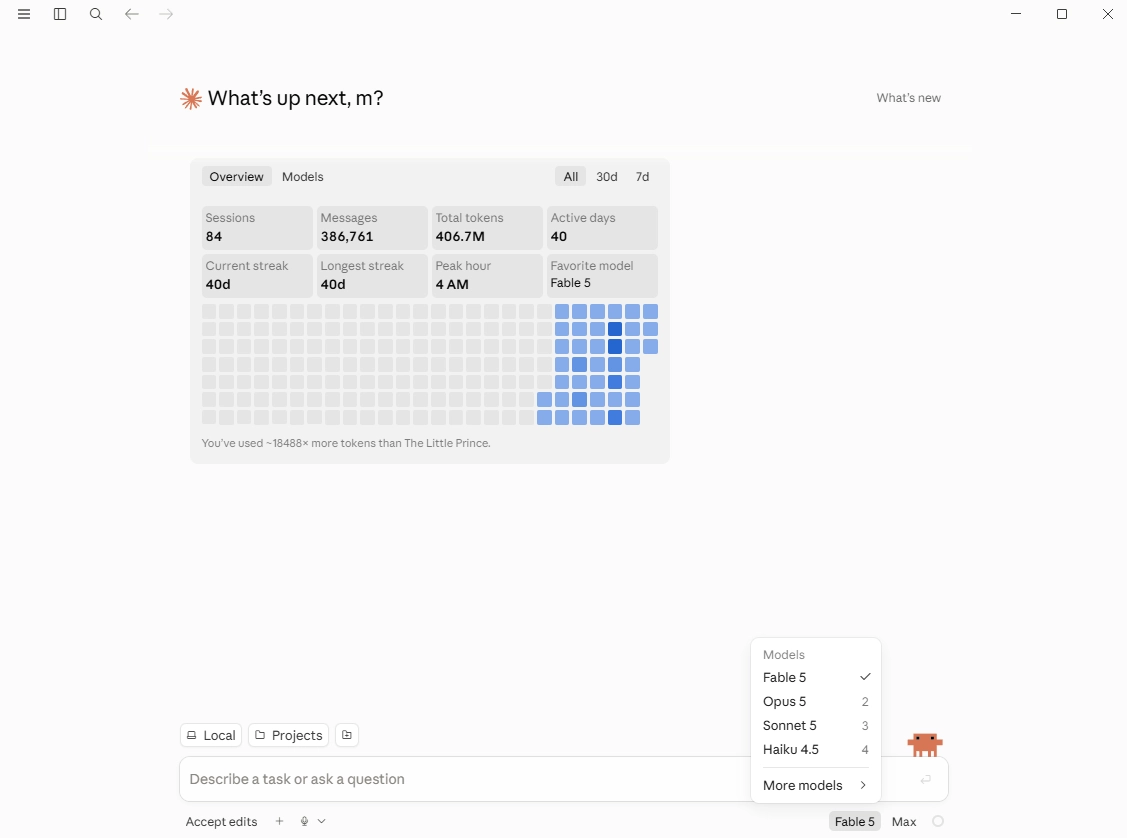
Anthropic hiện cung cấp Claude dưới ba hình thức chính, và lựa chọn phù hợp phụ thuộc vào đầu ra mà nhiệm vụ của bạn tạo ra.
Claude (trò chuyện trên web và máy tính để bàn) là công cụ phù hợp cho mọi quy trình trong hướng dẫn này: động não, tổng hợp từ ghi chú của bạn, soạn thảo từng phần, và các lượt biên tập sửa đổi. Nó mang tính hội thoại, khởi động ngay lập tức, và có tính năng tìm kiếm web.
Lựa chọn tác nhân cho công việc tri thức là Claude Cowork. Tác nhân này hoạt động ngay trong ứng dụng Claude trên máy tính để bàn. Không cần thiết lập. Các nhiệm vụ nhiều bước được nó tự xử lý, chẳng hạn tổ chức một thư mục ghi chú đọc tài liệu, xây dựng một bảng so sánh từ hàng chục bài báo, hoặc biên soạn một thư mục chú giải sơ bộ. Nó chạy trong một môi trường cô lập. Điều đó có nghĩa là đây là tác nhân an toàn hơn để xử lý các bản thảo nhạy cảm của bạn. Khi một nhiệm vụ tạo ra một tài liệu thay vì một cuộc trò chuyện, Cowork thường hiệu quả hơn chat.
Claude Code chạy trong terminal và được xây dựng cho những người viết phần mềm. Đối với các nhà nghiên cứu, nó xứng đáng có chỗ đứng trong công việc phân tích: làm sạch dữ liệu, chạy các script thống kê, tạo ra các hình minh họa có thể tái lập, làm việc bên trong một kho lưu trữ dự án. Nếu bạn không bao giờ dùng dòng lệnh, hãy bỏ qua nó, Cowork bao quát phần công việc tác nhân mà không cần thiết lập.
Nhà nghiên cứu nên chọn mô hình Claude nào?
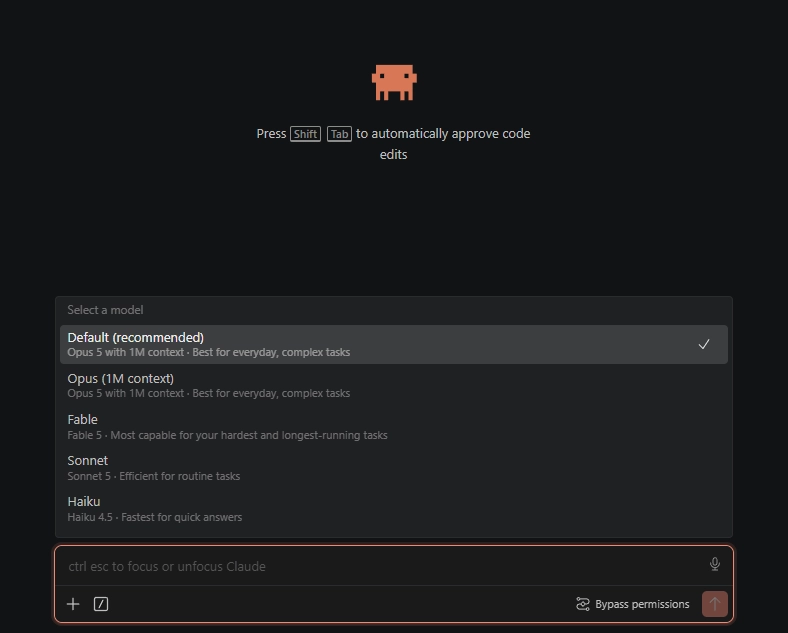
Tại thời điểm viết bài này, danh mục xếp Fable 5 ở vị trí cao nhất, sau đó là Opus 5, Sonnet 5, và Haiku 4.5 nhanh, ít tốn kém.
Sonnet 5 là lựa chọn mặc định hợp lý cho công việc viết hằng ngày, lập dàn ý, soạn thảo đoạn văn, các gợi ý chỉnh sửa. Mô hình này nhanh, và trần chất lượng của nó đáp ứng được phần lớn các mục trong đa số bài báo.
Fable 5 là mô hình nên dùng khi phần suy luận là phần khó nhất, đối chiếu các phát hiện mâu thuẫn trong một thân văn liệu, kiểm tra độ vững của một lập luận về phương pháp, hoặc giữ toàn bộ bản thảo trong ngữ cảnh trong khi kiểm tra tính nhất quán nội bộ. Mô hình này tiêu hao giới hạn kế hoạch nhanh hơn, vì vậy hãy xem nó như chuyên gia mà bạn chỉ gọi cho những câu hỏi xứng đáng với nó.
Opus 5 nằm ở giữa hai mô hình kia, mạnh hơn Sonnet trong suy luận dài và rẻ hơn Fable khi chạy cả ngày. Nếu gói của bạn giới hạn chặt mô hình hàng đầu, Opus là sự thỏa hiệp thực dụng.
Haiku 4.5 xử lý các yêu cầu cơ học nhanh, như định dạng lại, định nghĩa, sửa thì. Đừng dùng nó cho bất cứ thứ gì bạn sẽ trích dẫn hoặc nộp.
Mức độ effort: mô hình nên suy nghĩ ở mức nào?
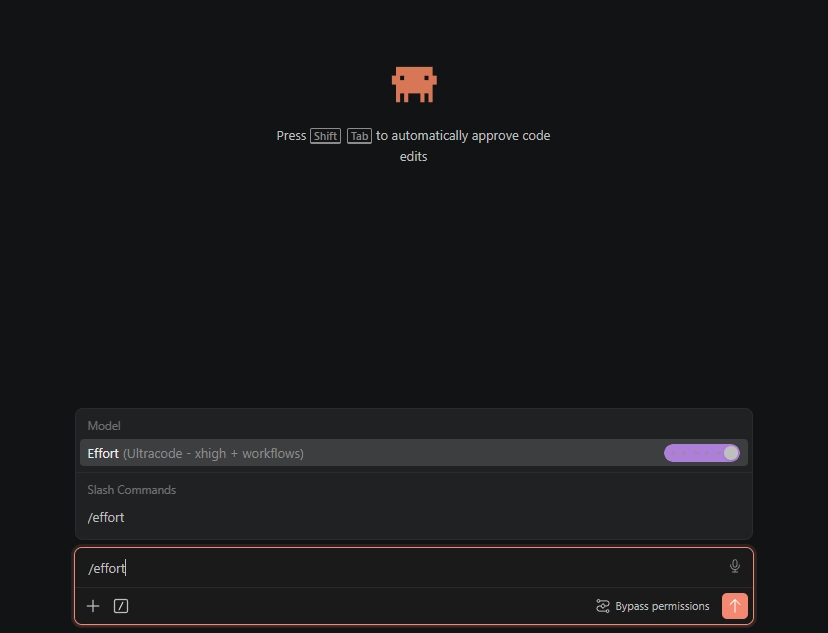
Các công cụ agentic của Claude cung cấp một thiết lập effort, thiết lập này kiểm soát lượng suy luận mà mô hình dành ra trước khi trả lời: low, medium, high, xhigh, và một mức max chỉ cho phiên làm việc. Cũng có một mức tăng cường cho từng prompt: đưa từ "ultrathink" vào một yêu cầu thì lượt đó sẽ nhận được suy luận sâu hơn mà không làm thay đổi thiết lập của phiên.
Hãy ghép mức effort với độ nặng của câu hỏi. Medium là đủ cho việc dọn dẹp mang tính cơ học. High phù hợp với các phiên soạn thảo và chỉnh sửa thông thường. Hãy dành xhigh và max cho những câu hỏi thực sự đòi hỏi phân tích nặng, như tổng hợp từ ba mươi nguồn, một quyết định thiết kế thống kê, hoặc kiểm tra tính nhất quán toàn bộ bản thảo. Effort cao hơn tốn nhiều token hơn và nhiều thời gian hơn cho mỗi câu trả lời, vì vậy việc ghim mọi phiên ở mức max sẽ làm chậm công việc thường ngày của bạn và làm hao tổn gói của bạn mà không mang lại lợi ích nào. Chỉ dùng nó khi thực hiện nghiên cứu thực sự cần độ chính xác rất cao.
Khi nào nên compact phiên làm việc của bạn
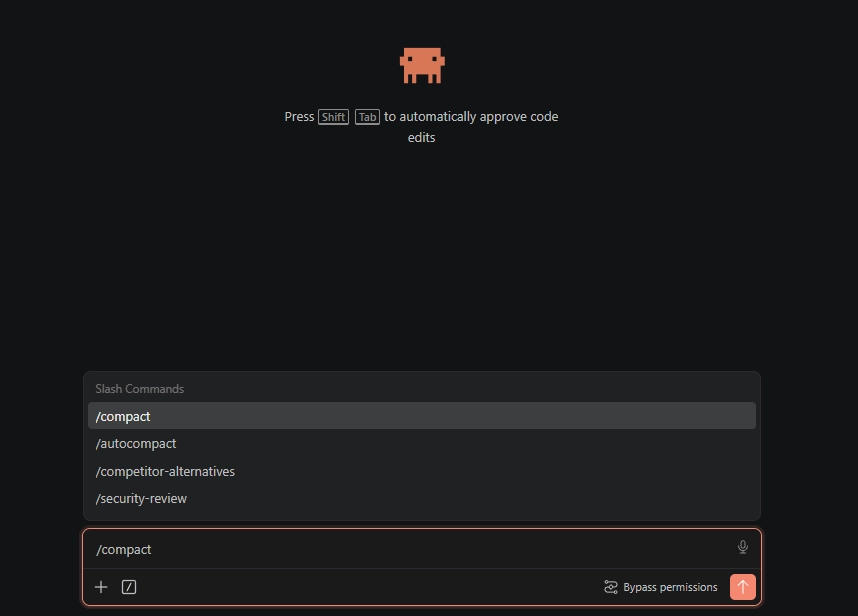
Các cuộc trò chuyện dài sẽ suy giảm chất lượng. Mỗi thông điệp đều mang theo toàn bộ cuộc trò chuyện, vì vậy một phiên làm việc ban đầu rất sắc bén sẽ trở nên chậm hơn và bắt đầu bỏ sót các chỉ dẫn trước đó khi cửa sổ ngữ cảnh dần đầy lên. Các nhà nghiên cứu nhận ra điều này như một dạng mệt mỏi: mô hình đã xử lý chính xác ba lời nhắc đầu tiên của bạn lại tạo ra đầu ra mơ hồ ở lời nhắc thứ mười lăm.
Giải pháp là compact: thu gọn cuộc trò chuyện cho đến thời điểm hiện tại thành một bản tóm tắt mà mô hình sẽ mang theo về sau. Có hai nguyên tắc thực hành rất hiệu quả. Hãy compact sau mỗi nhiệm vụ đã hoàn tất, tại ranh giới tự nhiên nơi phần tổng quan tài liệu kết thúc và phần phương pháp sắp bắt đầu. Hoặc theo dõi bộ đếm token và compact vào khoảng 25 percent mức sử dụng ngữ cảnh thay vì chờ công cụ buộc phải làm điều đó khi gần chạm giới hạn. Hướng dẫn của chính Anthropic cũng nói như vậy: hãy compact chủ động tại các ranh giới nhiệm vụ thay vì đợi đến khi chất lượng đã giảm. Một lần compact tại ranh giới rõ ràng không tốn gì cả, còn một lần forced compact giữa nhiệm vụ sẽ làm mất đi những sắc thái bạn muốn giữ lại.
Gói Claude Max có đáng giá đối với các nhà nghiên cứu không?
Claude Pro có giá $20 một tháng. Max có một gói $100 với mức sử dụng gấp năm lần Pro và một gói $200 với mức sử dụng gấp hai mươi lần. Với nhu cầu sử dụng thông thường, chỉ vài cuộc trò chuyện mỗi ngày, Pro là đủ và Max là dung lượng dư thừa bị lãng phí.
Đối với công việc nghiên cứu ổn định, cường độ cao, Max chắc chắn là đáng giá. Tổng hợp tài liệu trên các văn bản dài, kiểm tra tính nhất quán trên toàn bộ bản thảo, và các phiên làm việc mang tính tác tử trong Cowork hoặc Claude Code tiêu tốn mức sử dụng rất nhanh, và các giới hạn của Pro làm gián đoạn đúng những phiên quan trọng nhất. Gói $100 vượt qua ngưỡng giới hạn hằng ngày đối với phần lớn nhà nghiên cứu cá nhân. Gói $200 dành cho những người vận hành các công cụ này suốt cả ngày. Nếu một phiên bị đình trệ vào đêm trước hạn nộp mà khiến bạn tốn hơn $100, thì phép tính tự nó đã cho ra kết luận.
Vì sao chọn Claude mà không phải ChatGPT hay Gemini?
Đối với công việc nghiên cứu, Claude hiện đã chứng tỏ là đáng tin cậy nhất trong ba trợ lý tiên phong này. Năm 2026, các bộ theo dõi độ chính xác độc lập ước tính tỷ lệ ảo giác của Claude vào khoảng 3 phần trăm, trong khi các mô hình chủ lực của GPT và Gemini cao gần gấp đôi. Hành vi khi không chắc chắn cũng quan trọng không kém: Claude thừa nhận mình không biết dễ hơn là tự bịa ra một câu trả lời. Một lời khẳng định tự tin nhưng bịa đặt là dạng lỗi gây tổn hại nhiều nhất cho công việc học thuật.
Có hai điểm cần lưu ý. Tất cả các mô hình đều bịa ra trích dẫn. Một so sánh được bình duyệt năm 2026 cho thấy không trợ lý nào có thể tạo ra danh mục tài liệu tham khảo có thể kiểm chứng. Điều đó có nghĩa là mọi thứ các mô hình trích dẫn sẽ không thể đưa vào bài viết của bạn nếu chưa kiểm tra. Nếu bạn chỉ làm một số công việc cơ học cơ bản, như định dạng lại bảng biểu, chuyển đổi nhanh nội dung, thì giữa ba công cụ này không có nhiều khác biệt. Nhưng điều thực sự quan trọng là khả năng suy luận liên tục trên chính các nguồn của bạn.
Sử dụng Claude mà không bị phát hiện bởi công cụ AI
Phần văn bản mà Claude soạn ra mang những mẫu thống kê mà các công cụ phát hiện AI tìm kiếm, và các trường đại học ngày càng đưa bài nộp qua chỉ báo AI của Turnitin. Ba thực hành giúp bạn an toàn. Hãy dùng Claude cho công việc tư duy, như xây dựng cấu trúc, phản biện, tóm tắt nguồn, và tự viết phần văn xuôi cuối cùng khi chính sách yêu cầu. Hãy công khai việc hỗ trợ của AI khi tạp chí hoặc cơ sở của bạn yêu cầu; hướng dẫn AI disclosure statement guide của chúng tôi có các mẫu. Và khi chính sách cho phép dùng AI hỗ trợ soạn thảo, hãy biên tập lại đầu ra theo giọng văn của riêng bạn hoặc chạy nó qua một academic text humanizer để giữ nguyên trích dẫn và thuật ngữ, rồi kiểm tra kết quả bằng một công cụ phát hiện trước khi nộp. Điều bạn không nên làm là nộp nguyên văn đầu ra thô của mô hình, vì nó bị phát hiện một cách đáng tin cậy, và nó trông như văn xuôi chung chung đối với giám khảo quen thuộc với cách viết của bạn.
Claude hay sai ở điểm nào trong viết học thuật
Tính minh bạch là quan trọng. Đây là những chỗ chúng tôi đã thấy Claude thất bại:
Trích dẫn. Claude sẽ tạo ra các tên tác giả, tên tạp chí và năm xuất bản có vẻ hợp lý nhưng thực ra không tồn tại. Đừng bao giờ để Claude cung cấp các tài liệu tham khảo mà bạn chưa kiểm chứng. Hoặc, bạn có thể yêu cầu nó thực sự xác minh rằng trích dẫn đó tồn tại và cung cấp DOI của nó, để sau đó bạn có thể truy cập DOI của từng trích dẫn và tự xác minh rằng nó thực sự tồn tại.
Quy ước theo lĩnh vực. Claude có thể bỏ sót các chuẩn mực đặc thù của từng ngành. Bạn hiểu rõ quy ước của lĩnh vực mình hơn Claude, hãy tin vào chuyên môn của bạn thay vì đầu ra của mô hình.
Các khẳng định định lượng. Claude đôi khi đưa vào những khẳng định thống kê không có trong dữ liệu gốc của bạn. Nếu xuất hiện một con số mà bạn không cung cấp, hãy kiểm chứng nó.
Hiệu chỉnh giọng điệu. Claude viết tốt, nhưng nó không viết giống bạn. Luôn thực hiện một lượt chỉnh giọng, thay các cách diễn đạt chung chung bằng những mẫu câu của riêng bạn. Người hướng dẫn của bạn thường xuyên đọc bài viết của bạn. Nó nên nghe giống bạn.
Đây không phải là lý do để tránh Claude. Đây là lý do để dùng nó với sự giám sát.
Các câu hỏi thường gặp
Q: Việc sử dụng Claude cho viết học thuật có được các trường đại học chấp nhận không?
Điều đó phụ thuộc vào chính sách của cơ sở đào tạo của bạn. Phần lớn các trường đại học phân biệt giữa việc dùng AI như một công cụ viết, được chấp nhận nếu có công bố, và việc nộp bài do AI tạo ra như thể đó là sản phẩm của chính bạn, điều này là không chấp nhận. Dùng Claude để động não, lập dàn ý và soạn thảo, rồi chỉnh sửa và thêm giọng văn của riêng bạn, thuộc nhóm sử dụng công cụ. Luôn kiểm tra hướng dẫn của bạn và công bố khi được yêu cầu.
Q: Claude so với ChatGPT trong viết nghiên cứu thì thế nào?
Claude xử lý tài liệu dài và các chỉ dẫn tinh tế tốt hơn. Nó đáng tin cậy hơn trong việc tuân thủ yêu cầu định dạng và ít có xu hướng bịa đặt các khẳng định hơn. ChatGPT thường tốt hơn ở các nhiệm vụ cơ học như định dạng lại bảng. Với các nhiệm vụ viết cốt lõi, chúng tôi nghiêng về Claude hơn, nhưng cả hai đều dùng được. Xem AI prompts for academic writing của chúng tôi để có các prompt hoạt động trên nhiều mô hình.
Q: Claude có thể viết trọn một bài nghiên cứu không?
Về mặt kỹ thuật thì có. Nhưng có nên không? Không. Chất lượng của một bài hoàn chỉnh được tạo trong một lượt thấp hơn đáng kể so với một bài được phát triển từng phần với sự đóng góp của nhà nghiên cứu ở mọi giai đoạn. Cách bạn diễn giải dữ liệu, khung lý thuyết và xây dựng lập luận cần phải đến từ bạn. Claude hữu ích nhất khi nó xử lý các khía cạnh cơ học của việc viết, cấu trúc, diễn đạt, tiết kiệm từ ngữ, trong khi bạn định hướng nội dung trí tuệ.
Q: Văn bản do tôi soạn bằng Claude có bị các công cụ phát hiện AI gắn cờ không?
Có khả năng, nếu bạn nộp nguyên đầu ra mà không chỉnh sửa. Các mô thức viết của Claude có thể bị phát hiện bởi các công cụ như Turnitin và GPTZero. Giải pháp là humanizing the Claude draft thành giọng văn của riêng bạn, thêm giọng của bạn, đa dạng hóa cấu trúc câu và chạy văn bản qua một bước nhân hóa. Một bản nháp Claude được biên tập tốt, đã được cá nhân hóa và rà soát, thường cho điểm thấp hơn đáng kể so với ngưỡng phát hiện.
Q: Các trường đại học có thể phát hiện văn bản được viết bằng Claude không?
Các công cụ phát hiện không xác định mô hình nào đã viết một đoạn văn, nhưng đầu ra thô của Claude vẫn mang các tính quy luật thống kê giống như đầu ra của các mô hình khác, và các công cụ ở cấp độ Turnitin gắn cờ nó với tỷ lệ cao. Rủi ro phát hiện đến từ việc bao nhiêu phần văn bản mô hình chưa chỉnh sửa còn tồn tại trong bản nộp, và điều này áp dụng như nhau cho mọi mô hình. Vì vậy, tốt nhất là bạn tự tinh chỉnh đầu ra thô của Claude trước khi nộp ở bất kỳ đâu.
Q: Mô hình Claude nào là tốt nhất cho nghiên cứu học thuật?
Sonnet 5 cho soạn thảo và chỉnh sửa hằng ngày, và Fable 5 khi suy luận thực sự khó, như tổng hợp từ nhiều nguồn, phê bình phương pháp, hoặc giữ toàn bộ bản thảo trong bối cảnh. Opus 5 là lựa chọn trung gian cho các phiên làm việc dài trên gói tính phí theo mức sử dụng, còn Haiku 4.5 chỉ dành cho các nhiệm vụ cơ học nhanh. Dù dùng mô hình nào, hãy xác minh mọi trích dẫn và con số trước khi chúng đi vào bản thảo của bạn.
Q: Bạn nên compact một phiên Claude dài bao lâu một lần?
Hãy compact ở mỗi ranh giới hoàn thành một nhiệm vụ, hoặc vào khoảng 25 percent mức sử dụng ngữ cảnh, tùy điều nào đến trước. Thu gọn cuộc trò chuyện thành một bản tóm tắt để mô hình mang theo về sau nhằm giữ câu trả lời sắc bén và ngăn tình trạng quên dần chỉ dẫn do các phiên dài gây ra. Chờ đến khi công cụ buộc compact gần giới hạn ngữ cảnh thường có nghĩa là chất lượng đã suy giảm và bản tóm tắt sẽ bỏ sót những chi tiết bạn quan tâm.
Citation-safe humanization that holds your academic tone. The step between your Claude-assisted draft and any AI detector.

Moe là một kỹ sư NLP với PhD trong xử lý ngôn ngữ tự nhiên. Nghiên cứu của ông bao gồm ngôn ngữ học tính toán, phân tích văn bản và học máy, đồng thời được đưa trực tiếp vào các mô hình chỉnh sửa và nhân bản hóa đằng sau ProofreaderPro. Anh ấy viết về một phần của quá trình mà hầu hết mọi người không bao giờ thấy: cách một mô hình ngôn ngữ đọc một câu, chấm điểm và quyết định những gì cần thay đổi.